190_ Video Monitoring
video monitoring
LIVE VIDEO CONFIGURATION
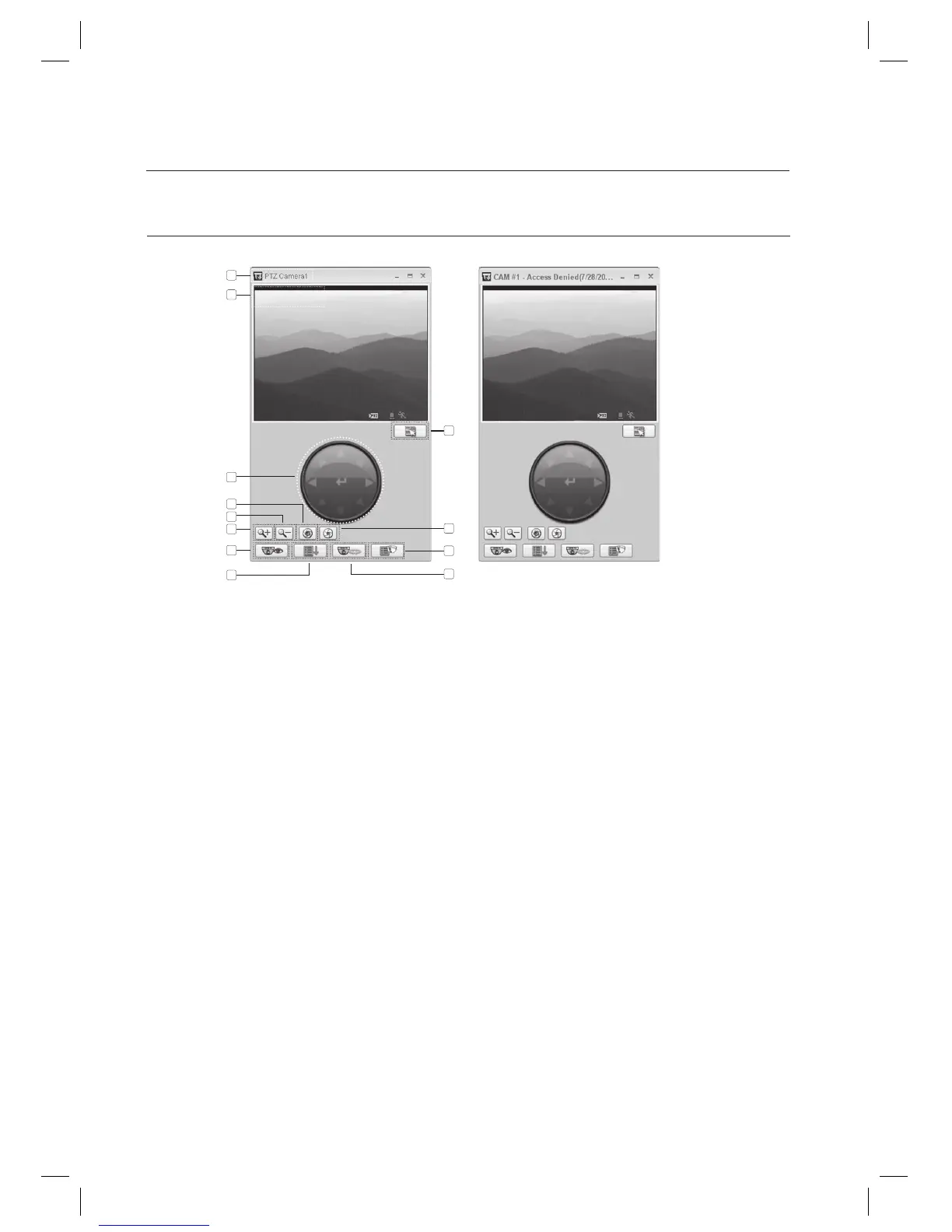
The live screen for simple monitoring will display the camera name in the message box while the live screen for an event will
display the camera name, event name and occurrence time and date.
This is the camera name that you provided in [Camera Settings].
This is a live screen where camera channels and time and date information are shown.
A collection of direction buttons.
Button that enlarges the image (Zoom In).
Button that shrinks the image (Zoom Out).
Iris In button.
Iris Out button.
Preset button.
Scan button.
Autopan button.
Pattern button.
Menu buttons that you can use to register, change the settings of or delete the camera.
For a PTZ camera, you can use these buttons to set the options: PRESET, AUTO PAN, PATTERN, SCAN. For
more information, refer to the manual of the applicable camera.
J
1.
2.
3.
4.
5.
6.
7.
8.
9.
10.
11.
12.
<In the live video mode>
<In the event mode>
1
2
12
4
7
5
6
8
9
11
10
3



 To Next Page