58_ system management
DEVICE SETTING WIZARD
After completing the initial installation, the Device Setting Wizard provides faster and easier device setup steps.
(This is not available in SAMS Pro Lite.)
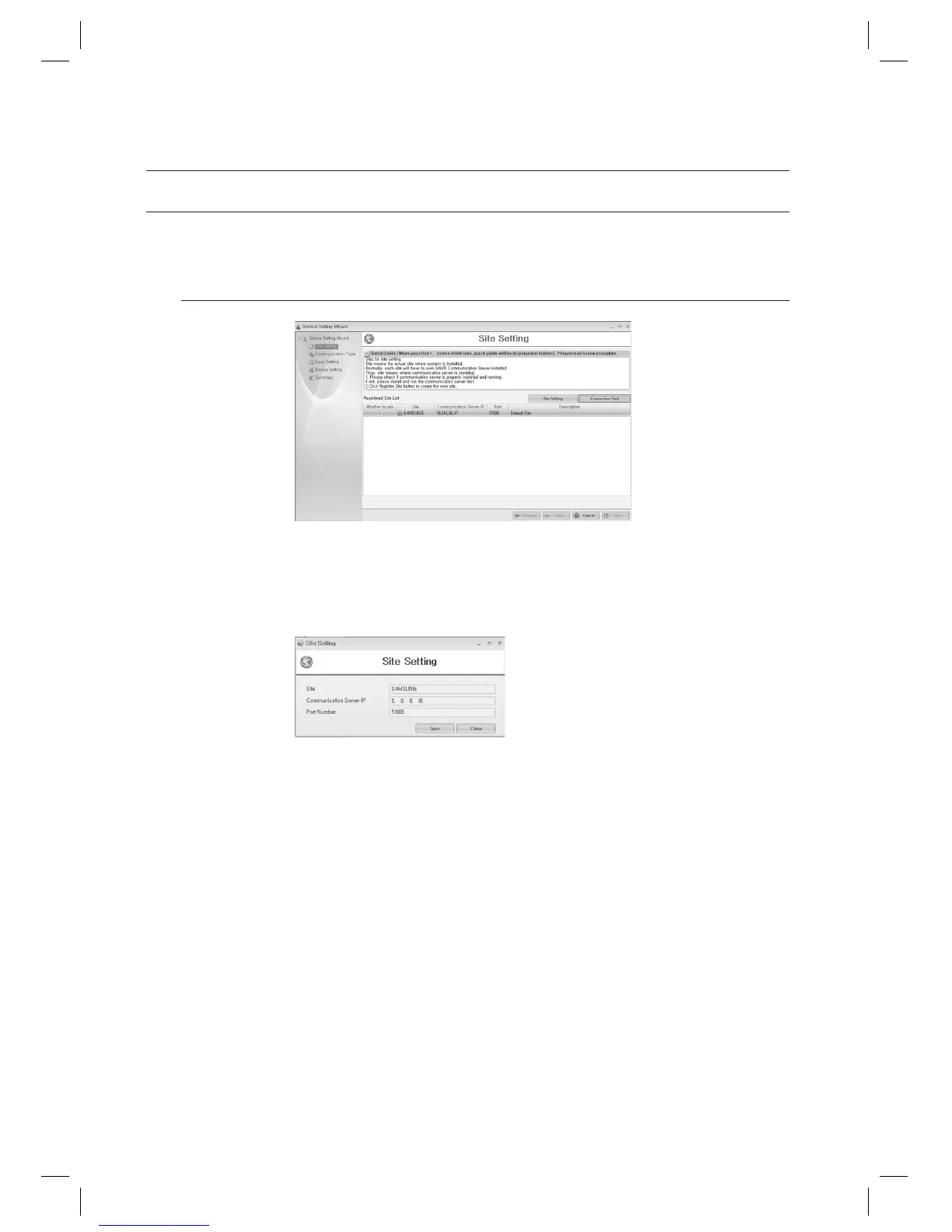
Device Setting Wizard – Site Setting
Registered Site List: Shows the list of registered sites. Select a site by checking the [Whether to use] checkbox
and use [Connection Test] button to test the connection and move to the next step if successful.
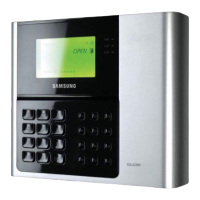
Site Setting: Use this button to setup a new site and register it.
Enter the [Site], and enter the IP address of the computer that is installed with SAMS Communication Server Pro into
the [Communication Server IP].
Use the default [Port Number] which is 51008, and click [Save] button.
Connection Test: Tests whether the connection to the selected site establishes, by using provided IP address
and port number. If error occurs with connection, check IP address, port number are properly set and the
communication server is online.
1.
2.
J
3.
system management



 To Next Page