English Englis_ English _59
SYSTEM MANAGEMENT
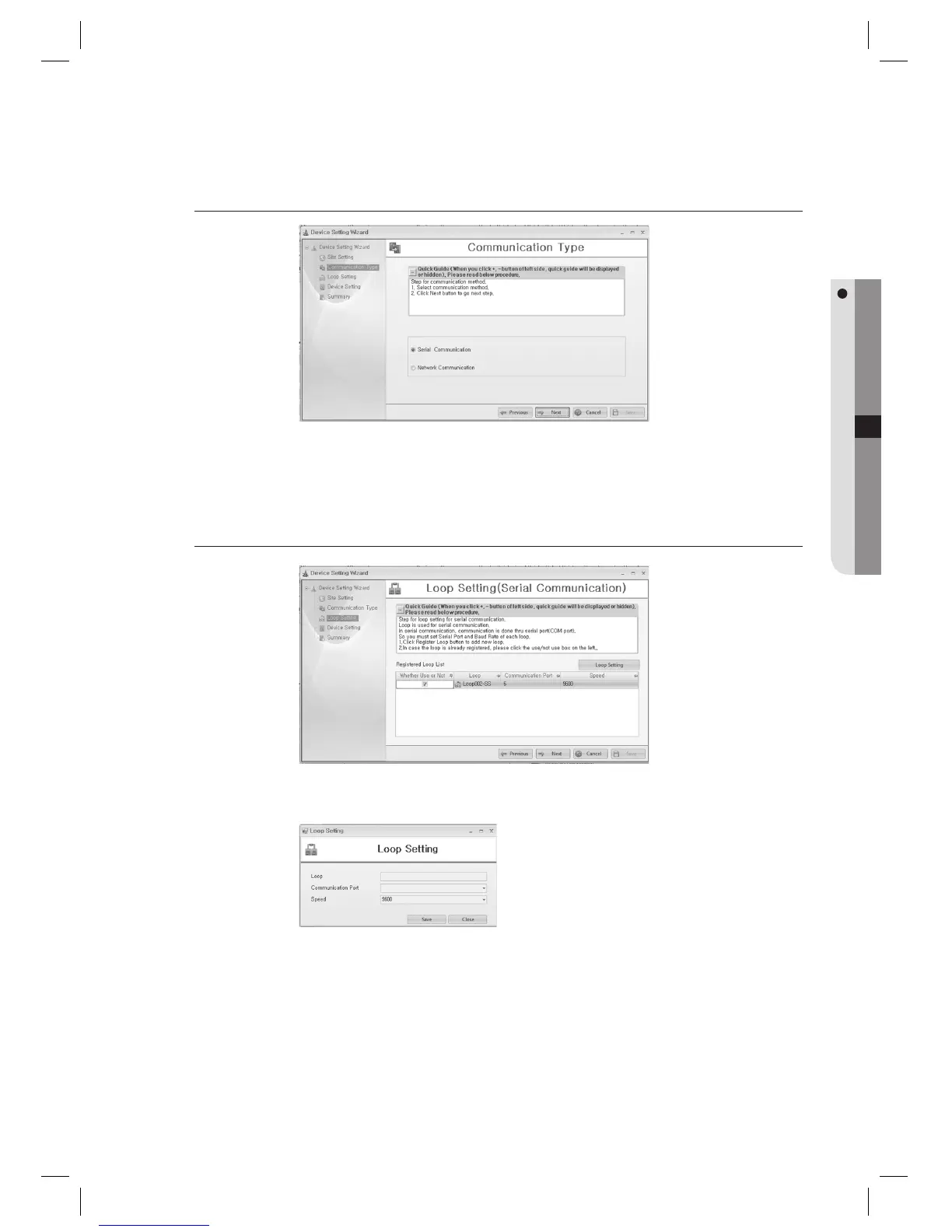
Device Setting Wizard – Communication Type
Select the communication type. Select either one of [Serial Communication] or [Network Communication].
Select the desired communication type and click [Next] button.
Device Setting Wizard – Loop Setting (Serial Communication)
This is for serial communication settings. For network communication settings, refer to the Network
Communication section.
Click [Loop Setting] to add a loop. Enter the [Loop]. Enter the [Communication Port] that is used for
communication to the device. Enter the baud rate of the device to [Speed]. Check your device and specify the
value properly, since the baud rate differs from devices. When you complete your selection, press the [Save]
button.
Once completed with adding a loop, select the desired loop and click [Next] button. (When a message of “Do
you want to restart the communication server?” appears, Click [Yes(Y)].)
1.
2.
1.
2.
3.



 To Next Page