70_ system management
system management
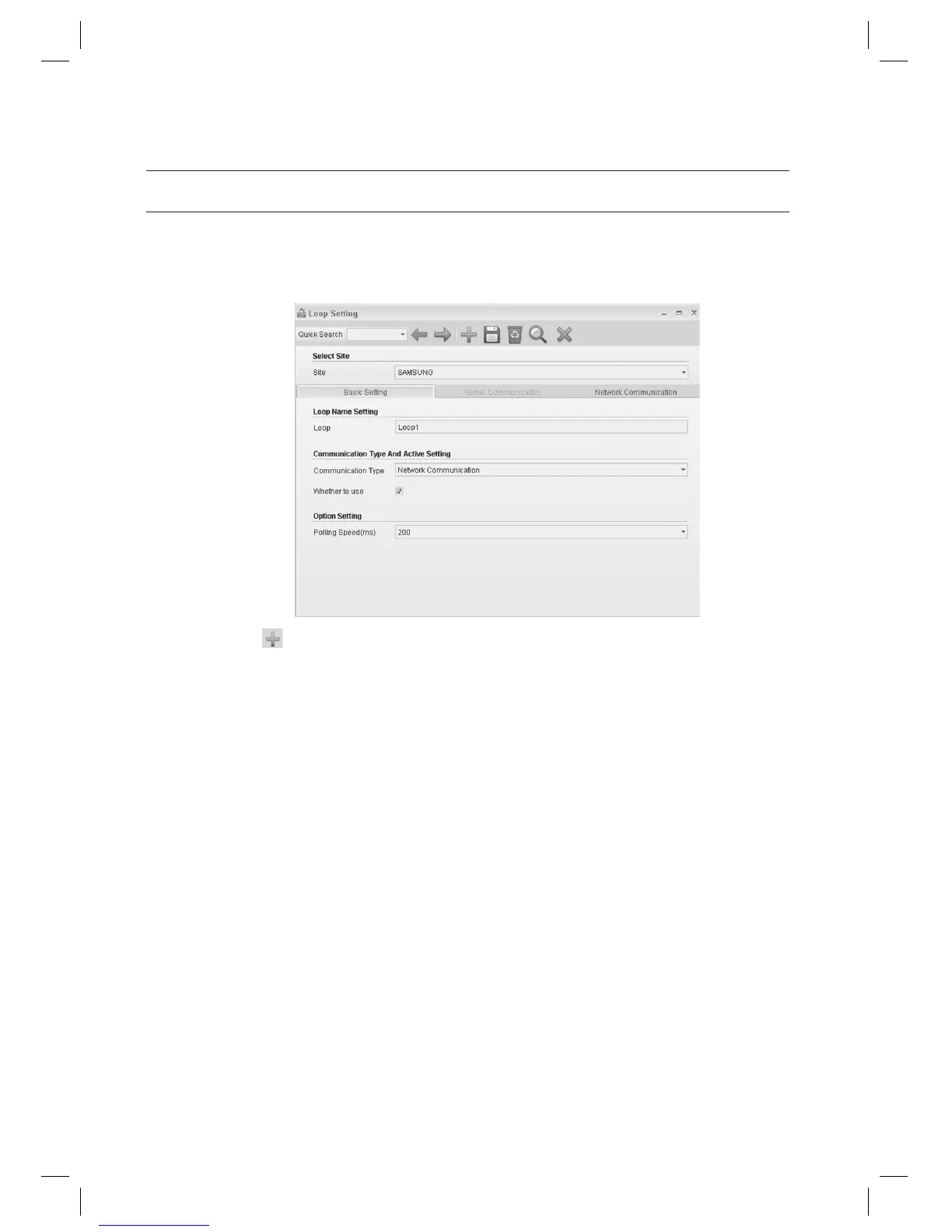
LOOP SETTING [ADD – NETWORK COMMUNICATION]
(This is not available in SAMS Pro Lite.)
From the upper menu, select [System Management] > [Loop Setting].
Click Add <
> in the tool bar.
Select a [Site].
Enter the [Loop].
Select a [Communication Type]. Select either one of [Serial Communication] or [Network Communication].
Select the [Network Communication] in this step.
Select [Serial Communication] if communication between the device and SAMS Pro is serial.
Select [Network Communication] for networks such as LAN connections.
Select whether to use or not in [Whether to use]. If unchecked, devices connected to the selected loop will not
communicate.
Set the interval of polling in [Polling Speed (ms)]. It is recommended to set to 200 ms even the optimal polling
speed may vary depending on devices.
Access controllers will communicate with the management program for data transfer in polling method. Polling
speed means the interval between data requesting polls of the SAMS Communication Server Pro to devices.
Move to the [Network Communication] tab.
1.
2.
3.
4.
5.
J
6.
7.
J
8.



 To Next Page