34 GSM-X SATEL
The content of one control command must not be inserted into the content of another
command.
In the SMS message, you can include address of the computer the module is to
connect to, and the number of TCP port which is to be used for communication.
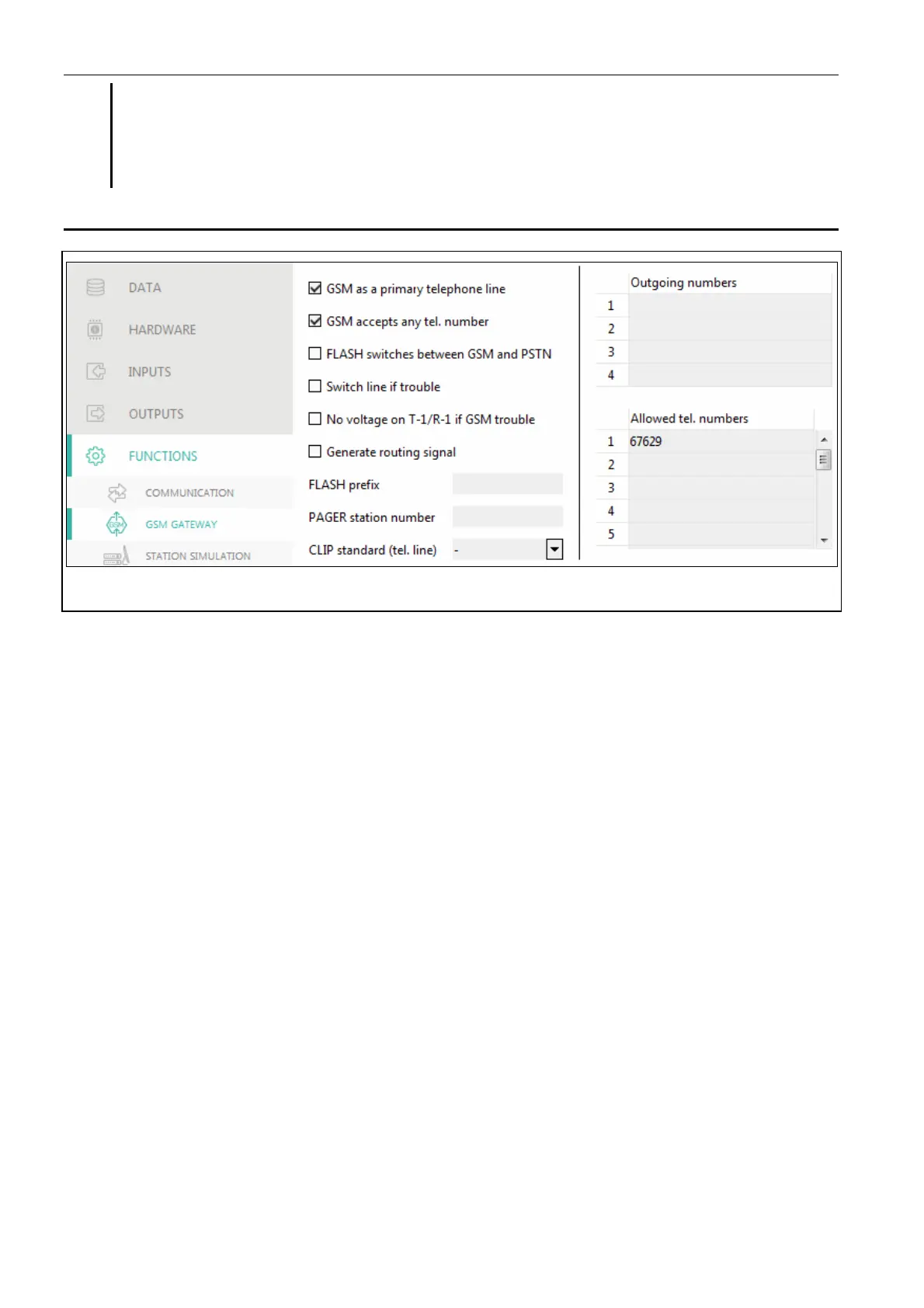
7.9 GSM gateway
Fig. 31. “GSM gateway” tab.
GSM as a primary telephone line – if this option is enabled, the module GSM telephone is
the primary communication path for devices connected to the telephone line output. If the
option is disabled, the analog telephone line is the primary communication path.
GSM accepts any tel. number – if this option is enabled, the module GSM telephone can
make calls to any number. If the option is disabled, the module GSM telephone can only
make calls to the telephone numbers whose initial digits or whole numbers are
programmed in the module (see “Allowed tel. numbers” p. 37).
Flash sw
itches between GSM and PSTN – if this option is enabled, it is possible to switch
between the primary and backup communication paths by using the FLASH key on the
telephone connected to the telephone line output. To define the primary communication
path, use the “GSM as a primary telephone line” option. In the example shown in Fig. 32,
analog telephone line is used as the primary path. If, after picking up the receiver, before
dialing the number, you press the FLASH key, the backup path will be used, i.e. GSM
telephone (Fig. 32-II).


 To Next Page