SATEL GSM-X 35
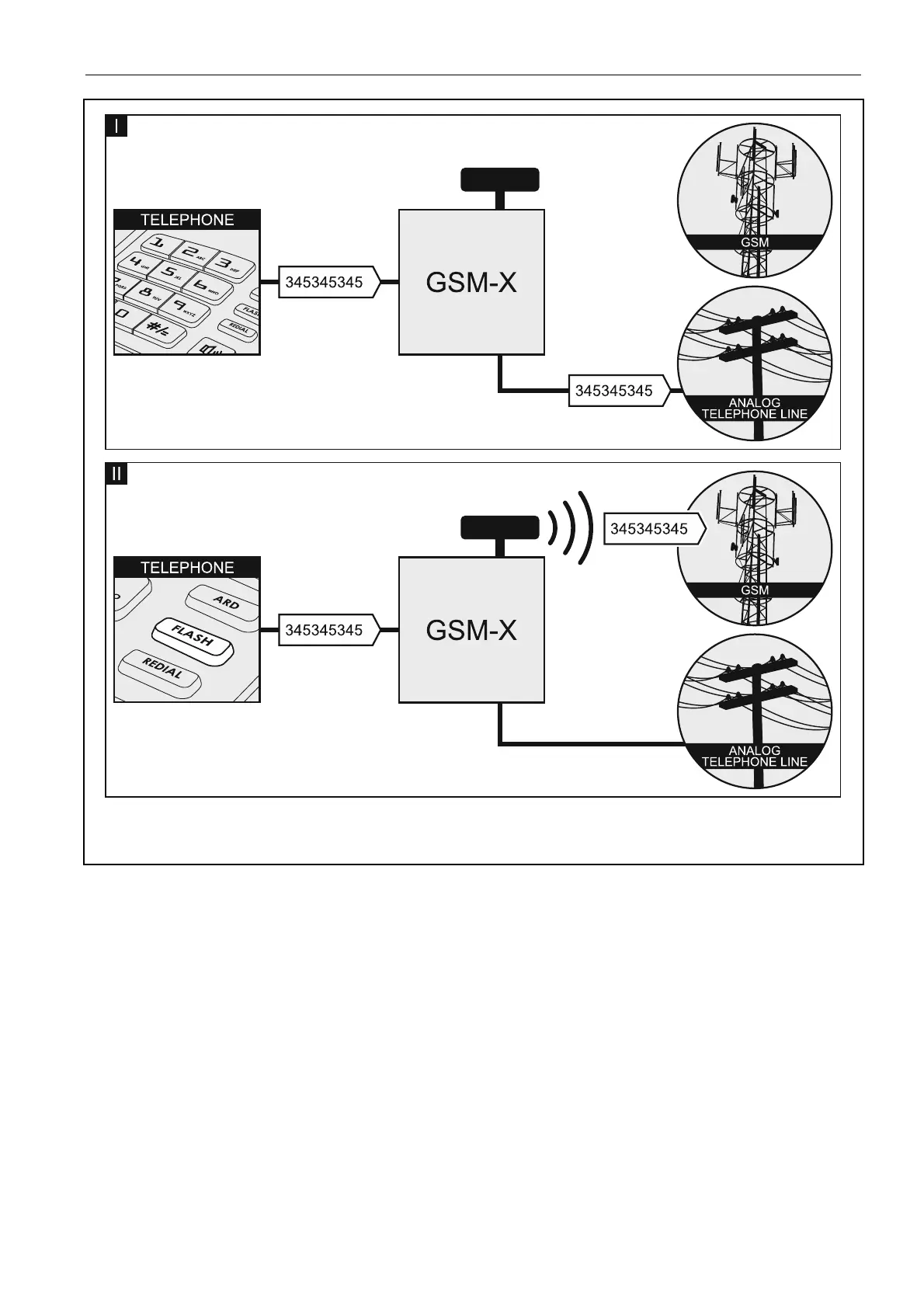
Fig. 32. Switching between the primary and backup communication paths by using the
FLASH key.
Switch line if trouble – if this option is enabled, the module will automatically switch over to
the backup communication path in case of the primary path trouble.
No voltage on T-1/R-1 if GSM trouble – if this option is enabled, voltage on the telephone
line output will be turned off in case of the GSM telephone trouble.
Generate routing signal – if the option is enabled, the connection setup is audibly signaled.
FLASH prefix – a string of up to 16 digits for switching between the primary communication
path and the backup one. To set the primary communication path, use the “GSM as a
primary telephone line” option. In the example shown in Fig. 33, analog telephone line is
used as the primary communication path. If the telephone number the control panel is
calling is preceded by a prefix (a string of digits against black background – Fig. 33-II), the
backup path will be used i.e. GSM telephone. In the control panel, you must program two
pauses after the prefix, before the telephone numbers, by entering two E or F characters.


 To Next Page