EasyManua.ls Logo

SBC 383 - M Enu; Structure and Options

Default Icon
56 pages
Print Icon
To Next Page IconTo Next Page
To Previous Page IconTo Previous Page
Loading...
20
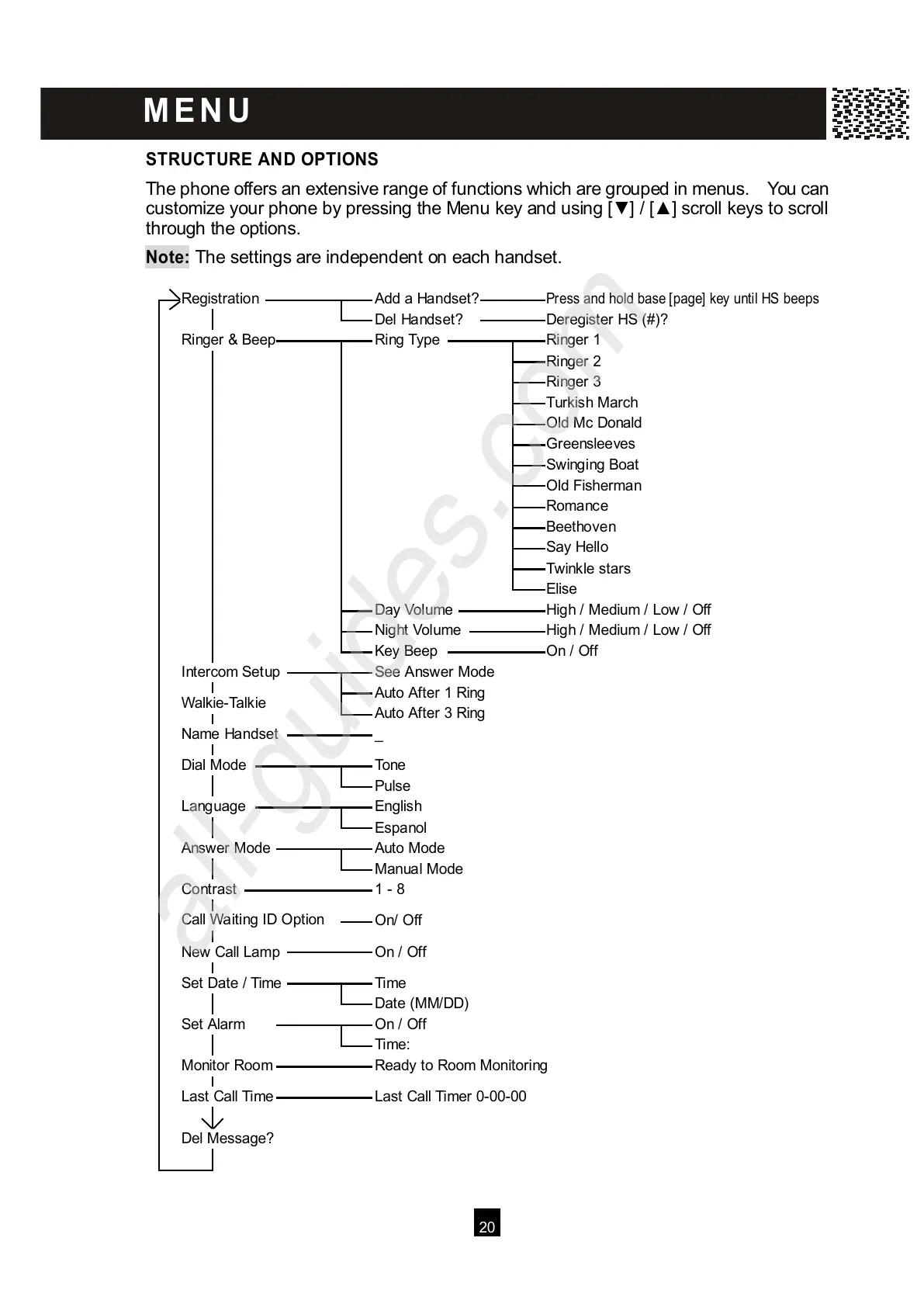
STRUCTURE AND OPTIONS
T
he phone offers an extensive range of functions which are grouped in menus. You can
customize your phone by pressing the Menu key and using [ ] / [ ] scroll keys to scroll
through the options.
Note:
The settings are independent on each handset.
Registration
Add a Handset?
Press and hold base [page] key until HS beeps
Del Handset?
Deregister HS (#)?
Ringer & Beep
Ring Type
Ringer 1
Ringer 2
Ringer 3
Turkish March
Old Mc Donald
Greensleeves
Swinging Boat
Old Fisherman
Romance
Beethoven
Say Hello
Twinkle stars
Elise
Day Volume
High / Medium / Low / Off
Night Volume
High / Medium / Low / Off
Key Beep
On / Off
Intercom Setup
See Answer Mode
Auto After 1 Ring
W alkie-Talkie
Auto After 3 Ring
Name Handset
_
Dial Mode
Tone
Pulse
Language
English
Espanol
Answer Mode
Auto Mode
Manual Mode
Contrast
1 - 8
Call W aiting ID Option
On/ Off
New Call Lamp
On / Off
Set Date / Time
Time
Date (MM/DD)
Set Alarm
On / Off
Time:
Monitor Room
Ready to Room Monitoring
Last Call Time
Last Call Timer 0-00-00
Del Message?
M E N U
All manuals and user guides at all-guides.com
all-guides.com

Table of Contents

Related product manuals