Ringer & Beep
E
ach handset can be assigned with a specific ring type and volume. Different volume
levels can be set for day and night. You can also choose between having a
confirmation beep or have silent operation.
Ring Type
There are 3 ringer patterns + 10 melodies in the handset.
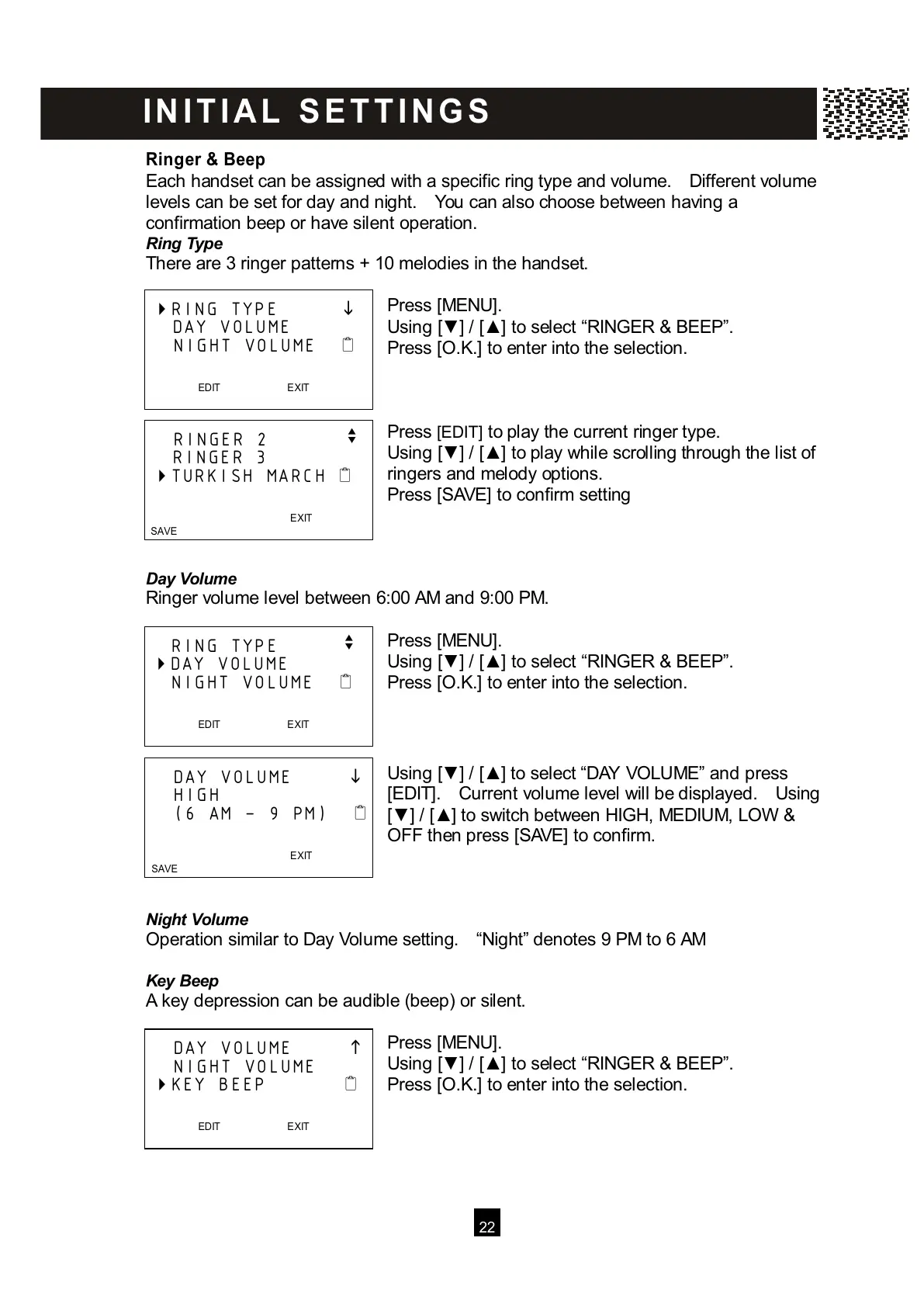
Press [MENU].
Using [▼ ] / [▲ ] to select “RINGER & BEEP”.
Press [O.K.] to enter into the selection.
Press [EDIT] to play the current ringer type.
Using [▼ ] / [▲ ] to play while scrolling through the list of
ringers and melody options.
Press [SAVE] to confirm setting
Day Volume
Ringer volume level between 6:00 AM and 9:00 PM.
Press [MENU].
Using [▼ ] / [▲ ] to select “RINGER & BEEP”.
Press [O.K.] to enter into the selection.
Using [▼ ] / [▲ ] to select “DAY VOLUME” and press
[EDIT]. Current volume level will be displayed. Using
[▼ ] / [▲ ] to switch between HIGH, MEDIUM, LOW &
OFF then press [SAVE] to confirm.
Night Volum e
Operation similar to Day Volume setting. “Night” denotes 9 PM to 6 AM
Key Beep
A key depression can be audible (beep) or silent.
Press [MENU].
Using [▼ ] / [▲ ] to select “RINGER & BEEP”.
Press [O.K.] to enter into the selection.
RING TYPE
DAY VOLUME
NIGHT VOLUME
EDIT EXIT
RINGER 2
v
RINGER 3
TURKISH MARCH
EXIT
SAVE
RING TYPE v
DAY VOLUME
NIGHT VOLUME
EDIT EXIT
DAY VOLUME



 To Next Page