– 49 –
Scanreco – Service Manual G6 Radio Remote Control System
7.2.2. Digital Actuators
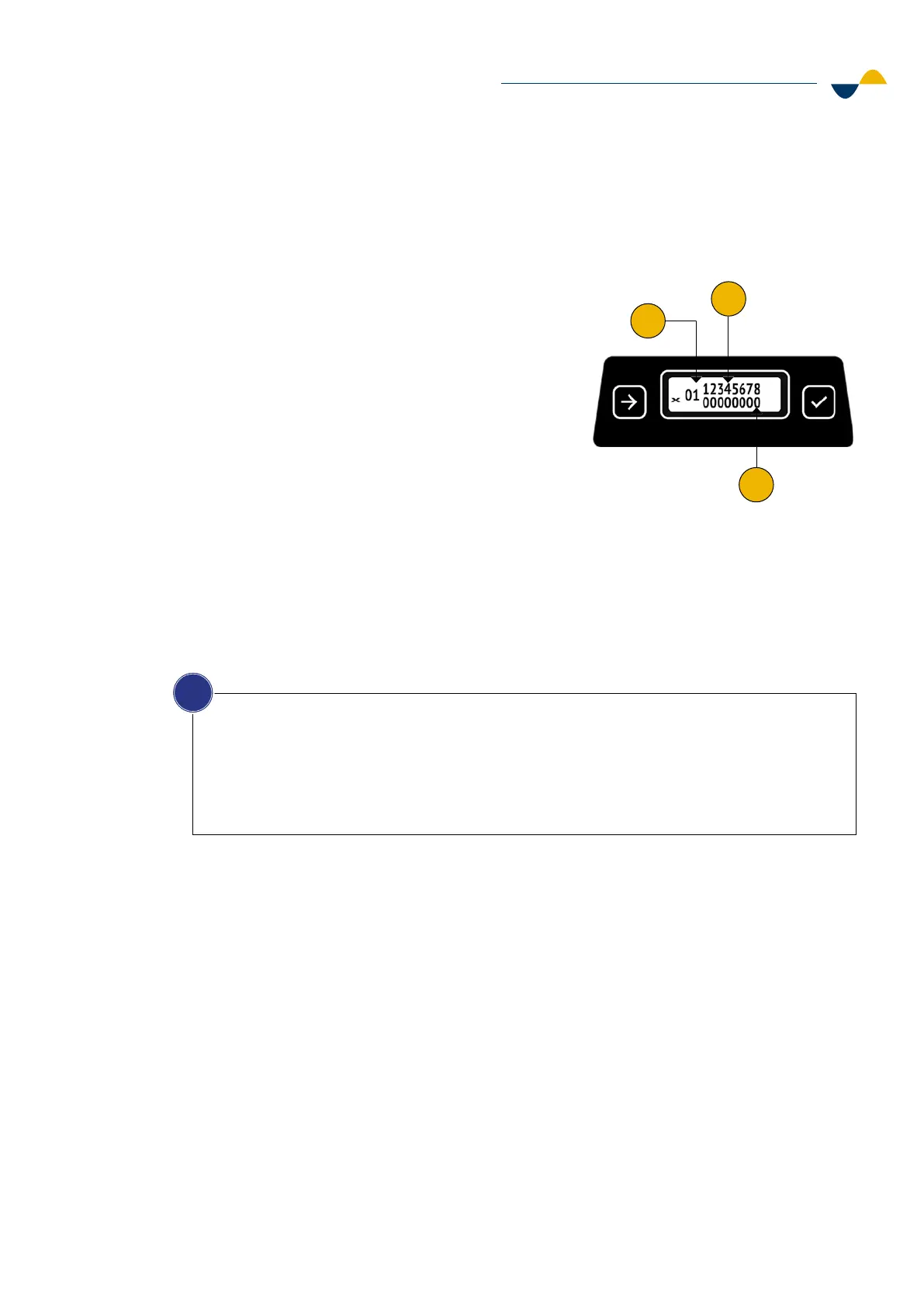
The digital actuators are push buttons, toggle switches and rotary switches. A set of numbers
will show on the display when the Digital actuator self-test is started.
The numbers shown on the display refer to:
1. The last activated (moved or pushed) digital
actuator. If another digital actuator is activated
during the test, the numbers will change.
2. The number of safety classified digital actuators.
The numbers 1-8 will always show on the display.
This is because eight is the maximum number
of safety classified digital actuators that can be
configured.
3. The status of the safety classified digital actuator:
0 = Not present or inactive
1 = Activated
2 = Invalid
3 = Faulty.
NOTICE!
If the numbers do not change when activating a digital actuator during the self-test:
1. The digital actuator is broken.
2. The digital actuator has not been implemented or activated in the software setting.
Depending on the configuration of the transmitter, the number of safety classified digital actuators
can vary. To find out how many safety classified digital actuators the transmitter has, refer to the
technical specification for your configuration.
i
1
2
3


 To Next Page