BASCSOUL_EN
V02 | 10.2017
41
www.schaerer.com
Operation
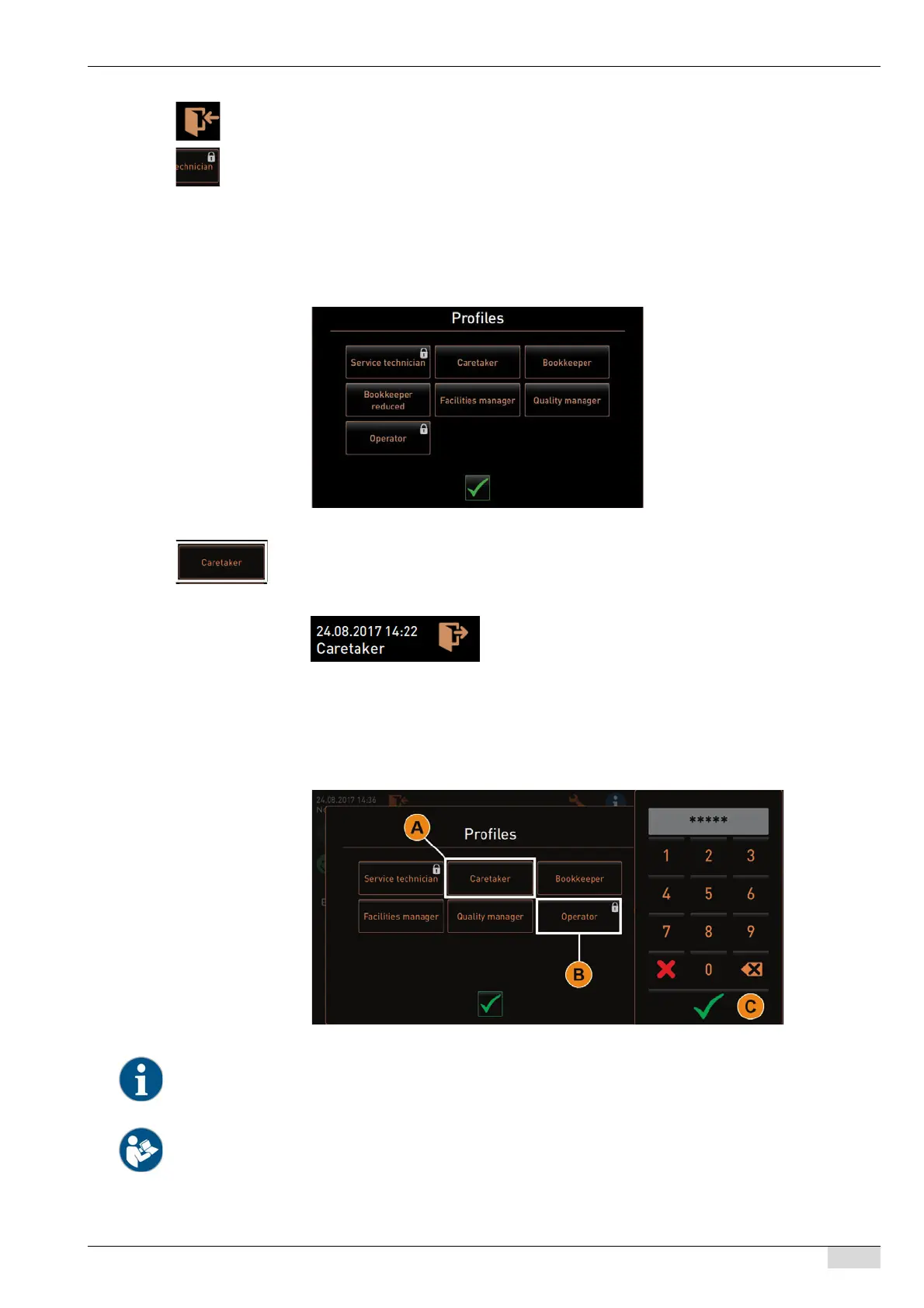
► Select the [Log-in] field at the top of the service menu.
The window with the profile configured by the service technician opens.
Profiles protected with a PIN are marked with a lock symbol.
The following profiles can be provided by the service technician:
• Caretaker
• Bookkeeper
• Bookkeeper reduced
• Restaurant manager
• Quality manager
• Machine operator
Option 1: Activating unprotected profile
► Select desired unprotected profile [A], e.g. [Caretaker].
The service menu is displayed with the "Caretaker" profile.
Option 2: Activating protected profile
► Activate protected profile, e.g. [Operator] [B].
The keypad for PIN entry opens.
► Enter the configured PIN and confirm using the [OK] [C] field.
The service menu with the selected profile appears.
The service technician can activate profiles. Every profile has specific authorisations. Logging in with a profile can
be protected with a PIN. The service technician can configure a PIN and assign it to the profile.
See "Programming" – "Configuration" – "Profiles".














 To Next Page