www.schaerer.com
Operation
BASCSOUL_EN
V02 | 10.2017
56
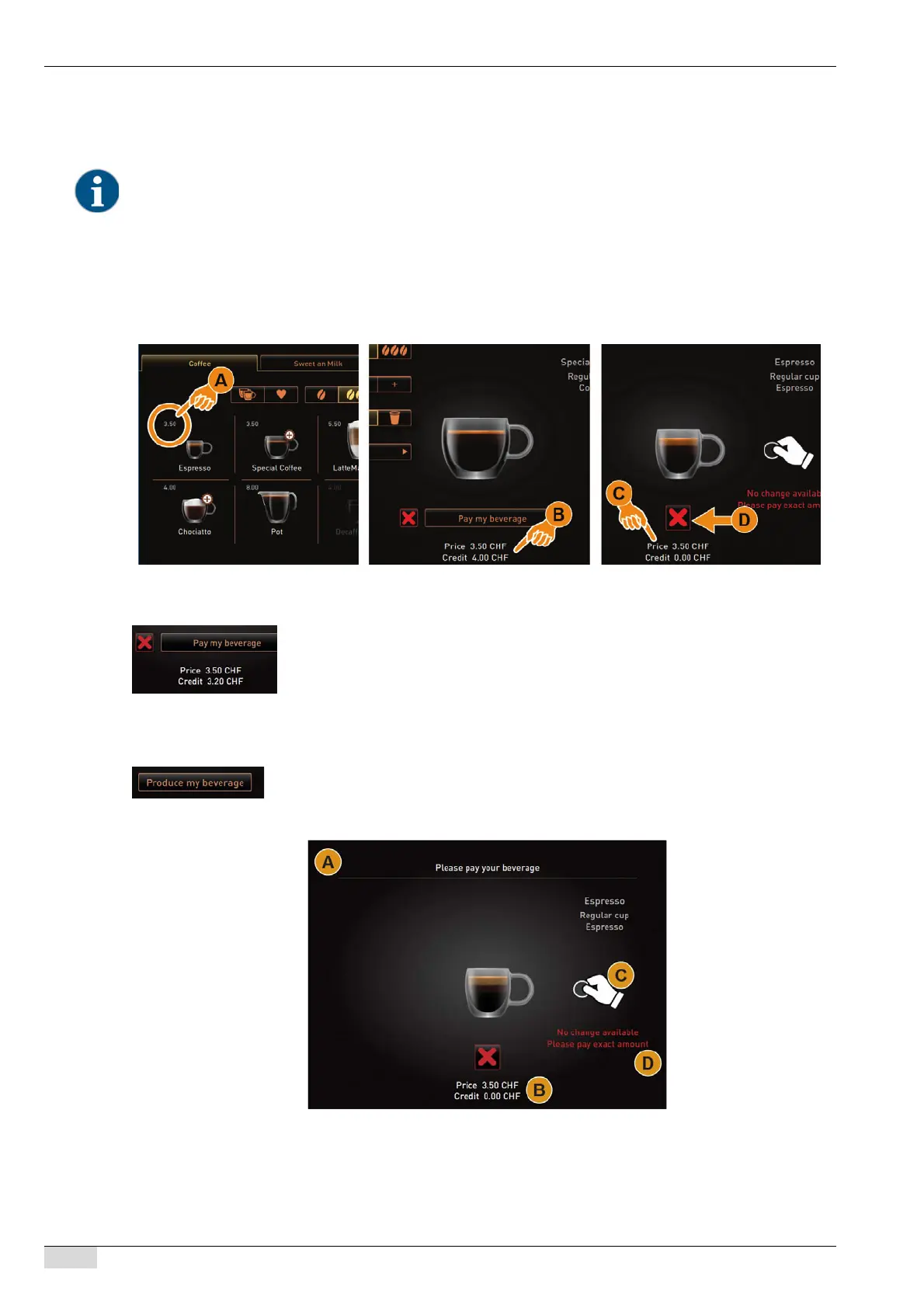
Beverage selection with price information
The basic beverage price is displayed in the beverage field [A]. The beverage price is immediately updated during
a beverage selection if beverage options are added [B].
Beverage order with payment
A beverage selection can be cancelled at any time before payment with the [X] field. If the beverage has been paid
for, cancelling the order is no longer possible.
Price/Credit information during beverage selection:
• [A] On the user interface for beverage selection
• [B] During the selection of beverage options
• [C] During payment instructions
• [D] Cancelling beverage selection
► Select the desired beverage from the user interface.
► If needed, select the beverage options for the beverage.
► Select the [Pay my beverage] field.
[A] The window for payment of the beverage order is displayed.
[B] The amount to be paid and the available credit is displayed.
[C] The possible means for payment are displayed.
[D] "No change" announcement is displayed.
► Make payment with available means of payment.
► Select the [Make my beverage] field.
The beverage is made and dispensed.














 To Next Page