10R
36
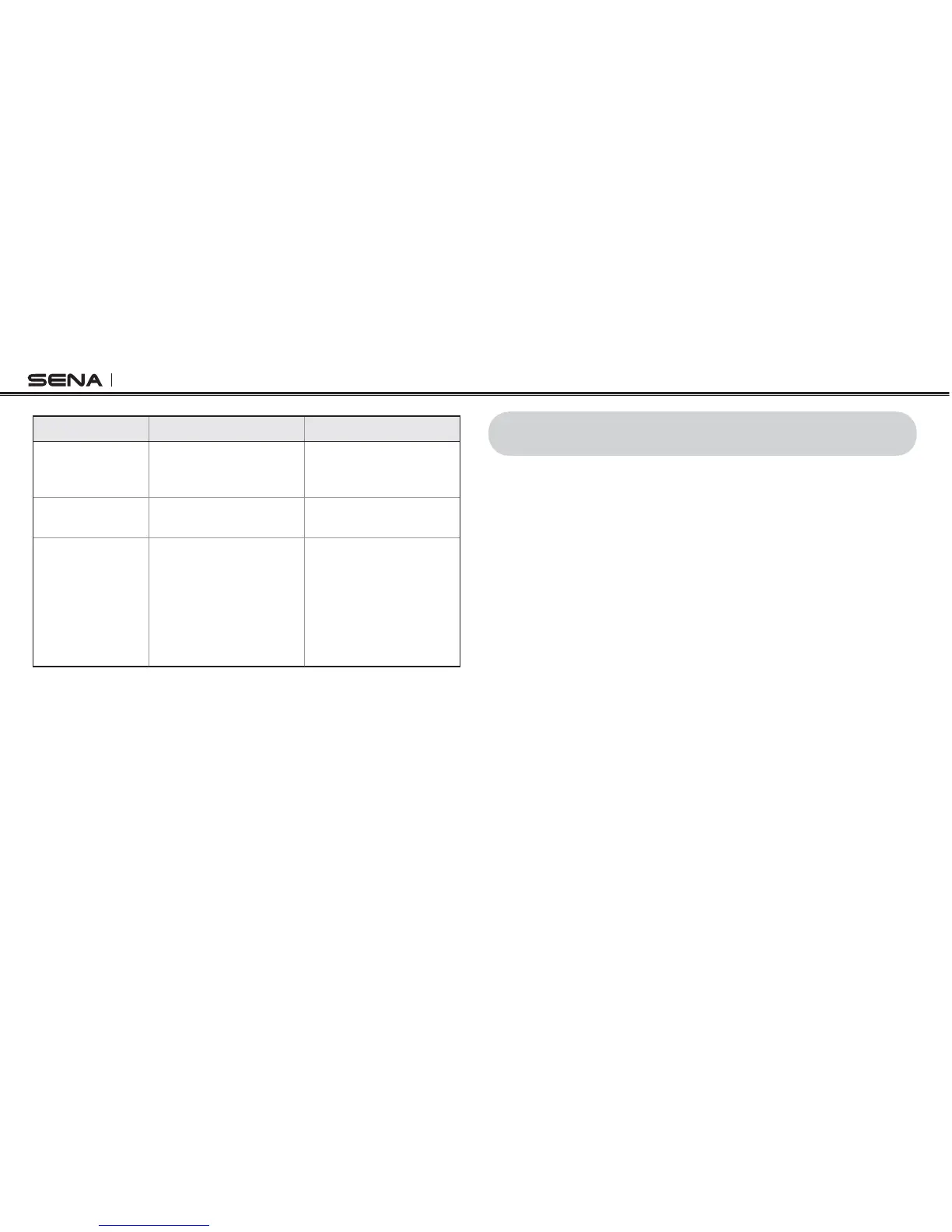
Function Handlebar Remote Headset
Start
Tap the Front Button while
having a mobile phone
call
Tap the Center Button
while having a mobile
phone call
End intercom
lRST
Tap the Front Button Tap the Center Button
End phone call
lRST
Tap the Rear Button
or
Press the Front Button
for 2 seconds
or
Wait for the called
person to end the call
Press the Center
Button for 2 seconds
or
Wait for the called
person to end the call
Button Operation Table for Three-way Conference Phone Call
10 UNIVERSAL INTERCOM
You can have an intercom conversation with non-Sena Bluetooth
headsets using the Universal Intercom function. Non-Sena Bluetooth
headsets can be connected to the Sena Bluetooth headset if they
SUPPORTTHE"LUETOOTH(ANDS&REE0ROlLE(&04HEWORKINGDISTANCE
may differ depending on the performance of Bluetooth headset that it
is connected to. In general, it is shorter than normal intercom distance
SINCEITUSESTHE"LUETOOTH(ANDS&REE0ROlLE4HE5NIVERSAL)NTERCOM
affects both the phone call connection and the multipoint connection
(mostly used for GPS connections for riders). You cannot use a
multipoint connection device while you are using the Universal
Intercom in case as below.



 To Next Page