10R
56
15 TROUBLESHOOTING
15.1 Intercom Failure
When you try to start an intercom conversation with an intercom friend
who is unavailable within range or already having a conference
intercom with other riders or a mobile phone call, you will hear a low
tone double beep signifying an intercom busy signal. In this case, you
have to try again later.
15.2 Intercom Reconnection
If your intercom friend goes out of range while having an intercom
conversation, you may hear static noise and eventually the intercom
will be disconnected. In this case, the 10R automatically tries to
reconnect the intercom every 8 seconds and you will hear high tone
double beeps until the intercom is reestablished. If you do not want to
make a reconnection, tap the Front Button to stop the attempt.
15.3 Fault Reset
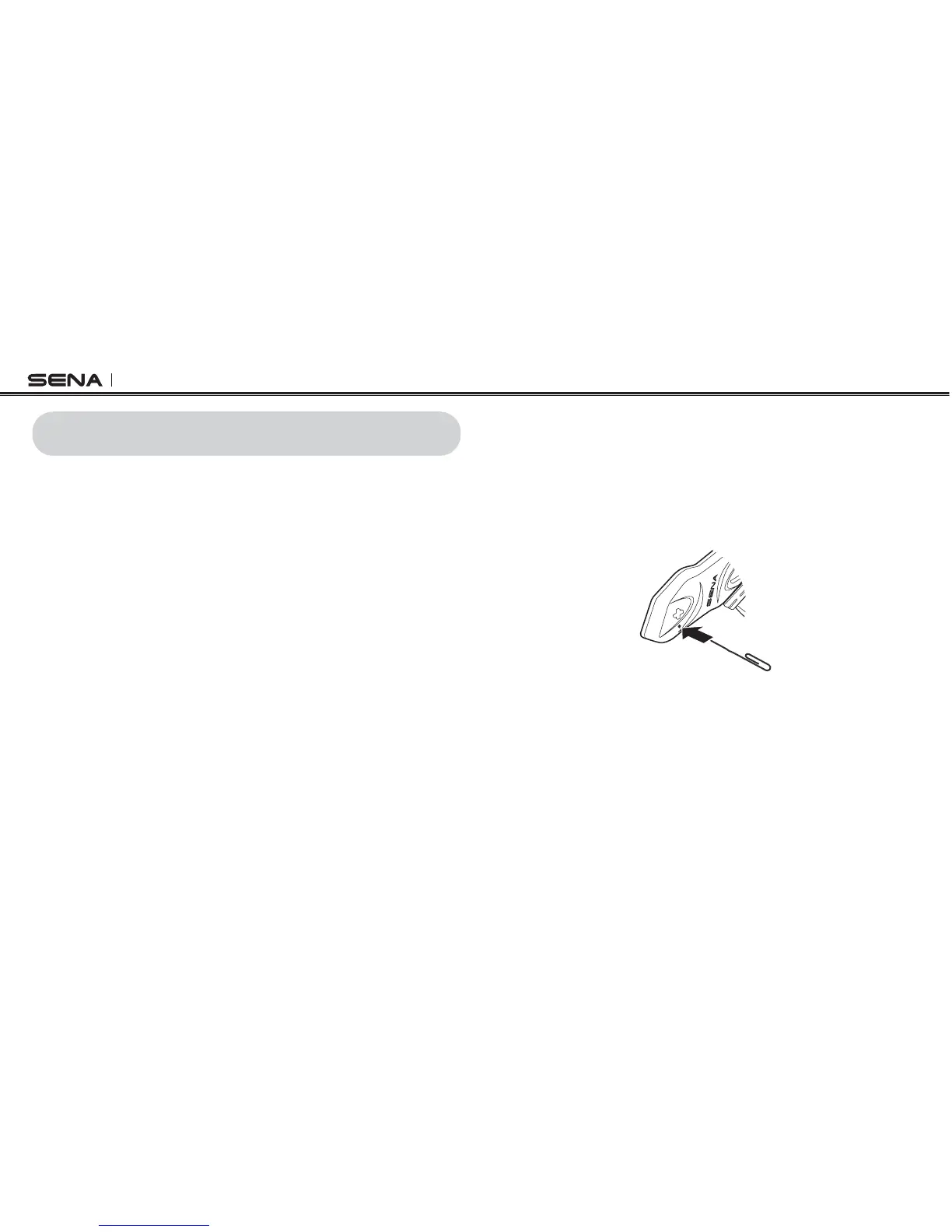
When the 10R is not working properly or is in faulty status for any
reason, you may reset by pushing the pin-hole reset button below the
(+) Button . Insert a paper clip into the reset pin-hole and press the
reset button for a second with light pressure. The 10R will be switched
off. Restart the system and try again. This will not restore the headset
to factory default settings.
15.4 Factory Reset
15.4.1 Headset
If you want to restore the headset to factory default settings, use the
&ACTORY 2ESET IN THE CONlGURATION MENU 4HE HEADSET AUTOMATICALLY
restores the default settings and turns off. Please refer to
section
13.16, “Factory Reset”
for more details.



 To Next Page