10R
46
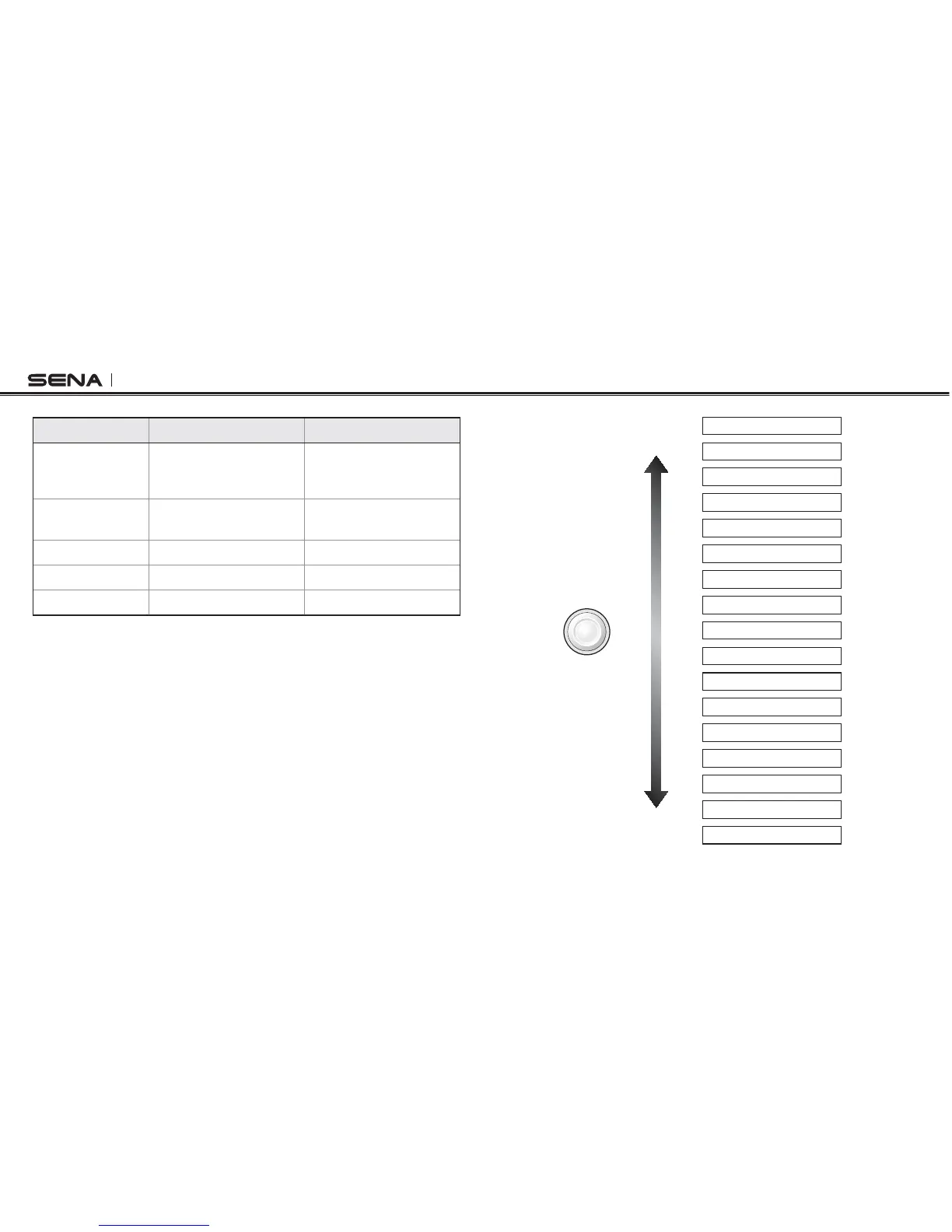
Function Handlebar Remote Headset
Enter
CONlGURATION
menu
Press the Front Button for
12 seconds
Press the Center Button
for 12 seconds
Navigate
between menus
Move the Joystick up or
down
Tap the (+) Button or (-)
Button
Execute
Tap the Rear Button Tap the Center Button
Enable setting
Tap the Rear Button Tap the Center Button
Disable setting
Tap the Front Button Tap the Center Button
$WVVQP1RGTCVKQP6CDNGHQT%QPſIWTCVKQP5GVVKPI
4HEVOICEPROMPTFOREACHMENUITEMISASBELOW
(1) Phone pairing (10) Voice prompt
(2) Second mobile phone pairing (11) RDS AF setting
(3) Phone selective pairing (12) Sidetone
(4) Media selective pairing (13) Noise control
(5) Speed dial (14) Delete all pairings
(6) Audio Boost (15) Remote control pairing
(7) VOX phone (16) Factory reset
(8) VOX intercom 'ZKVEQPſIWTCVKQP
(9) VOX sensitivity
3KRQHSDLULQJ
6HFRQGPRELOHSKRQHSDLULQJ
3KRQHVHOHFWLYHSDLULQJ
0HGLDVHOHFWLYHSDLULQJ
6SHHGGLDO
$XGLR%RRVW
92;SKRQH
92;LQWHUFRP
92;VHQVLWLYLW\
9RLFHSURPSW
5'6$)VHWWLQJ
6LGHWRQH
1RLVHFRQWURO
'HOHWHDOOSDLULQJV
5HPRWHFRQWUROSDLULQJ
)DFWRU\UHVHW
([LWFRQILJXUDWLRQ



 To Next Page