DVR Setup
2–12 700-1014 R002
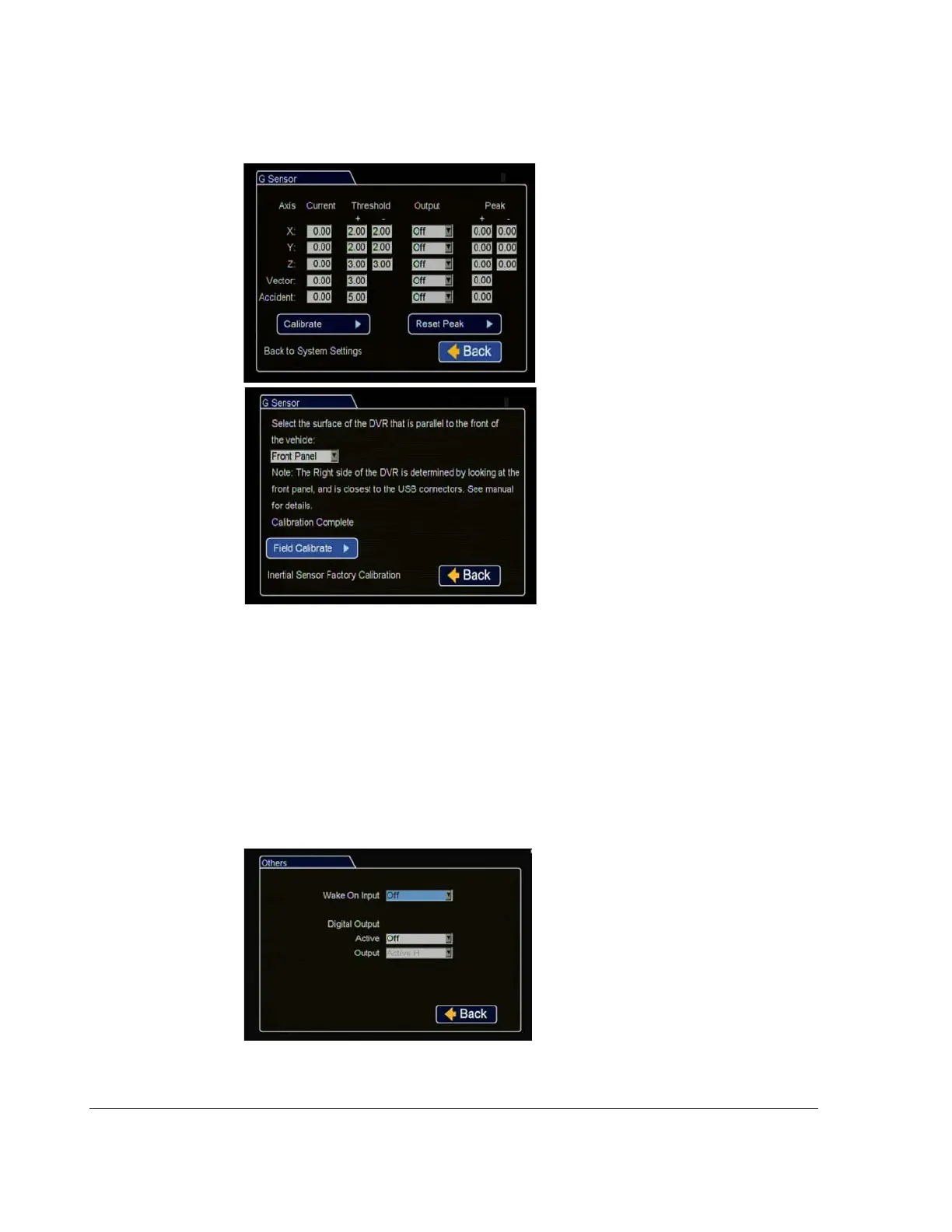
21. In the Alarms and Signals menu, click G Sensor.
22. In the Alarms and Signals menu, click Others.
Current: Display only, shows current
live readings.
Threshold: Seon recommends the
following G Sensor threshold defaults
for large bus movement detection.
X and Y thresholds: +2.0 and -2.0.
Z threshold: +3.0 and -3.0.
Vector threshold: +3.0.
Accident threshold: +5.0.
Smaller vehicles may require lower
thresholds - some experimentation may
be required to define optimum settings
for each vehicle type.
If the thresholds are set too low, they
will generate many alarms.
Output: Select an alarm or signal
output for the settings if required.
Peak: Use the observed peak values to
refine threshold settings.
Click Calibrate to open the Calibration menu. From the drop down menu, select
the DVR front surface.
Click Field Calibrate for the G Sensor to set the X/Y/Z axis planes based on the
mounting surface selection.
Click Back to save the menu settings.
Figure 2-18
G Sensor Menu
Wake On Input
:
Select if requested
.
Digital Output: Select if requested.
Click Back to save the menu settings.
Figure 2-19
Others Settings Menu



 To Next Page