DVR Configuration Menus
700-1014 R002 4–29
4.7.1. Program Update Menu
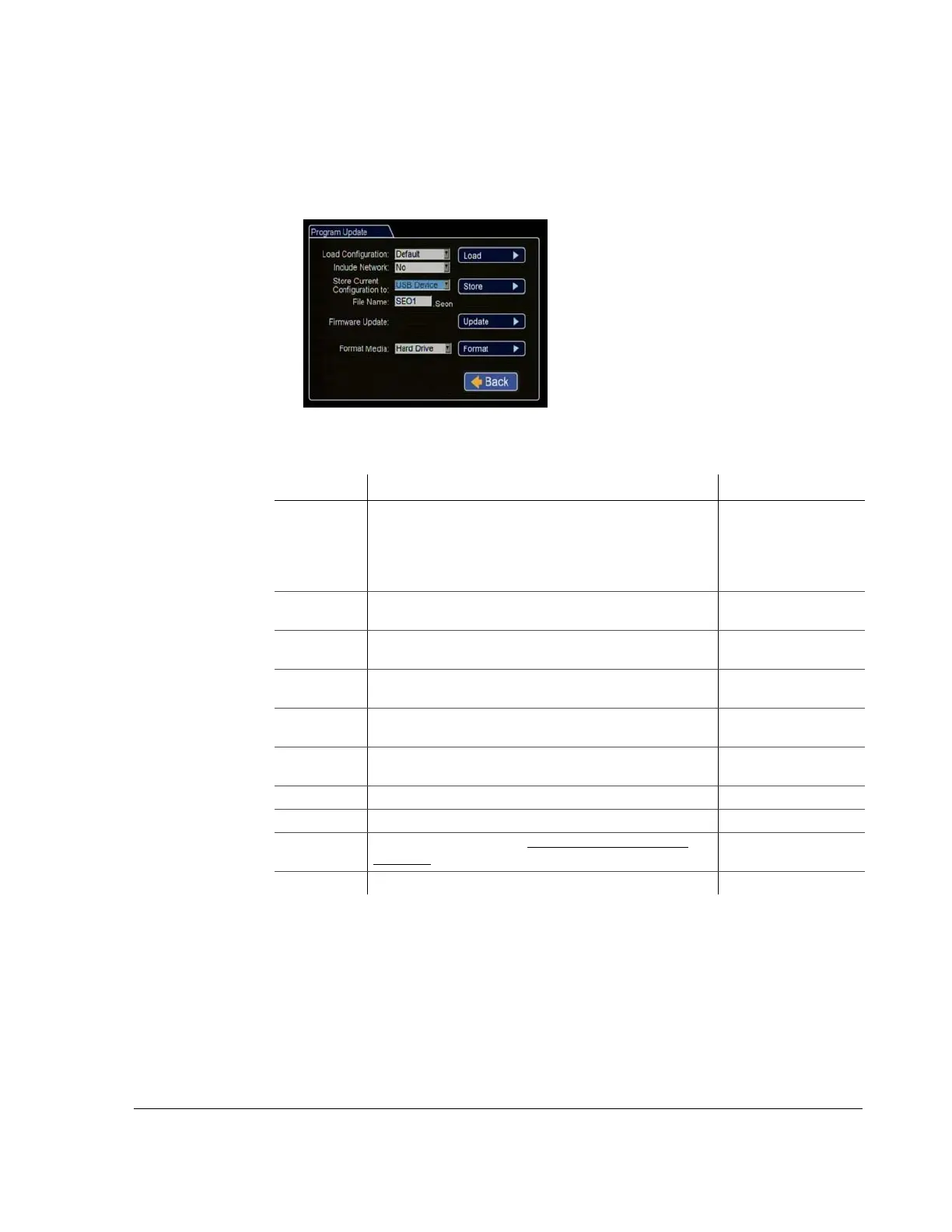
The Program Update menu enables users to update the internal firmware and to store
and load the DVR configuration.
Figure 4-28
Program Update Menu
Table 25
Program Update Configuration Items
Menu Item Description Value [Default]
Load
Configuration
Load the configuration settings from a USB device. MEM1
and MEM2 are customized configuration settings.
The drop down list will only show the most
recent 10 configuration files on the USB
device.
[Default],
MEM1
Include
Network
Select to include network information when the
configuration is loaded.
[NO], YES
Store Current
Configuration
Store the DVR configuration settings to a USB device. [USB Device],
MEM1, MEM2
File Name Set the file name of the configuration file you are saving. [SEO1]
Maximum 4 characters
Firmware
Update
Click update to perform firmware update from USB drive.
Format Media Select media type: Hard Drive, SD Card, or Both [Hard Drive], SD Card,
Both
Load Load the new DVR configuration settings.
Store Store the DVR’s configuration to a USB device.
Update Upgrade the firmware. See DVR Firmware Updates, on
page 3–10.
Format Format the hard drive.



 To Next Page