DVR Configuration Menus
4–18 700-1014 R002
4.5.4. GPS Menu
Use the GPS Settings menu to set the options for recording vehicle time and location
data.
* The Geo-fencing rectangular area is defined by the top left and bottom right
coordinates. If other coordinates are entered, such as top right and bottom left,
inaccurate results may be generated.
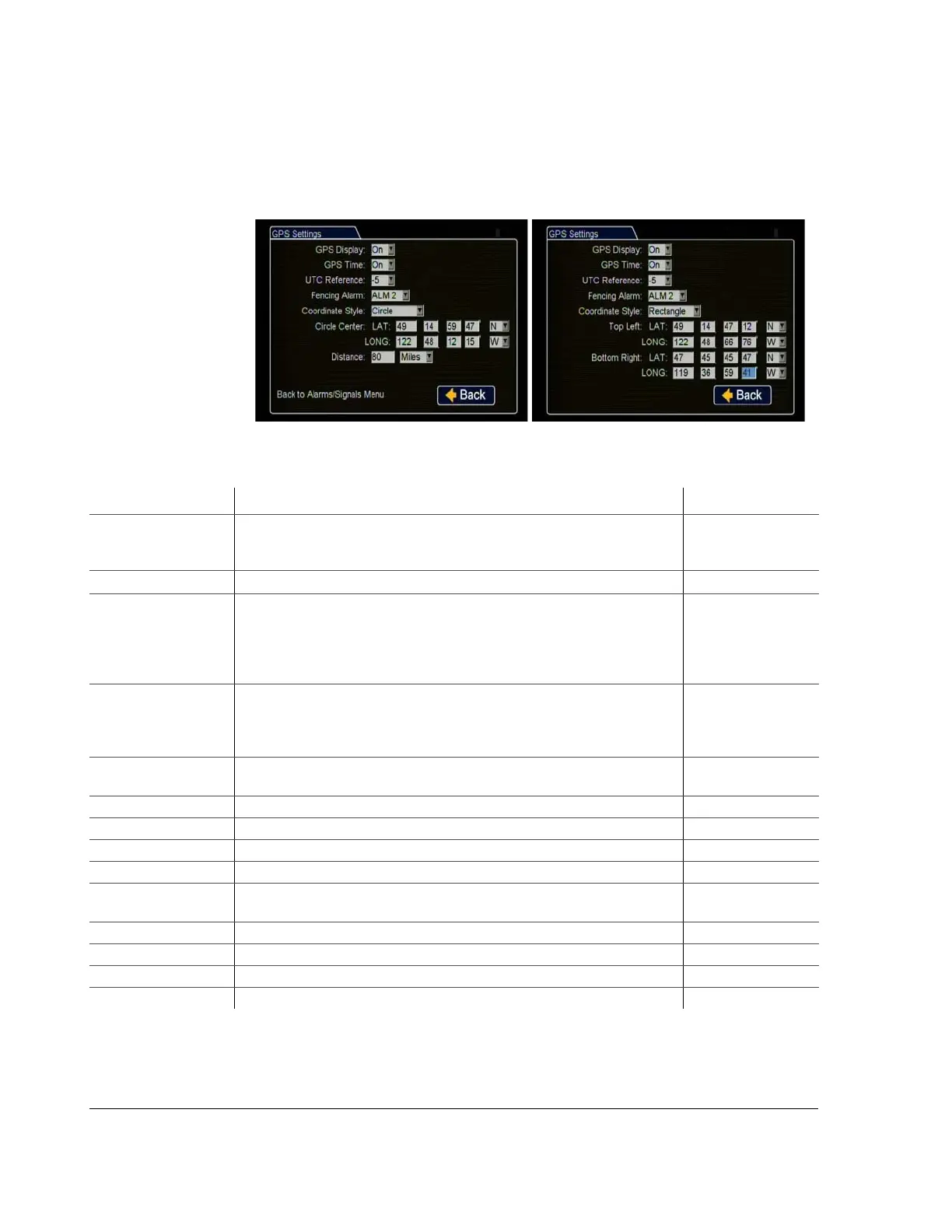
Figure 4-17
GPS Settings Menu
Table 15
GPS Settings Configuration Items
Menu Item Description Value [Default]
GPS Display Show or hide the GPS display on the main screen overlay. With a GPS module
connected to the DVR, the latitude and longitude of the vehicle location are
displayed.
[On], Off
GPS Time Show or hide the GPS time on the main screen overlay.
[Off], On
UTC Reference UTC refers to the atomic clock standard in Greenwich, England. The DVR
location is a certain time difference from UTC time. Determine your time
difference from UTC time and select this time.
• For example, Eastern Standard Time is –5 hours from UTC time.
• Pacific Standard Time is –8 hours from UTC time.
–12 [–5] to –1, 0,
+1 to +12
Fencing (Geo-fencing)
Alarm
Using GPS, Geo-fencing lets the administrator set a designated geographic
radius and if the vehicle deviates from this area, the DVR can be configured to
trigger an alarm.
Enable or disable the fencing alarm to record an alarm or not.
[Off], ALM 1, ALM
2, ALM 3, ALM 4
Coordinate Style:
Circle
Set the coordinate style to a circle. Enter information for LAT and LONG, as
displayed above.
[Circle], Rectangle
Circle Center: LAT Set the latitude to 0° 00.00.00’ through 90° 00.00.00’. [0 0.0 0 N]
Circle Center: LONG Set the longitude 0° 00.00.00’ through 180° 00.00.00’. [0 0.0 0 E]
Distance If the coordinate style is circle, this option defines the radius. [1] to 999
Units Set the units in miles or kilometers. [Miles] KM
Coordinate Style:
Rectangle
Set the coordinate style to a rectangle. Enter information for Top Left: LAT
and LONG and Bottom Right: LAT and LONG appear, as displayed above.
Top Left: LAT * Set the latitude to 0° 00.0000’ through 90° 00.0000’. [0 0.0 0 N]
Top Left: LONG * Set the longitude to 0° 00.00.00’ through 180° 00.00.00’. [0 0.0 0 E]
Bottom Right: LAT * Set the latitude to 0° 00.00.00’ through 90° 00.00.00’. [0 0.0 0 N]
Bottom Right: LONG * Set the longitude to 0° 00.00.00’ through 180° 00.00.00’. [0 0.0 0 E]



 To Next Page