DVR Configuration Menus
4–22 700-1014 R002
4.6. Network Menu
The TL-HD DVR has three Ethernet ports for connecting to a computer, HD camera,
and Smart-Reach Lite wireless network equipment.
See Installation Diagram, on page 1–3
.
Use the Network settings menu to set the network communication parameters needed to
use the Smart-Reach Mobile wireless bridge equipment and Ethernet on the TL-HD.
CAUTION: Network Configuration
To connect using the network connection, each host (computer) connected to the
network must have a unique IP address. A qualified IT administrator is required
to provide information about the network settings and to configure the Network
settings, Advanced Settings, DDNS settings, and E-mail settings.
Contact Seon Engineering Services or Technical Support to perform any
configuration, assign an IP address, reset the Smart-Reach Mobile wireless
bridge or operating information.
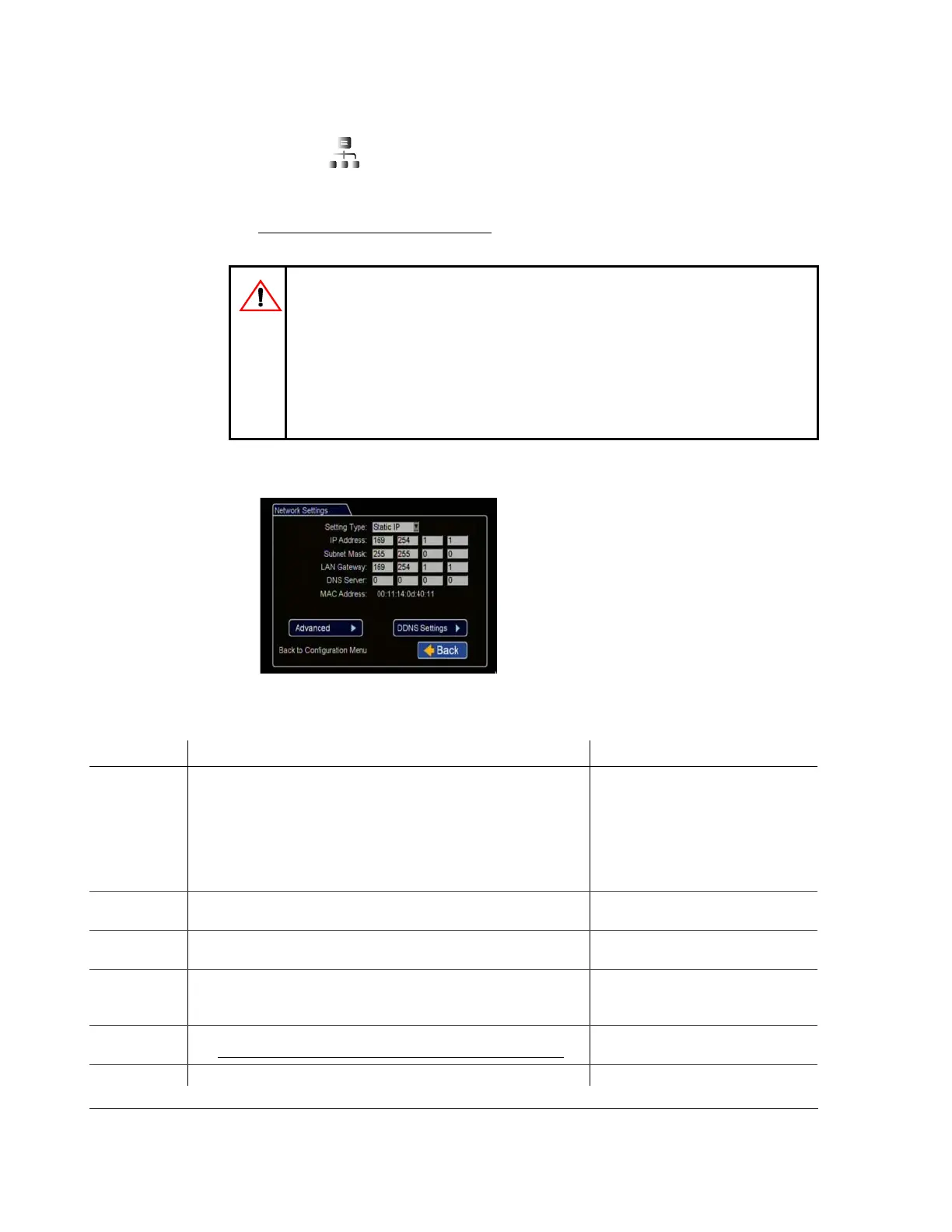
Figure 4-21
Network Settings Menu
Table 18
Network Settings Configuration Items
Menu Item Description Value [Default]
Setting Type For network settings, consult your IT administrator to configure the
setting type and IP address.
If DHCP is used, the subnet mask, default gateway and DNS server
are configured automatically.
Off,
[Static IP], (a permanent address on
the network assigned by the network
administrator),
DHCP (Dynamic Host Configuration
Protocol) automates the assignment of
IP addresses in a network
IP Address Enter the DVR IP Address as determined by a qualified network
expert.
[169.254.1.1]
Subnet Mask Enter the network subnet mask as determined by a qualified network
expert.
[255.255.0.0]
LAN Gateway Gateway address uniquely identifies a host or computer on the LAN
which connects the subnet to other networks. Enter the LAN gateway
as determined by a qualified network expert or network administrator.
[169.254.1.1]
DNS Server Uses an IP address composed of four octets separated by decimals.
See DDNS (Dynamic Domain Name Server) Menu, on page 4–27
.
[0.0.0.0]
MAC Address MAC (Media Access Control) is the DVR’s unique hardware number. Fixed



 To Next Page