74
To adjust Glide:
1. Press Glide.
2. Use the slider.
The Glide range is 0-99. Notes glide at a linear, constant rate. The higher the
Glide value, the longer it takes to glide from note to note.
VOICE PAN
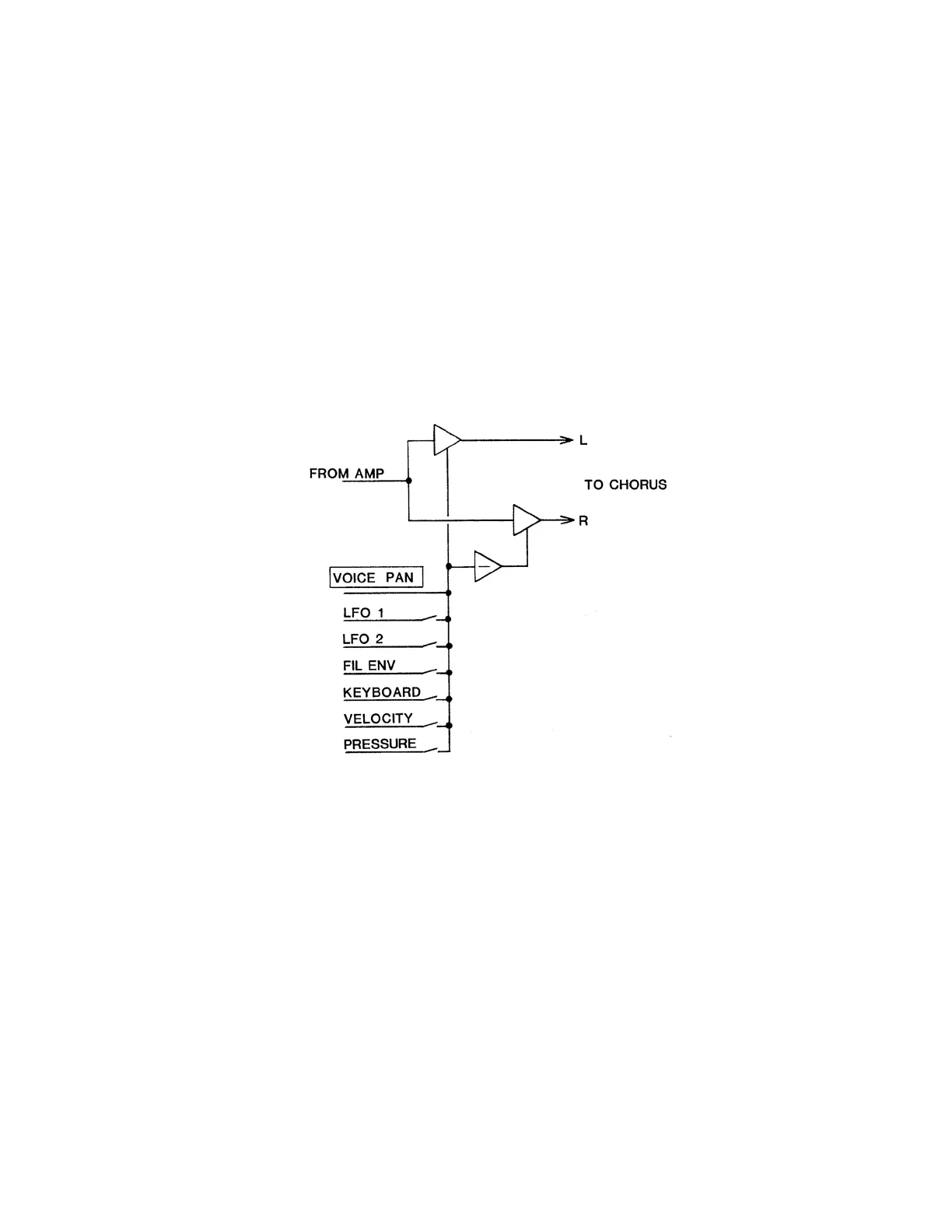
The voice output can be positioned anywhere within the stereo eld by the
Voice Pan control and the modulation sources shown:
There are several new implications to this arrangement. For example, when
modulated by the keyboard (key position), the placement of the note within the
stereo eld can be analogous to its position on the keyboard. This has been a
long-desired feature for electronic keyboard instruments.
1. To select desired voice numbers, press Voice Pan.
The LCD shows the voice number and pan value from -63 to +63 on the top
line. In the bottom line it provides a bar graph showing the approximate initial
voice position. The resolution of the slider far exceeds that of the display.
There are 42 display positions but 128 pan positions.
2. To adjust the voice pan, use the slider.
Figure 11-1
PAN MODULE
HOME















 To Next Page