Part
Names
Remote
Control
Unit
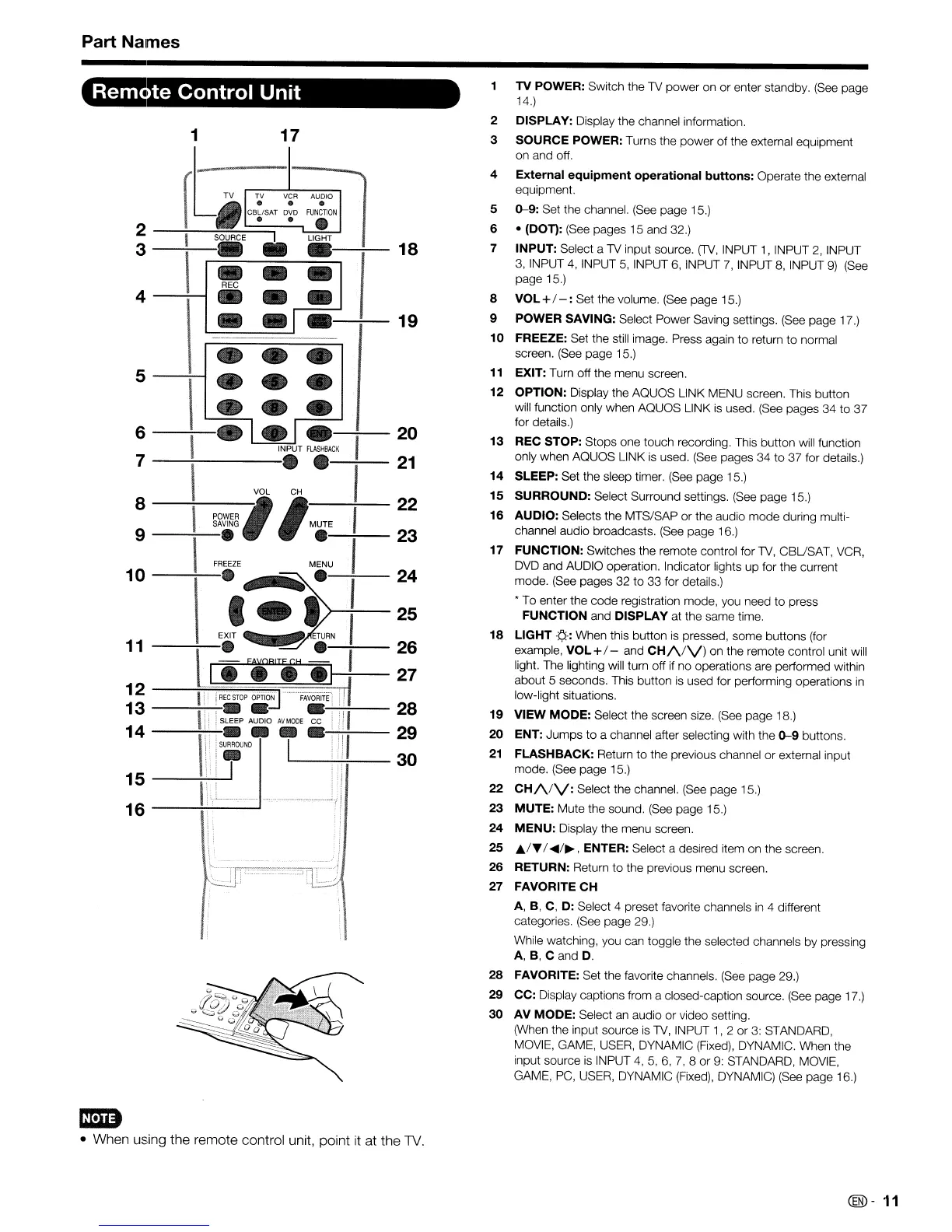
TV POWER: Switch the TV power on
or
enter standby. (See page
14.)
2 DISPLAY: Display the channel information,
3
SOURCE POWER: Turns the power of the external equipment
on and off.
4
External
equipment
operational
buttons:
Operate the external
equipment.
5
0-9:
Set the channel. (See page 15.)
6 •
(DOn:
(See pages 15 and 32.)
7
INPUT: Select a TV input source,
(TV,
INPUT
1,
INPUT 2, INPUT
3, INPUT
4,
INPUT
5,
INPUT
6,
INPUT
7,
INPUT
8,
INPUT
9)
(See
page 15.)
8
VOL +/
-:
Set the volurne. (See page 15.)
9
POWER SAVING: Select Power Saving settings. (See page 17.)
10 FREEZE: Set the still image. Press again
to
return
to
norrnal
screen. (See page 15.)
11
EXIT: Turn off the rnenu screen,
12
OPTION: Display the AQUOS LINK MENU screen. This button
will function only when AQUOS LINK is used. (See pages 34
to
37
for details.)
13
REC STOP: Stops one touch recording. This button will function
only when AQUOS LINK is used, (See pages 34
to
37 for details.)
14
SLEEP: Set the sleep timer. (See page 15,)
15
SURROUND: Select Surround settings. (See page 15.)
16
AUDIO: Selects the MTS/SAP
or
the audio mode during multi-
channel audio broadcasts, (See page 16.)
17
FUNCTION: Switches the remote control for TV, CBUSAT, VCR,
DVD and AUDIO operation, Indicator lights
up
for the current
mode, (See pages 32
to
33 for details.)
• To enter the code registration mode, you need
to
press
FUNCTION and DISPLAY at the same time,
18
LIGHT
.¢.-:
When this button
is
pressed, some buttons (for
example,
VOL+/- and
CH/\/V)
on the rernote control unit will
light. The lighting will turn off
if
no
operations are performed within
about 5 seconds. This button is used for perforrning operations
in
low-light situations.
19
VIEW MODE: Select the screen size. (See page 18.)
20
ENT:
Jumps
to
a channel after selecting with the
0-9
buttons.
21
FLASHBACK: Return
to
the previous channel or external input
mode. (See page 15.)
22
CH/VV:
Select the channel. (See page 15.)
23
MUTE: Mute the sound, (See page 15.)
24
MENU:
Display the menu screen.
25
A/T
/
~/~,
ENTER: Select a desired item on the screen.
26
RETURN: Return
to
the previous menu screen,
27 FAVORITE
CH
A, B, C, D: Select 4 preset favorite channels
in
4 different
categories. (See page 29.)
While watching, you can toggle the selected channels by pressing
A, B, C and
D.
28
FAVORITE: Set the favorite channels. (See page 29.)
29
CC: Display captions from a closed-caption source.
(See
page 17.)
30
AV MODE: Select an audio or video setting.
(When the input source
is
TV,
INPUT
1,2
or
3:
STANDARD,
MOVIE, GAME, USER, DYNAMIC (Fixed), DYNAMIC. When the
input source is INPUT
4,5,
6,
7,
8
or
9: STANDARD, MOVIE,
GAME, PC, USER, DYNAMIC (Fixed), DYNAMIC) (See page 16.)
19
18
I
17
•
--
REC
\
•
--
•
-,-
•
• •
I
•
• •
•
• •
• • •
6
7
5
4
2
--~~S~O~UA~C~E=::::;----='''
3
--..:---:.
--:---
20
INPUT
FlASHBACK
1
----:---V-OL-~H
.~,-
21
8
~~~~~
,
'MUTE
I
22
9 •
..-:-----
23
FREEZE
MENU
,
10-~e~(
.:~,
I :
11
--'7--.
•
26
I•
FiA1Ti
H
4t]---:I-
27
12
----.JI'-i~!:;:::[
R~EC~ST~OP~O~PT~'~~-~-~--~F::::-AV~O~RrT~E1~lrl!
13
---;,:-:-,
~i.
.
.,-'-,
':"';'11--
28
I i SLEEP AUDIO
AV
MODE
CC
i'
!
14
--\:-:-\i,-il.-
i
·:-'-!";';!!I--
~~
15
----'1'"'"\
'-'-..t-J
---------J
I
16
em
• When using the remote control unit, point
it
at the
TV
@-
11










 To Next Page