Preparation
Antennas .
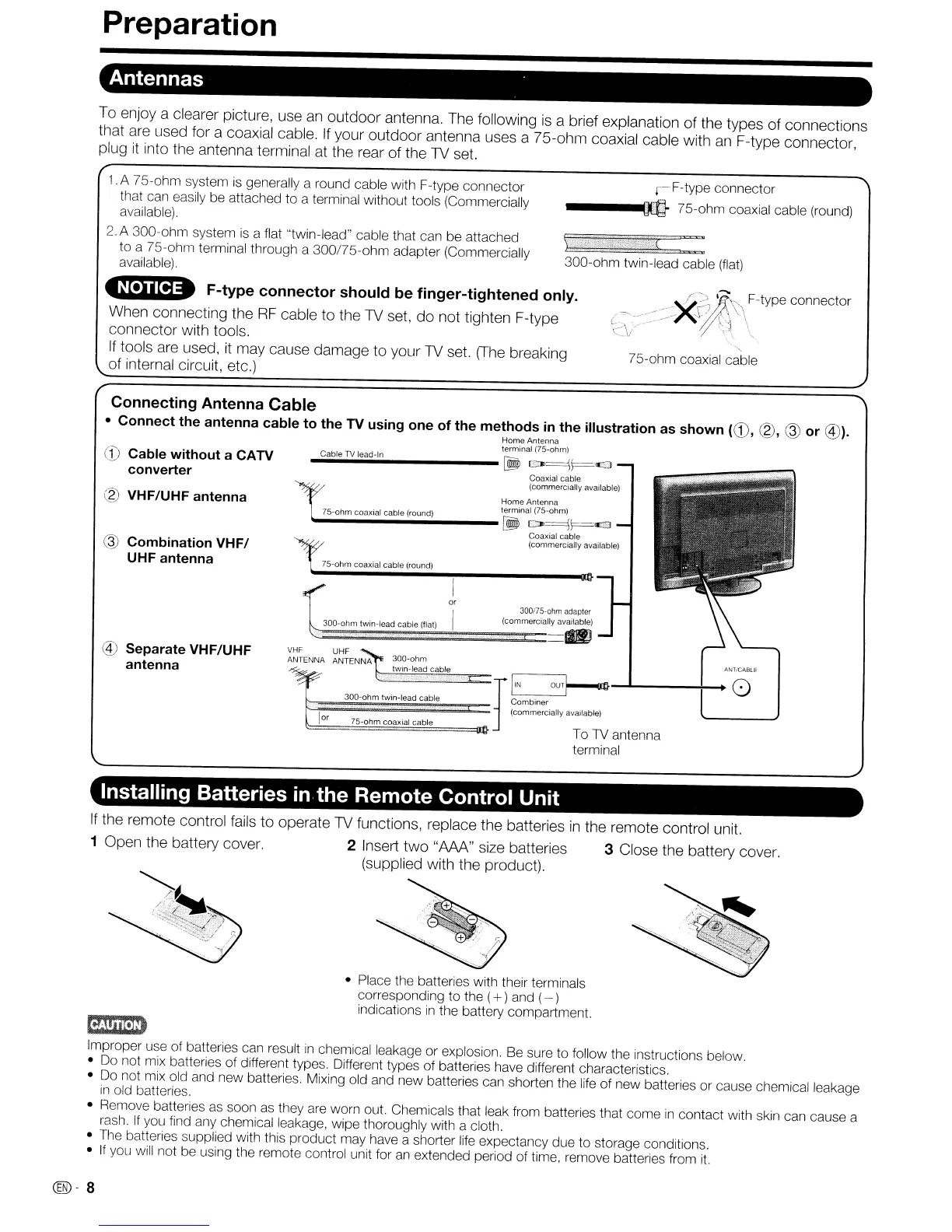
To enjoy a clearer picture, use
an
outdoor antenna. The following
is
a brief explanation of the types of connections
that
are
used for a coaxial cable.
If
your outdoor antenna uses a 75-ohm coaxial cable with
an
F-type connector,
plug
it
into the antenna terminal at the rear of the 1V set.
300-ohm twin-lead cable
(flat)
r-F-type
connector
----m
75-ohm coaxial cable (round)
.A 75-ohm system
is
generally a round cable with F-type connector
that can easily be attached to a terminal without tools (Commercially
available).
2.
A 300-ohm system
is
a flat "twin-lead" cable that can be attached
to
a 75-ohm terminal through a 300/75-ohm adapter (Commercially
available).
~
F-type connector should be finger-tightened only.
When connecting the
RF
cable to the 1V set, do not tighten F-type
connector with tools.
If
tools
are
used, it may cause damage to your
1V
set.
(The
breaking
of internal circuit, etc.)
"-
75-ohm coaxial cable
M~T/CABLE
I
or
30D-ohm
twin-lead cable
75-ohrn coaxial cable (round)
.....
C,;;;ab.,le
..
TV
..
I,;;;ea
..
d-
..
ln
[!!Ii
CO>~\=<1
Coaxial
cable
(commercially available)
Home
Antenna
75-ohm coaxial cable (round) terminal (75-ohm)
Io0o-
[!!Ii
CO>~\=<£3
Coaxial cable
(commercially available)
300175-ohm
adapter
30D-ohm twin-lead cable
(flat)
(commercially available)
\::==:::===~=~==
dl
300-ohm twin-lead cable r
~:mbiner
OUT~-""'----+-_
0
~~=======::::i==
(commercially available)
lor
75-ohm
coaxial cable
~===============llt}
To
TV
antenna
terminal
VHF
UHF
ANTENNA ANTENNA
Connecting Antenna Cable
• Connect the antenna cable to the TV using one of the methods
in
the illustration as shown
(CD,
(g),
@
or
@).
Home
Antenna
terminal (75-ohm)
@ Separate VHF/UHF
antenna
® VHF/UHF antenna
@ Combination
VHF/
UHF antenna
CD
Cable without a CATV
converter
Installing Batteries
in
the Remote Control Unit
If
the remote control fails to operate
1V
functions, replace the batteries
in
the remote control unit.
1 Open the battery cover. 2 Insert two
"AM"
size batteries 3 Close the battery cover.
(supplied with the product).
• Place the batteries with their terminals
corresponding to the (
+)and (- )
indications
In
the battery compartment.
~
Improper use of batteries can result
in
chemical leakage or explosion. Be sure to follow the instructions below.
• Do not mix batteries of different types. Different types of batteries have different characteristics.
• Do not mix old and new batteries. Mixing old and new batteries can shorten the life of new batteries or cause chemical leakage
in
old batteries.
• Remove batteries as soon as they are worn out. Ctlemicals that leak from batteries that come
in
contact with skin can cause a
rash.
If
you find any chemical leakage, wipe thoroughly with a cloth.
• The batteries supplied with this product may have a shorter life expectancy due to storage conditions.
•
If
you will not be using the remote control unit for
an
extended period of time, remove batteries from
it.
C®-
8










 To Next Page