Using
AQUaS
LINK
Controlling
HDMI Equipment Using
AQUaS
LINK
What's
AQUaS
LINK?
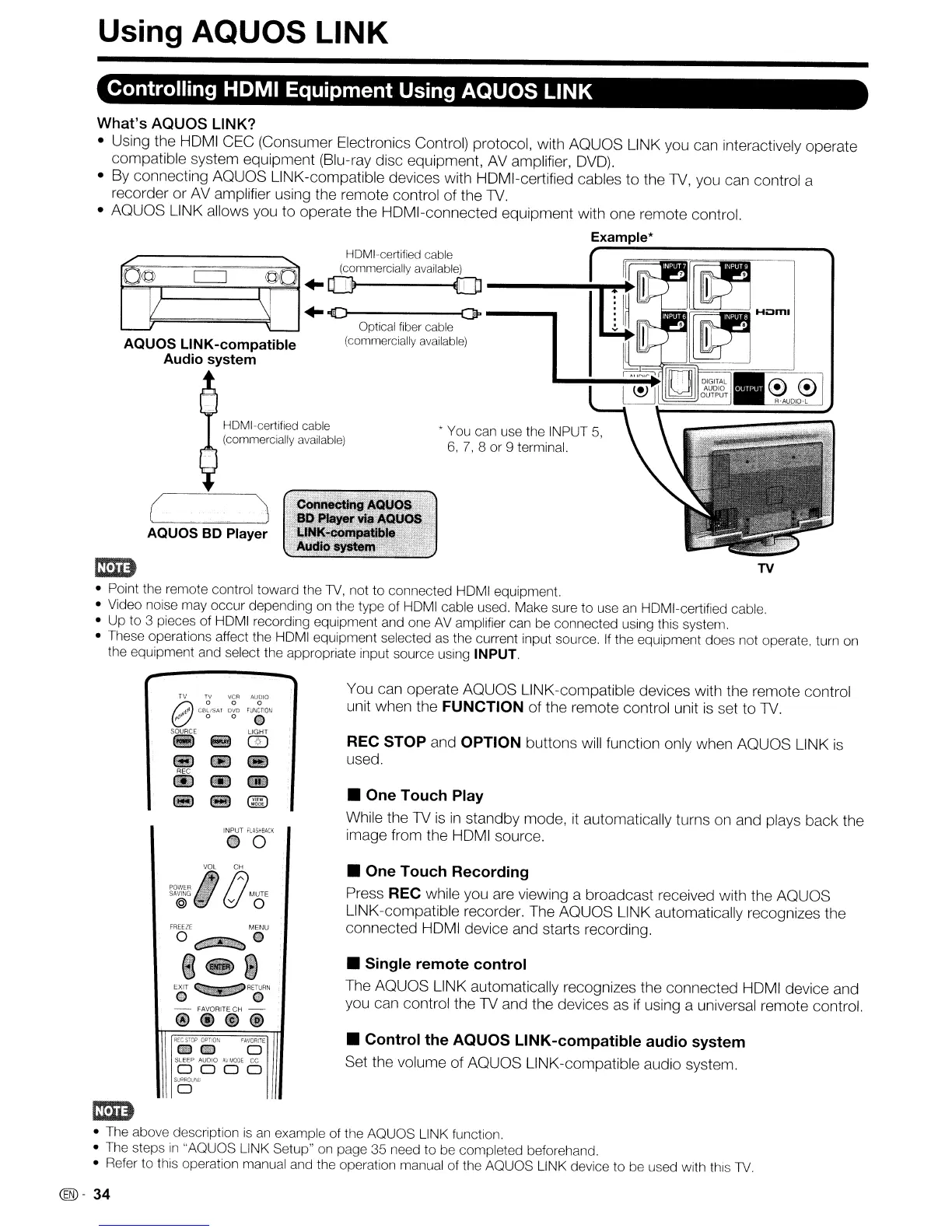
• Using the HDMI CEC (Consumer Electronics Control) protocol, with AQUaS LINK you can interactively operate
compatible system equipment (Blu-ray disc equipment, AVamplifier,
DVD).
• By connecting AQUaS LINK-compatible devices with HDMI-certified cables to the 1V, you can control a
recorder or
AV
amplifier using the remote control of the 1V.
• AQUaS LINK allows you to operate the HDMI-connected equipment with one remote control.
Example*
* You can use the INPUT 5,
6,7,8
or
9 terminal.
.
:6onneJt!ng
'A<:KJOS"
;
,
SO
PlaYer
vl8'AotJOS!,c;
. L1NK-cpmpatible
.•
~
Audio:system,
HOMI-certified cable
(commercially available)
(
AQUaS
BD Player
HOMI-certified cable
(commercially available)
+0
O---~
+
-V
(JP
---.lI1
Optical fiber cable
AQUaS
LINK-compatible (commercially available)
Audio system
....
~-
..........I
TV
• Point the remote control
toward
the
1V,
not
to
connected
HOMI equipment.
• Video noise may
occur
depending
on the
type
of
HOMI cable used. Make sure
to
use an HOMI-certified cable.
•
Up
to
3 pieces
of
HOMI recording equipment and one AV amplifier can
be
connected
using this system.
• These operations affect
the
HOMI equipment selected as the current input source. If the equipment
does
not operate, turn on
the equipment and select the appropriate input source using
INPUT.
INPUT
~ASi-BACK
@O
You can operate AQUaS LINK-compatible devices with the remote control
unit when the FUNCTION of the remote control unit
is
set to 1V.
REC STOP and OPTION buttons will function only when AQUaS LINK
is
used.
• One
Touch
Play
While the
1V
is
in
standby mode,
it
automatically turns
on
and plays back the
image from the HDMI source.
G
VOL
()c~
POWER
~
SAVING
~
...
MUTE
@ - v 0
FREEZE
MENU
O~G
8@J}lW
EXIT
~RETURN
o 0
-
FAVORITE
CH
-
@@@@
REC
STOP
OPTION
FAVORiTE
€illCID 0
SLEEP AUDIO
~VMOOE
cc
0000
SURAOIJ'lO
o
• One
Touch
Recording
Press REC while you
are
viewing a broadcast received with the AQUaS
LINK-compatible recorder. The AQUaS LINK automatically recognizes the
connected HDMI device and starts recording.
•
Single
remote
control
The AQUaS LINK automatically recognizes the connected HDMI device and
you can control the
1V
and the devices
as
if using a universal remote control.
•
Control
the
AQUOS
LINK-compatible
audio
system
Set the volume of AQUaS LINK-compatible audio system.
mm
• The above description is
an
example
of
the
AQUaS
LINK function
• The steps
in
"AQUQS LINK Setup" on page
35
need
to
be
completed
beforehand.
• Refer
to
this operation manual and the operation manual
of
the
AQUaS
LINK device
to
be
used with this 1V.
@-
34










 To Next Page