On-Screen Display Menu
Identification
EXIT q-
PAETURN
o 0
- FAVORITE
CH
-
o ® ® @ ,
FAEEZE
MENU
o •
d2
•••
•••
•••
0.@
INPUT
FLAS:lilACK
00,
Software Update
m.mmD
• Do not remove the USB memory device or unplug the
AC
cord while the software
is
being updated.
• Be sure to properly follow the whole procedure
described below, step by step. Otherwise, for
example, the TV cannot read the data
in
the USB
memory device and software updating will fail.
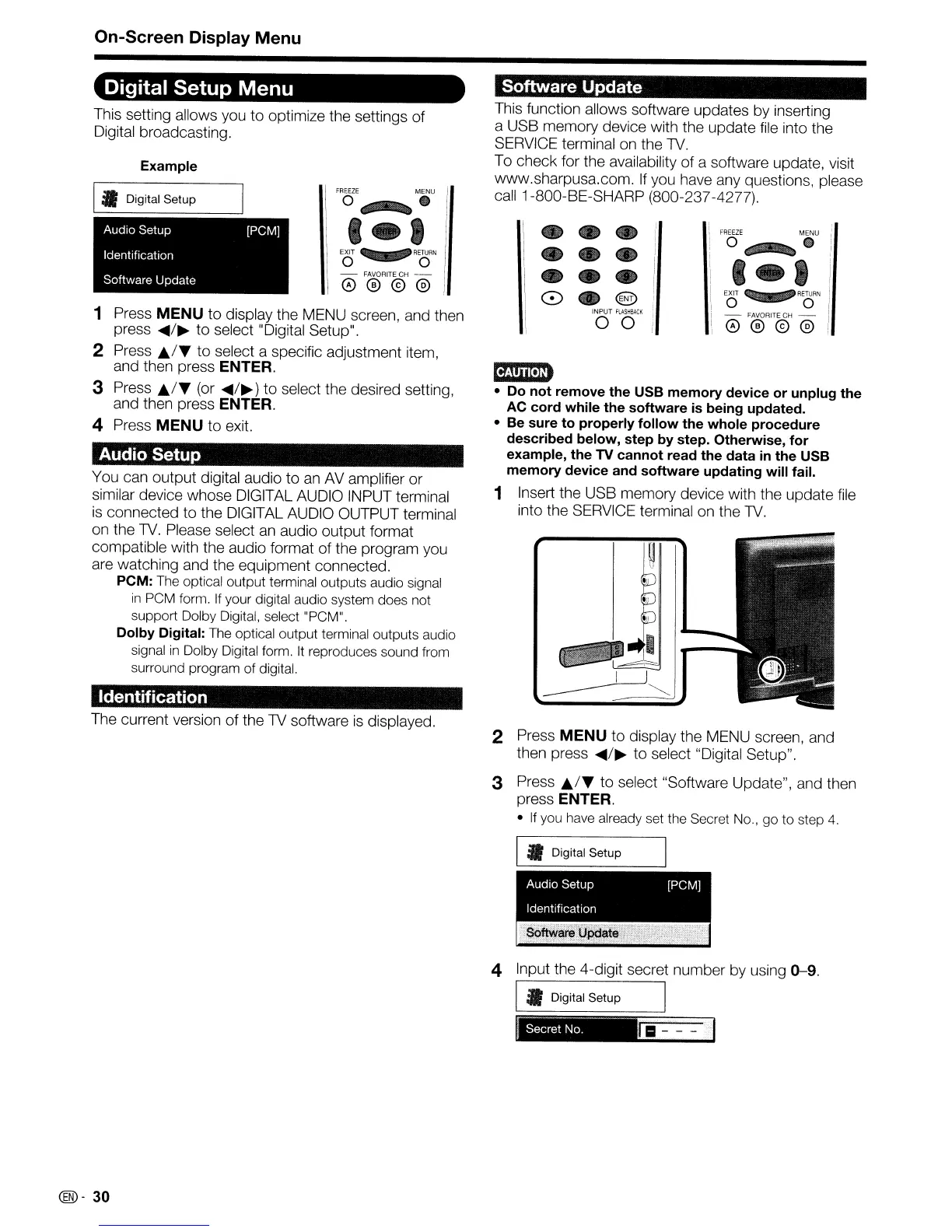
1 Insert the USB memory device with the update
file
into the SERVICE terminal on the
TV.
This function allows software updates by inserting
a USB memory device with the update file into the
SERVICE terminal on the
TV.
To check for the availability of a software update, visit
www.sharpusa.com.
If
you have any questions, please
call 1-800-BE-SHARP (800-237-4277).
FREEZE
MENU
o •
6
Example
Audio Setup [PCMj
Identification
Software Update
You can output digital audio to
an
AV amplifier
or
similar device whose DIGITAL AUDIO INPUT terminal
is
connected to the DIGITAL AUDIO OUTPUT terminal
on the
TV.
Please select
an
audio output format
compatible with the audio format of the program you
are watching and the equipment connected.
PCM:
The optical output terminal outputs audio signal
in
peM
form.
If
your digital audio system does not
support Dolby Digital, select
"peM".
Dolby Digital:
The optical output terminal outputs audio
signal
in
Dolby Digital form.
It
reproduces sound from
surround program of digital.
Digital Setup Menu
Audio Setup
\_
Digital Setup
EXIT q P
RETURN
o 0
- FAVORITE
CH
-
0®®@
1 Press MENU
to
display the MENU screen, and then
press
.....
/~
to
select "Digital Setup".
2 Press
~.rY
to select a specific adjustment item,
and then press
ENTER.
3 Press
~jY
(or
.....
/~)
to select the desired setting,
and then press
ENTER.
4 Press MENU to exit.
This setting allows you to optimize the settings of
Digital broadcasting.
The current version
of
the
TV
software
is
displayed.
2 Press MENU to display the MENU screen, and
then press
.....
/~
to select "Digital Setup".
3 Press
Ji../Y
to select "Software Update", and then
press
ENTER.
•
If
you have already set the Secret No.,
go
to
step
4.
I _ Digital Setup
AudiO Setup [PCMj
Identification
4 Input the 4-digit secret number by using
0-9.
I _ Digital Setup I
(®-
30










 To Next Page