Direct Button Operation
El
8
•
FREEZE
MENU
• •
•
.~O
• •
•
888
• • •
EXIT
<::::::::!:::::
RETURN
o • 0
• •
- FAVORITE
CH
-
0
®
@ @
INPUT
R.ASHBACK
••
REC
STOP
OPTION
FAVORITE
00
0
SLEEP AUDIO
AV
MODE
CC
VOL CH
••••
SURROUND
ro~RII
•
SAiO
M.E
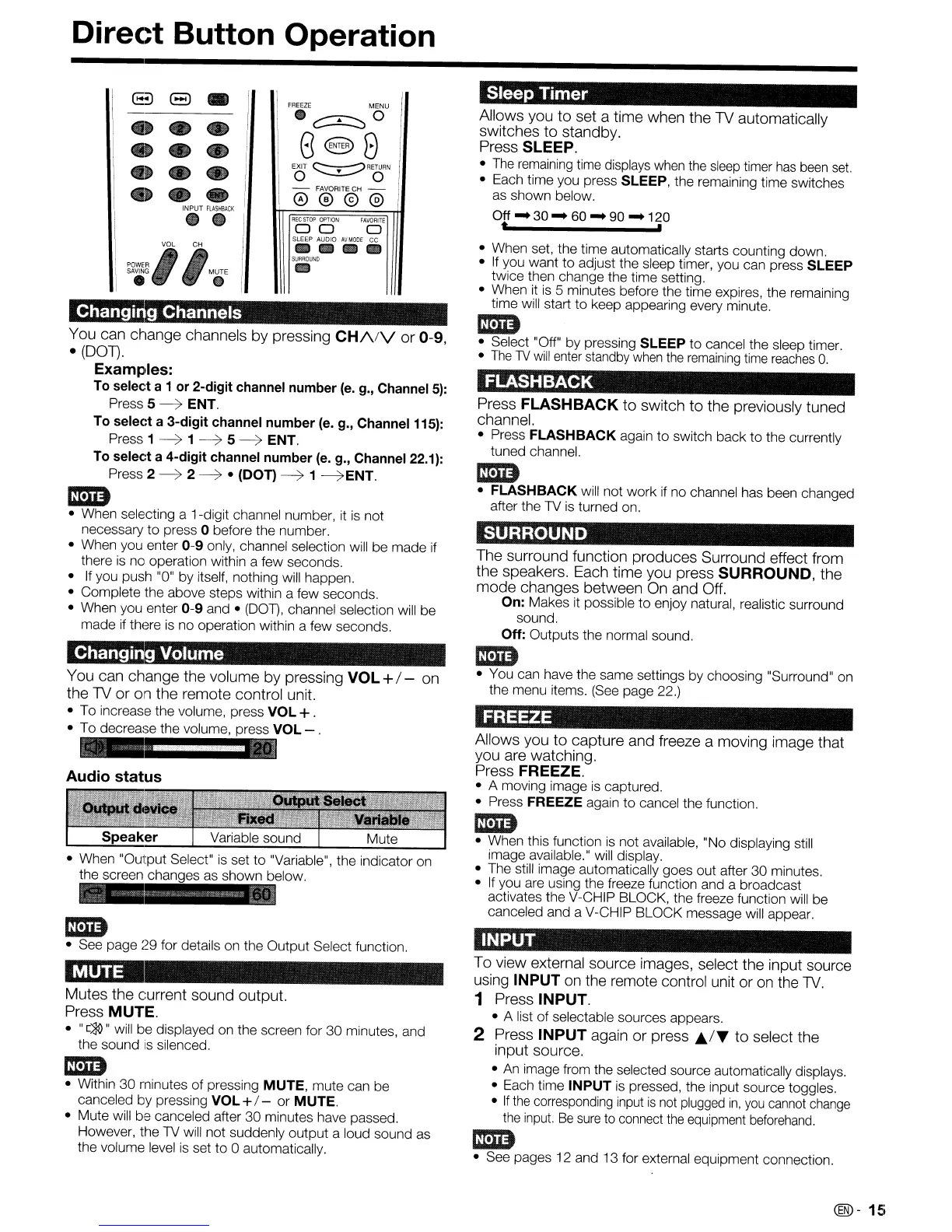
Changing Channels
You can change channels by pressing
CH/\/V
or 0-9,
•
(DOT).
Examples:
To select a 1
or
2-digit
channel
number
(e.
g., Channel
5):
Press 5
~
ENT.
To
select
a
3-digit
channel
number
(e. g., Channel 115):
Press 1
~
1
~
5~
ENT.
To
select
a
4-digit
channel
number
(e.
g., Channel 22.1):
Press 2
~
2
~
• (DOT)
~
1
~ENT.
1m
• When selecting a 1-digit channel number, it
is
not
necessary
to
press 0 before the number.
• When you enter
0-9
only, channel selection will be made if
there
is
no operation within a few seconds.
•
If
you push "0"
by
itself, nothing will happen.
• Complete the above steps within a few seconds.
• When you enter
0-9
and •
(DOT),
channel selection will be
made if there is no operation within a few seconds.
Changing Volume
You can change the volume by pressing
VOL
+/- on
the
TV
or
on
the remote control unit.
• To increase the volume, press VOL+.
• To decrease the volume, press VOL - .
Audio
status
1m
• See page
29
for details on the Output Select function.
MUTE
Mutes the current sound output.
Press MUTE.
•
"[~"
will be displayed on the screen for 30 minutes, and
the sound
is
silenced.
mm
• Within
30
minutes of pressing MUTE, mute can be
canceled by pressing VOL +I - or MUTE.
• Mute will be canceled after
30
minutes have passed.
However, the TV will not suddenly output a loud sound as
the volume level
is
set to 0 automatically.
Sleep
Timer
Allows you to set a time when the TV automatically
switches to standby.
Press SLEEP.
•
The
remaining time displays when the
sleep
timer
has
been
set.
• Each time you press SLEEP, the remaining time switches
as shown below.
Off - 30 - 60 - 90 - 120
t ,
• When set, the time automatically starts counting down.
•
If
you want
to
adjust the sleep timer, you can press SLEEP
twice then change the time setting.
• When it
is
5 minutes before the time expires, the remaining
time will start
to
keep appearing every minute.
1m
• Select "Off"
by
pressing SLEEP
to
cancel the sleep timer.
•
The
lV
will
enter standby
when
the
remaining
time
reaches
O.
FLASHBACK
Press
FLASHBACK
to switch to the previously tuned
channel.
• Press
FLASHBACK
again
to
switch back
to
the currently
tuned channel.
1m
•
FLASHBACK
will not work if no channel has been changed
after the TV is turned on.
SURROUND
The surround function produces Surround effect from
the speakers. Each time you press SURROUND, the
mode changes between
On
and Off.
On:
Makes it possible
to
enjoy natural, realistic surround
sound.
Off:
Outputs the normal sound.
1m
• You can have the same settings by choosing "Surround" on
the menu items. (See page 22.)
FREEZE
Allows you to capture and freeze a moving image that
you are watching.
Press FREEZE.
• A moving image
is
captured.
• Press
FREEZE again
to
cancel the function.
1m
• When this function
is
not available, "No displaying still
image available." will display.
• The still image automatically goes out after
30
minutes.
•
If
you are using the freeze function and a broadcast
activates the V-CHIP BLOCK, the freeze function will be
canceled and a V-CHIP BLOCK message will appear.
INPUT
To view external source images, select the input source
using
INPUT
on
the remote control unit or
on
the
TV.
1 Press INPUT.
• A list of selectable sources appears.
2 Press
INPUT
again or press J;,./T to select the
input source.
•
An
image from the selected source automatically displays.
• Each time
INPUT is pressed, the input source toggles.
•
If
the
corresponding input
is
not
plugged
in,
you
cannot
change
the
input.
Be
sure
to connect
the
equipment
beforehand.
1m
• See pages 12 and 13 for external equipment connection.
@-
15










 To Next Page