Connecting to External Equipment
You can connect many types of external equipment to your
1V
like a Blu-ray disc player,
DVD
player,
VCR,
Digital
1V
tuner, HDMI equipment, game console or camcorder. To view external source images, select the input source
from
INPUT on the remote control unit or on the 1V.
(See
page 15.)
E1'!imD
• To protect equipment, always turn off the
1V
before connecting any external equipment.
• Please read the relevant operation manual (Blu-ray disc player. etc.) carefully before making conneclions.
Connecting Audiovisual Equipment
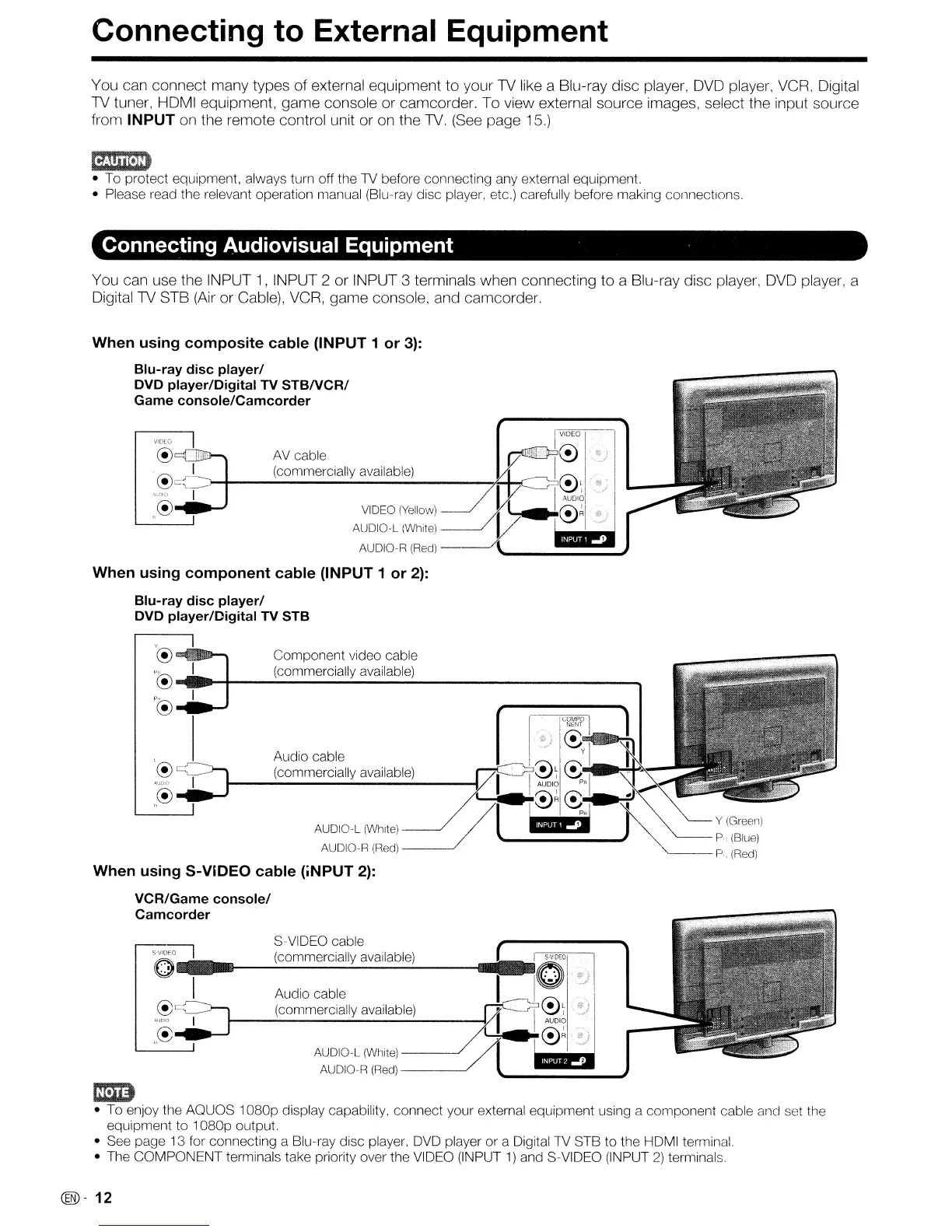
You can use the INPUT
1,
INPUT 2 or INPUT 3 terminals when connecting to a Blu-ray disc player,
DVD
player, a
Digital1V STB
(Air
or Cable),
VCR,
game console, and camcorder.
When using composite cable (INPUT 1 or
3):
Blu-ray disc player/
DVD player/Digital TV
STBNCR/
Game console/Camcorder
VIDEO
When using component cable (INPUT 1 or
2):
Blu-ray disc player/
DVD player/Digital TV STB
'@
.....
_""""
Component video cable
p®
"'.H
__
.-;..(c_o_m_m_e_rc_i_al..;;,ly_a_v_a_ila_b_le_)
....
p®
.....
..J
, I
:~~
I
COMPO
NENT
C!)
....
Audio cable
i.
y I
~'~
(commerCiaIlYavailab~e)
Vf:I~~
~.·p'l·
~.~
~~RC!).
~J
AUDIO-L(White) /
/l
.1@ilE;
~Y
..
(Greell)
~
P.(Blue)
AUDIO-R
(Red)
P
(Red)
When using S-VIDEO cable (iNPUT
2):
VCR/Game console/
Camcorder
S-VIDEO cable
SVID~
(commercially available)
O-"-~~~:::::'::::':::':"'--"---"
I Audio cable
@~
(commercially available)
,":.~_I
._r-------~-----
,,@
AUDIO-L (White)
-----'
AUDIO-R
(Red)
---~
em;:)
• To enjoy the AOUOS
1080p
display capability,
connect
your external equipment using a
component
cable and set the
equipment
to
1080p
output.
• See page 13 for connecting a Blu-ray disc player, DVD player
or
a
Digital1V
STB
to
the HDMI terminal.
• The
COMPONENT
terminals take priority over the VIDEO (INPUT
1)
and S-VIDEO (INPUT
2)
terminals.
@-
12










 To Next Page