Watching TV
Turning On/Off the Power
Pil-ER-+-P-O....,~ER
m
U
INPUT
m
,...-----+1'
r--
TV POWER
TV
/r,V
VCR
AUO'O
:li'lll
(On/Standby)
•
CB~/SAT
D~D
FUN~TION
.,
0 0 0
SOURCE
LIGHT
8 8
@)
Initial Setup
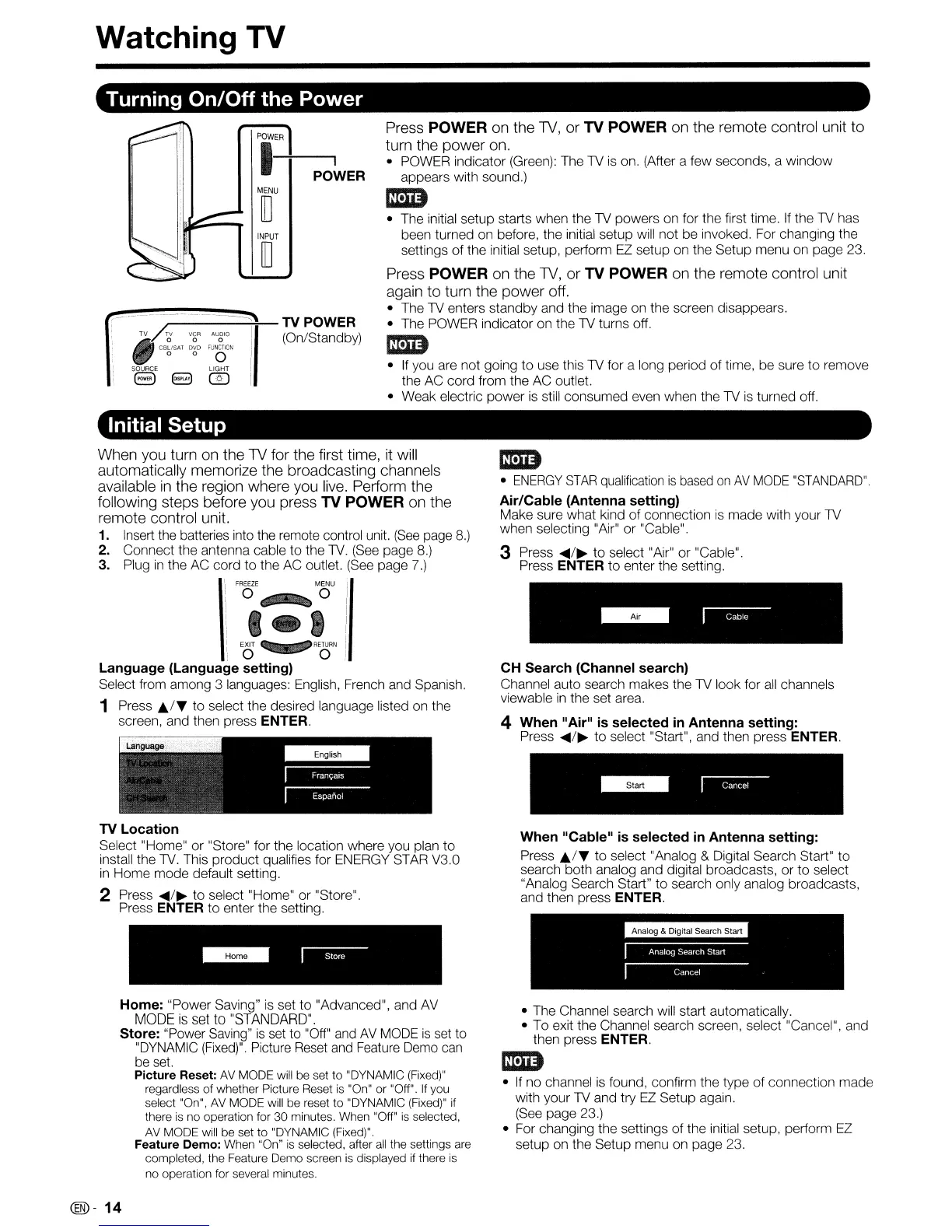
Press POWER on the
TV,
or TV POWER on the remote control unit to
turn the power on.
• POWER indicator (Green): The
TV
is
on. (After a few seconds, a
window
appears with sound.)
I5D
• The initial setup starts when the TV powers on for the first time.
If
the TV has
been turned on before, the initial setup will not be invoked. For changing the
settings
of
the initial setup, perform
EZ
setup on the Setup menu on page 23.
Press POWER on the
TV,
or TV POWER on the remote control unit
again to turn the power off.
• The TV enters standby and the image on the screen disappears.
• The POWER indicator on the
TV
turns off,
I5D
•
If
you are not going to use this TV for a long period
of
time, be sure
to
remove
the AC cord from the AC outlet.
• Weak electric power
is
still consumed even when the TV
is
turned off.
When you turn on the TV for the first time, it will
automatically memorize the broadcasting channels
available
in
the region where you
live.
Perform the
following steps before you press TV POWER on the
remote control unit.
1. Insert the batteries into the remote control unit.
(See
page
8.)
2. Connect the antenna cable to the TV. (See page
8.)
3. Plug
in
the AC cord
to
the AC outlet. (See page 7.)
I
i
FREEZE
MENU
'/
: 0 0 I
i J 4 I
:i:
,1---
"~o·1
Language (Language setting)
Select from among 3 languages: English, French and Spanish.
1 Press
J;./~
to
select the desired language listed on the
screen, and then press
ENTER.
TV Location
Select "Home"
or
"Store" for the location where you plan to
install the
TV.
This product qualifies for ENERGY STAR V3.0
in
Home mode default setting.
2 Press
....
/~
to select "Home" or "Store".
Press
ENTER to enter the setting.
Home: "Power Saving"
is
set to "Advanced", and AV
MODE
is
set
to
"STANDARD".
Store: "Power Saving"
is
set to "Off" and
AV
MODE
is
set to
"DYNAMIC
(Fixed)".
Picture Reset and Feature Demo can
be
set.
Picture Reset:
AV
MODE will be set
to
"DYNAMIC (Fixed)"
regardless of whether Picture Reset
is
"On"
or
"Off".
If
you
select "On",
AV
MODE will be reset
to
"DYNAMIC (Fixed)"
if
there
is
no operation for 30 minutes, When "Off"
is
selected,
AV
MODE will be set to "DYNAMIC (Fixed)".
Feature Demo: When "On"
is
selected, after
all
the settings are
completed, the Feature Demo screen
is
displayed
if
there
is
no operation for several minutes.
@-14
I5D
•
ENERGY
STAR
qualification
is
based
on
AV
MODE
"STANDARD".
Air/Cable (Antenna setting)
Make sure what kind
of
connection
is
made with your TV
when selecting "Air"
or
"Cable".
3 Press
....
/~
to
select "Air" or "Cable".
Press
ENTER
to
enter the setting.
CH Search (Channel search)
Channel auto search makes the TV look for
all
channels
viewable
in
the set area,
4
When"
Air"
is
selected
in
Antenna setting:
Press
....
/~
to
select "Start", and then press ENTER.
When "Cable"
is
selected
in
Antenna setting:
Press
J;./~
to select "Analog & Digital Search Start" to
search both analog and digital broadcasts, or
to
select
"Analog Search Start" to search only analog broadcasts,
and then press
ENTER.
• The Channel search will start automatically,
• To exit the Channel search screen, select "Cancel", and
then press
ENTER.
I5D
•
If
no channel
is
found, confirm the type of connection made
with your
TV
and try
EZ
Setup again.
(See page 23.)
• For changing the settings of the initial setup, perform EZ
setup on the Setup menu on page 23.










 To Next Page