Using
AQUaS
LINK
INKSelup
\
:,~:'~i.1
',0'
0
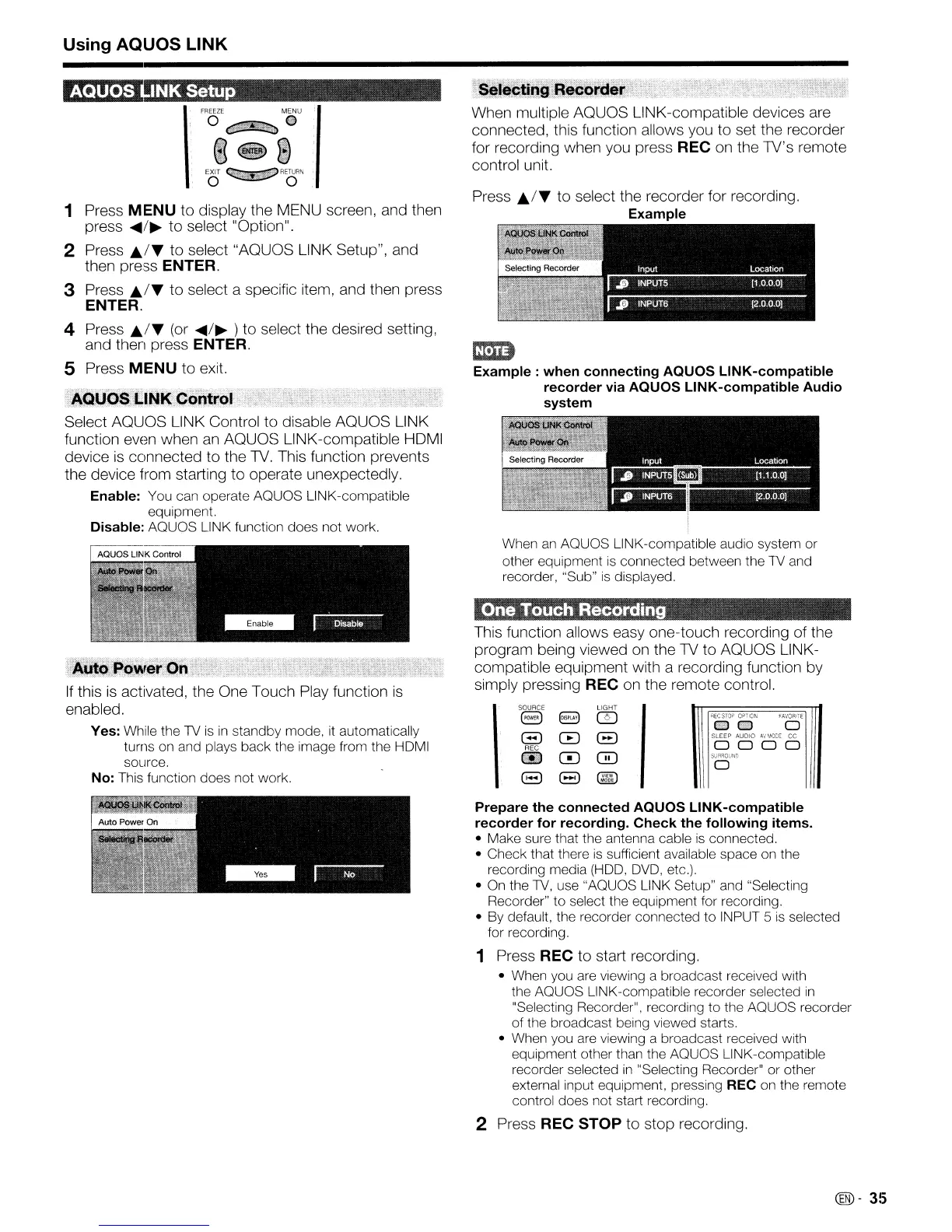
1 Press MENU to display the MENU screen, and then
press
....
/~
to select "Option".
2 Press
A./T
to select "AQUOS LINK Setup", and
then press ENTER.
3 Press
A./T
to select a specific item, and then press
ENTER.
4 Press
A./T
(or
....
/~
) to select the desired setting,
and then press ENTER.
S Press MENU to exit.
Select AQUOS LINK Control to disable AQUOS LINK
function even when
an
AQUOS LINK-compatible HDMI
device
is
connected to the
TV.
This function prevents
the device from starting to operate unexpectedly.
Enable: You can operate AQUOS LINK-compatible
equipment.
Disable: AQUOS LINK function does not work.
If
this
is
activated, the One Touch Play function
is
enabled.
Yes: While the
TV
is
in
standby mode.
it
automatically
turns on and plays back the image from the HDMI
source,
No: This function does not work.
When multiple AQUOS LINK-compatible devices are
connected, this function allows you to set the recorder
for recording when you press REC on the TV's remote
control unit.
Press
A./T
to select the recorder for recording.
Example
em
Example:
when connecting AQUOS LINK-compatible
recorder via AQUOS LINK-compatible Audio
system
When
an
AQUOS LINK-compatible audio system or
other equipment
is
connected between the
TV
and
recorder, "Sub"
is
displayed.
'On8!J
mouch
Recording
This function allows easy one-touch recording of the
program being viewed
on
the
TV
to AQUOS
L1NK-
compatible equipment with a recording function by
simply pressing REC on the remote control.
\
SOURCE
LIGHT
I
8
8 rn
RECSTOP
OPTION
FAVORITE
ell
ell
0
EJ
G
(3
SLEEP AUDIO
AV
MODE
CC
REC
0 0 0 0
lie
0 0
SURROUND
0
8 8
@ID
MODE
Prepare the connected AQUOS LINK-compatible
recorder for recording.
Check
the following items.
• Make sure that the antenna cable
is
connected.
• Check that there
is
sufficient available space on the
recording media
(HOD,
DVD,
etc.),
• On the
TV,
use "AQUOS LINK Setup" and "Selecting
Recorder" to select the equipment for recording,
• By default, the recorder connected to INPUT 5
is
selected
for recording,
1 Press REC to start recording.
• When you are viewing a broadcast received with
the AQUOS LINK-compatible recorder selected
in
"Selecting Recorder", recording to the AQUOS recorder
of
the broadcast being viewed starts.
• When you are viewing a broadcast received with
equipment other than the AQUOS LINK-compatible
recorder selected
in
"Selecting Recorder" or other
external input equipment, pressing REC on the remote
control does not start recording.
2 Press REC STOP to stop recording.
~-
35










 To Next Page