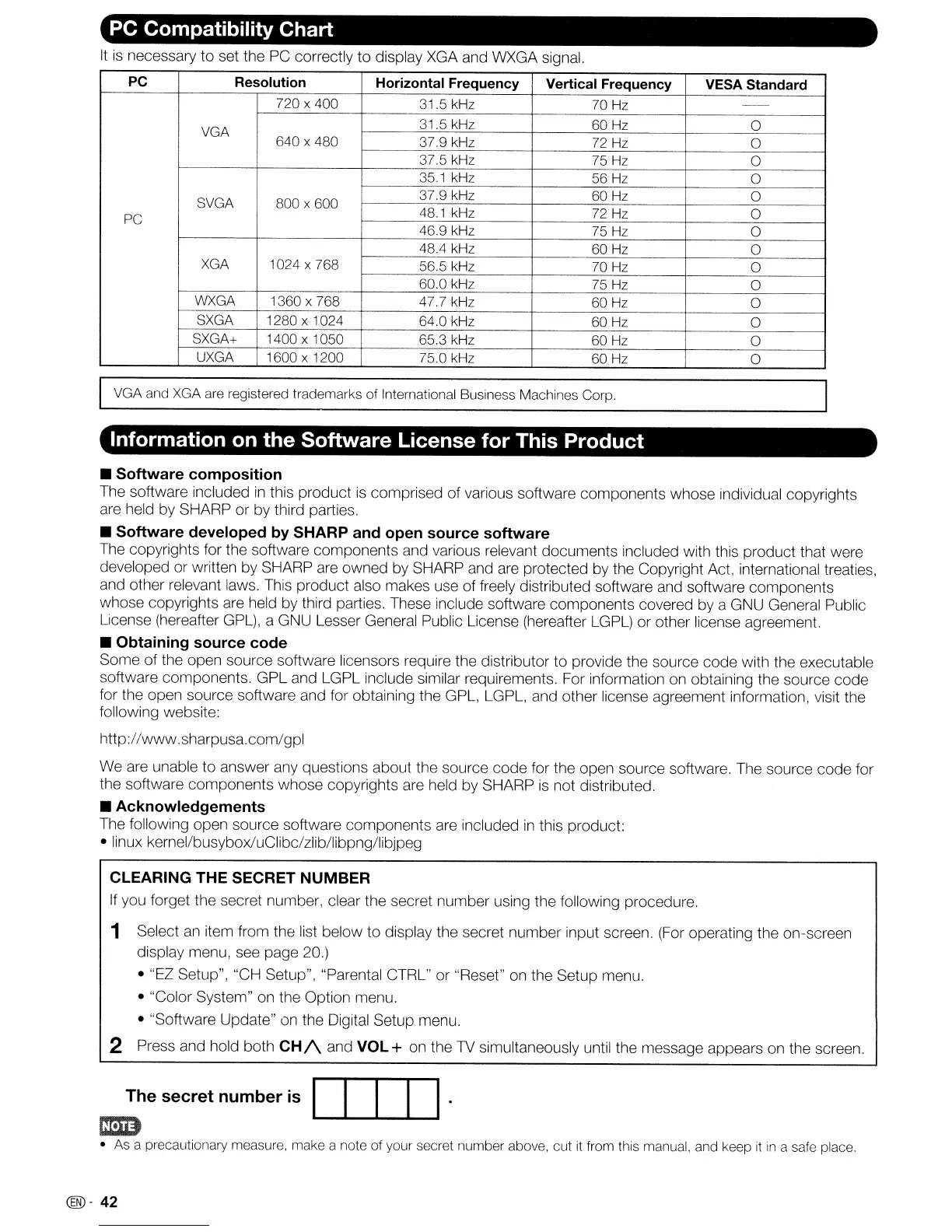
PC Compatibility Chart
It
is
necessary to set the
PC
correctly
to
display XGA and WXGA signal.
PC Resolution
Horizontal Frequency Vertical Frequency
VESA Standard
720 x 400 31.5 kHz 70 Hz
-
VGA
31.5 kHz 60 Hz
0
640 x 480 37.9 kHz
72 Hz
0
375
kHz 75 Hz
0
351
kHz 56
Hz
0
SVGA 800 x 600
37.9 kHz
60
Hz
0
PC
48.1
kHz
72
Hz
0
46.9 kHz 75 Hz
0
48.4 kHz 60 Hz
0
XGA 1024 x 768
56.5 kHz 70 Hz
0
60.0 kHz 75 Hz
0
WXGA
1360 x 768
47.7 kHz
60 Hz
0
SXGA
1280 x 1024
64.0 kHz 60 Hz
0
SXGA+
1400 x 1050 65.3 kHz
60
Hz
0
UXGA 1600 x 1200 75.0 kHz
60 Hz
0
VGA and XGA are registered trademarks of International Business Machines Corp.
Information on the Software License for This Product
• Software composition
The software included
in
this product
is
comprised of various software components whose individual copyrights
are held by SHARP or by third parties.
• Software developed
by
SHARP and open source software
The copyrights for the software components and various relevant documents included with this product that were
developed or written
by
SHARP are owned by SHARP and are protected
by
the Copyright Act, international treaties,
and other relevant laws. This product also makes use of freely distributed software and software components
whose copyrights are held by third parties. These include software components covered by a GNU General Public
License (hereafter GPL), a GNU Lesser General Public License (hereafter LGPL) or other license agreement.
• Obtaining source code
Some of the open source software licensors require the distributor to provide the source code with the executable
software components. GPL and LGPL include similar requirements. For information on obtaining the source code
for the open source software and for obtaining the GPL, LGPL, and other license agreement information, visit the
following website:
http://www.sharpusa.com/gpl
We are unable to answer any questions about the source code for the open source software. The source code for
the software components whose copyrights are held by SHARP
is
not distributed.
• Acknowledgements
The following open source software components are included
in
this product:
• linux kernel/busyboxluClibc/zlib/libpng/libjpeg
CLEARING THE SECRET NUMBER
If
you forget the secret number, clear the secret number using the following procedure.
1 Select
an
item from the list below to display the secret number input screen.
(For
operating the on-screen
display menu, see page 20.)
• "EZ Setup", "CH Setup", "Parental CTRL" or "Reset" on the Setup menu.
• "Color System" on the Option menu.
• "Software Update" on the Digital Setup menu.
2 Press and hold both
CH/\
and VOL + on the
1V
simultaneously until the message appears on the screen.
The secret number
is
DID
.
m:m
•
As
a precautionary measure, make a note of your secret number above, cut
it
from this manual, and keep
it
in
a safe place.
@-
42










 To Next Page