On-ScreEm Display
Menu
Control
Menu
Setup
Menu
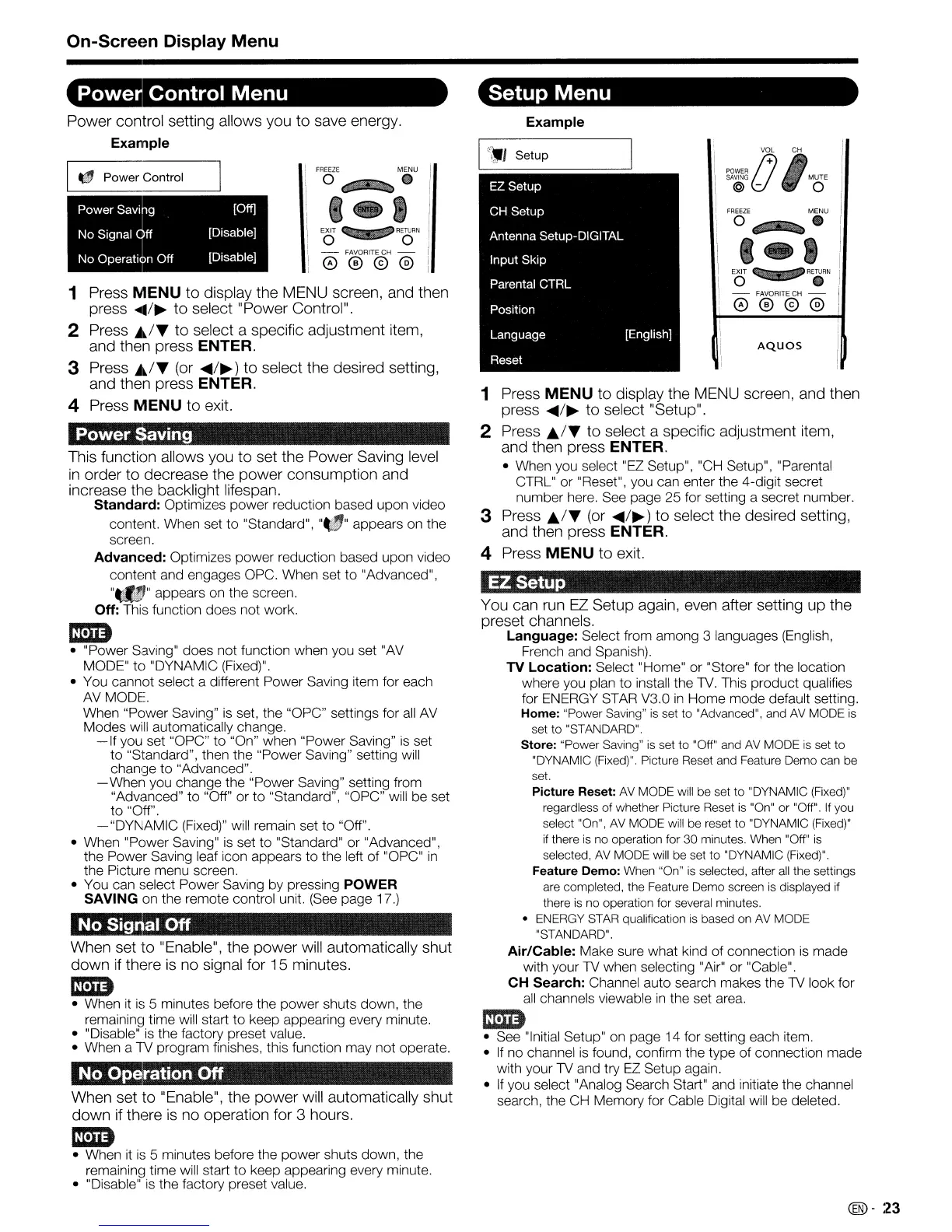
Power control setting allows you to save energy.
Example
AQUOS
EXIT q 9
RETURN
o •
- FAVORITE CH -
0®@@
FREEZE
MENU
O~
•
..
-..
,.,
(J
v~
,eH
POWER
SAVING
MUTE
@ - 0
[English]
etup
Example
EZ
Setup
CH
Setup
Antenna Setup-DIGITAL
Input
Skip
Parental CTRL
Position
Language
Reset
You can
run
EZ
Setup again, even after setting up the
preset channels.
Language:
Select from among 3 languages (English,
French and Spanish).
TV
Location:
Select "Home" or "Store" for the location
where you plan to install the
TV.
This product qualifies
for ENERGY STAR V3.0
in
Home mode default setting.
Home:
"Power Saving"
is
set to "Advanced", and AV MODE
is
set
to
"STANDARD".
Store:
"Power Saving" is set
to
"Off" and
AV
MODE is set
to
"DYNAMIC (Fixed)". Picture Reset and Feature Demo can be
set.
Picture
Reset:
AV
MODE will be set to "DYNAMIC (Fixed)"
regardless
of
whether Picture Reset
is
"On" or "Off".
If
you
select "On", AV MODE will be reset
to
"DYNAMIC (Fixed)"
if
there is no operation for 30 minutes. When "Off" is
selected,
AV
MODE will
be
set
to
"DYNAMIC (Fixed)".
Feature
Demo:
When "On"
is
selected, after
all
the settings
are completed, the Feature Demo screen is displayed if
there is no operation for several minutes.
• ENERGY STAR qualification
is
based on
AV
MODE
"STANDARD".
Air/Cable:
Make sure what kind of connection
is
made
with your TV when selecting "Air" or "Cable".
CH
Search:
Channel auto search makes the
TV
look for
all
channels viewable
in
the set area.
em
• See "Initial Setup"
on
page 14 for setting each item.
•
If
no channel
is
found, confirm the type of connection made
with your
TV
and try
EZ
Setup again.
•
If
you select "Analog Search Start" and initiate the channel
search, the
CH
Memory for Cable Digital will be deleted.
EZSetup
1 Press
MENU
to display the MENU screen, and then
press
....
/~
to select "Setup".
2 Press
A/~
to select a specific adjustment item,
and then press ENTER.
• When you select "EZ Setup", "CH Setup", "Parental
CTRL" or "Reset", you can enter the 4-digit secret
number here. See page 25 for setting a secret number.
3 Press
./~
(or
....
/~)
to select the desired setting,
and then press ENTER.
4 Press
MENU
to exit.
EXIT q- 9
RETURN
o 0
- FAVORITE CH -
0®@@
FREEZE
MENU
O~.
'-I
aving
g [Off]
ff [Disable]
n
Off
[Disable]
ration
Off
1 Press
MENU
to display the MENU screen, and then
press
....
/~
to select "Power Control".
2 Press
~~/~
to select a specific adjustment item,
and then press ENTER.
3 Press
~~/~
(or
....
/~)
to select the desired setting,
and then press ENTER.
4 Press
MENU
to exit.
~
This function allows you to set the Power Saving
level
in
order to decrease the power consumption and
increase the backlight lifespan.
Standard:
Optimizes power reduction based upon video
content. When set to "Standard",
"",,
appears on the
screen.
Advanced:
Optimizes power reduction based upon video
content and engages OPC. When set to "Advanced",
"~'"
appears on the screen.
Off:
This function does not work.
IDD
• "Power Saving" does not function when you set
"AV
MODE"
to
"DYNAMIC (Fixed)".
• You cannot select a different Power Saving item for each
AVMODE.
When "Power Saving"
is
set, the "OPC" settings for
all
AV
Modes will automatically change.
-If
you set "OPC" to "On" when "Power Saving"
is
set
to "Standard", then the "Power Saving" setting will
chanl::je
to
"Advanced".
- When you change the "Power Saving" setting from
"Advanced"
to
"Off" or
to
"Standard", "OPC" will be set
to "Off".
-"DYt\IAMIC
(Fixed)" will remain set to "Off".
• When "Power Saving"
is
set to "Standard" or "Advanced",
the Power Saving leaf icon appears to the left of "OPC"
in
the Picture menu screen.
• You can select Power Saving by pressing POWER
SAVING on the remote control unit.
(See
page 17.)
1mImm·
•
When set to "Enable". the power
will
automatically shut
down
if
there
is
no signal for 15 minutes.
IDD
• When
it
is
5 minutes before the power shuts down, the
remainin~1
time will start to keep appearing every minute.
• "Disable"
is
the factory preset value.
• When a
1V
program finishes, this function may not operate.
mIi1m
When set to "Enable", the power
will
automatically shut
down
if
there
is
no operation for 3 hours.
IDD
• When
it
is
5 minutes before the power shuts down, the
remainin~l
time will start to keep appearing every minute.
• "Disable"
is
the factory preset value.
I "
Power
Control
•
•••
. .
...
.......
4










 To Next Page