On-Screen Display Menu
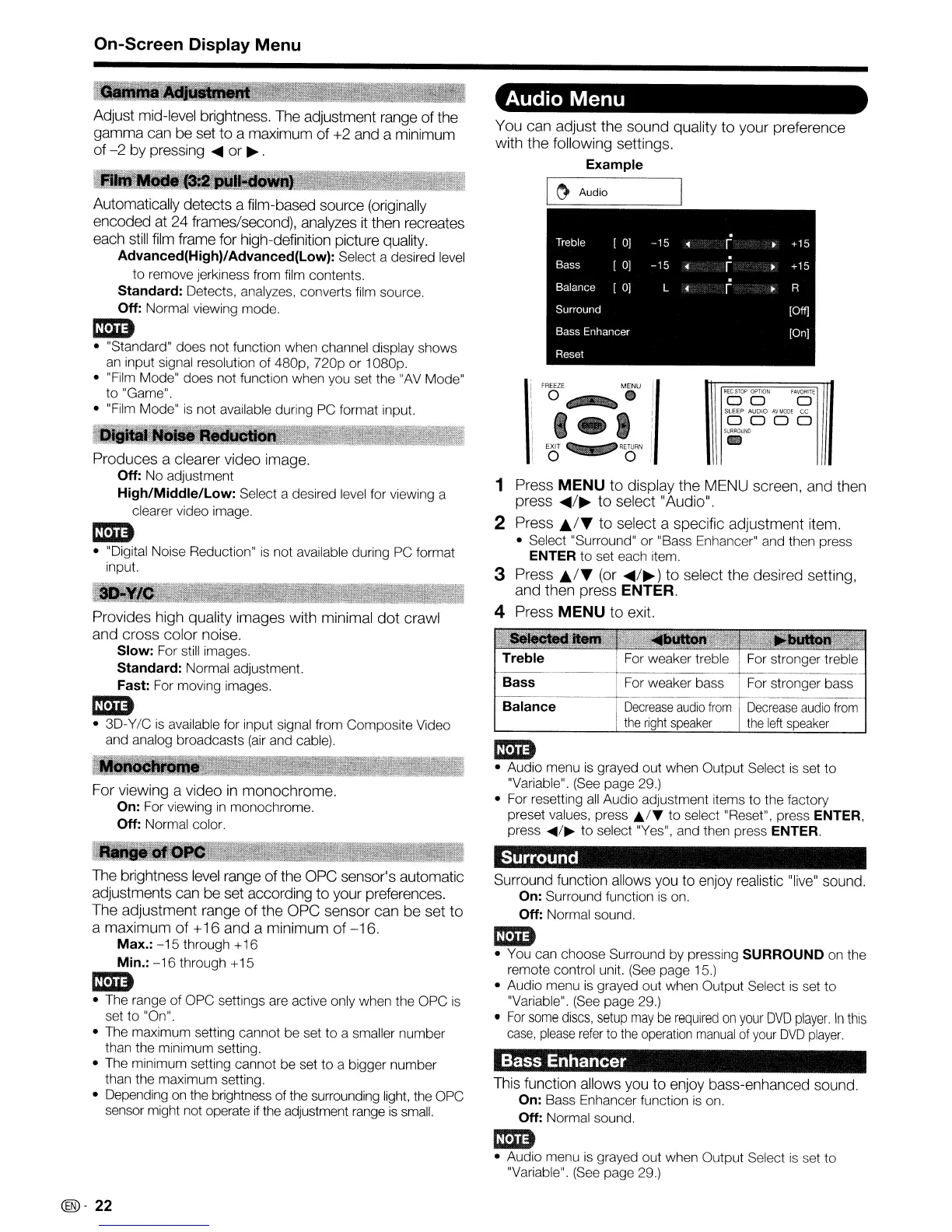
Audio Menu
Decrease
audio
from
the
left
speaker
For stronger bass
For stronger treble
Decrease
audio
from
the
right
speaker
For weaker bass
For weaker treble
.
Treble
[
OJ
-15
['"
+15
Bass
[
OJ
-15
['"
•
+15
.
Balance [
0]
L
['"
R
Surround
[Off]
Bass Enhancer
[On]
Reset
Balance
Treble
Bass
I
~
Audio
1 Press
MENU
to display the MENU screen, and then
press
....
/~
to
select "Audio".
2 Press
..
/~
to
select a specific adjustment item.
• Select "Surround" or "Bass Enhancer" and then press
ENTER to set each item.
3 Press
..
/~
(or
....
/~)
to
select the desired setting,
and then press
ENTER.
4 Press
MENU
to
exit.
Im1D
• Audio menu
is
grayed out when Output Select
is
set to
"Variable". (See page 29.)
• For resetting
all
Audio adjustment items to the factory
preset values, press
It,f'f
to select "Reset". press ENTER,
press
....
/~
to
select "Yes", and then press ENTER.
You can adjust the sound quality
to
your preference
with the following settings.
Example
Adjust mid-level brightness. The adjustment range of the
gamma can be set to a maximum of +2 and a minimum
of
-2
by pressing
....
or
~
.
For viewing a video
in
monochrome.
On:
For viewing
in
monochrome.
Off: Normal color.
Provides high quality images with minimal
dot
crawl
and cross color noise.
Slow: For still images.
Standard: Normal adjustment.
Fast: For moving images.
Im1D
•
3D-Y/C
is
available for input signal from Composite Video
and analog broadcasts
(air
and cable).
~
Produces a clearer video image.
Off: No adjustment
High/Middle/Low: Select a desired level for viewing a
clearer video image.
Im1D
• "Digital Noise Reduction"
is
not available during PC format
input.
Automatically detects a film-based source (originally
encoded at 24 frames/second), analyzes
it
then recreates
each
still
film frame for high-definition picture quality.
Advanced(High)/Advanced(Low): Select a desired level
to remove jerkiness from film contents.
Standard: Detects, analyzes, converts film source.
Off: Normal viewing mode.
Im1D
• "Standard" does not function when channel display shows
an
input signal resolution
of
480p,
nop
or 1080p.
• "Film Mode" does not function when you set the "AV Mode"
to "Game".
• "Film Mode"
is
not available during PC format input.
Surround
The brightness
level
range of the OPC sensor's automatic
adjustments can be set according
to
your preferences.
The adjustment range
of
the OPC sensor can be set
to
a maximum
of
+16 and a minimum of
-16.
Max.:
-15
through + 16
Min.:
-16
through +15
Im1D
• The range of OPC settings are active only when the OPC
is
set to "On".
• The maximum setting cannot be set to a smaller number
than the minimum setting.
• The minimum setting cannot be set to a bigger number
than the maximum setting.
• Depending on the brightness of the surrounding light, the OPC
sensor might not operate
if
the adjustment range
is
small.
Surround function allows you to enjoy realistic "live" sound.
On:
Surround function
is
on.
Off: Normal sound.
Im1D
• You can choose Surround by pressing SURROUND on the
remote control unit. (See page 15.)
• Audio menu
is
grayed out when Output Select
is
set to
"Variable". (See page 29.)
•
For
some
discs,
setup
may
be
required
on
your
DVD
player.
In
this
case,
please
refer
to
the
operation
manual
of
your
DVD
player.
Bass Enhancer
This function allows you to enjoy bass-enhanced sound.
On:
Bass Enhancer function
is
on.
Off: Normal sound.
Im1D
• Audio menu
is
grayed out when Output Select
is
set
to
"Variable". (See page 29.)
(@-
22










 To Next Page