Direct Button Operation
VIEW MODE
You can select the screen size.
1 Press VIEW MODE.
• The View Mode menu displays.
• The menu lists the View Mode options selectable for the type of video signal currently being received.
2 Press VIEW
MODE
or
1;,..1""
while the View Mode menu
is
displayed to select a desired item on the menu.
• You can sequentially select a View Mode that has its
own
aspect ratio.
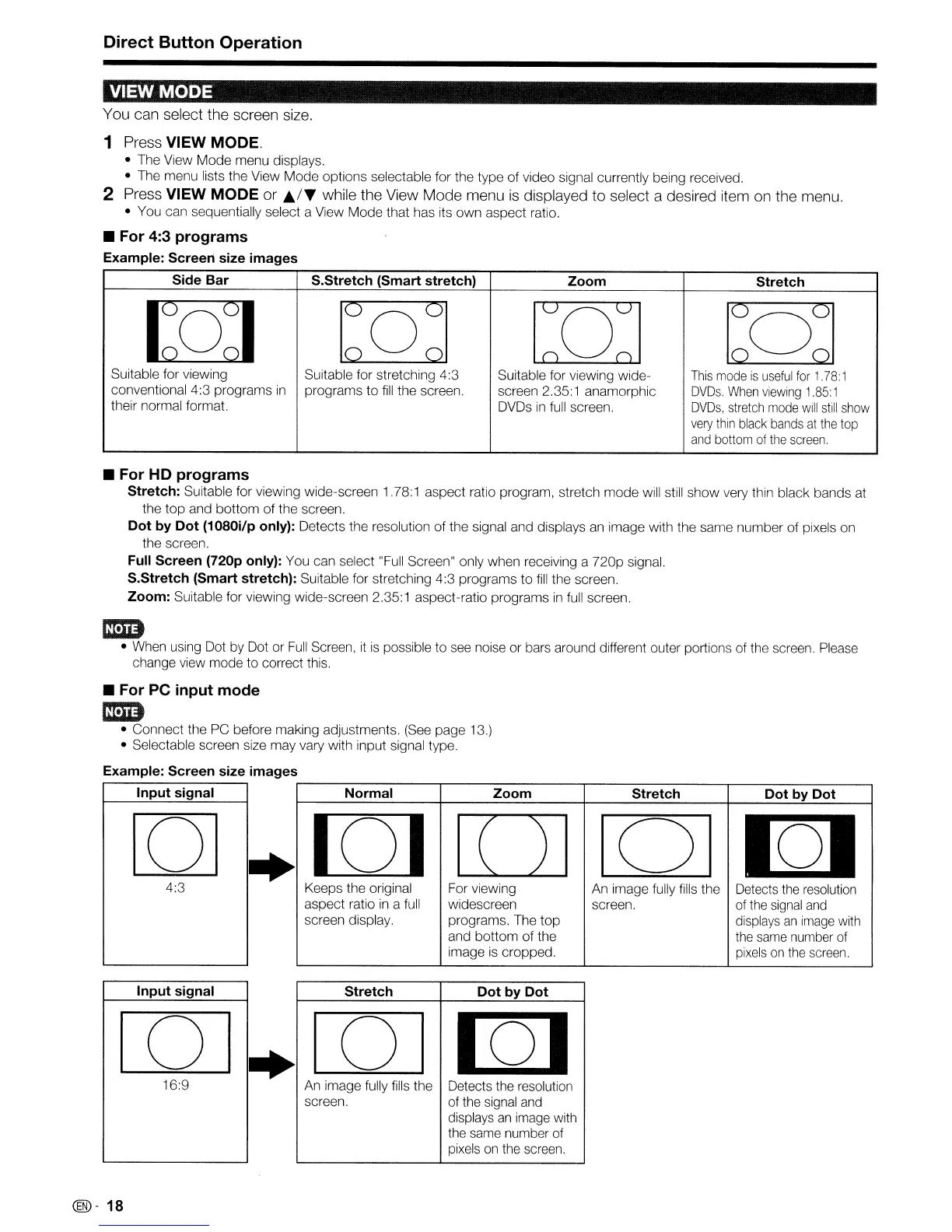
• For 4:3 programs
Example: Screen size images
Side Bar S.Stretch (Smart stretch)
Zoom
Stretch
IMI
bQ)
LITI
1:0:1
Suitable for viewing Suitable for stretching 4:3
Suitable for viewing wide-
This
mode
is
useful
for
1.781
conventional 4:3 programs
in
programs
to
fill
the screen. screen 2.35:1 anamorphic
DVDs.
When
viewing
1,851
their normal format.
DVDs
in
full screen.
DVDs,
stretch
mode
will
still
show
very
thin
black
bands
at
the
top
and
bottom
of
the
screen,
• For
HD
programs
Stretch: Suitable for viewing wide-screen 1.78:1 aspect ratio program, stretch
mode
will still show very thin black bands at
the
top
and
bottom
of the screen.
Dot by Dot (1080i/p only): Detects the resolution
of
the signal and displays an image with the same number
of
pixels on
the screen.
Full Screen (720p only): You can select "Full Screen" only when receiving a
nop
signal.
S.Stretch (Smart stretch): Suitable for stretching 4:3 programs
to
fill
the screen.
Zoom: Suitable for viewing wide-screen 2.35:1 aspect-ratio programs
in
full screen.
Normal Zoom Stretch Dot by Dot
IIII
[]]
[0]
IQI
Keeps the original For viewing An image fully fills the
Detects the resolution
aspect ratio
in
a full
widescreen screen. of the
signal
and
screen display. programs. The
top
displays
an
image with
and
bottom
of
the
the
same
number of
image
is
cropped.
pixels
on
the screen.
4:3
mm
• When using Dot by Dot or
Full
Screen, it
is
possible to see noise or bars around different outer portions of the screen. Please
change view mode to correct this.
• For PC input mode
mm
• Connect the PC before making adjustments. (See page 13.)
• Selectable screen size may vary with input signal type.
Example: Screen size images
Input signal
Input signal
16:9
Stretch
Dot
by Dot
[IT]
[QJ
An image fully fills the Detects the resolution
screen.
of the signal and
displays
an
image with
the same number of
pixels
on
the screen.
@-
18










 To Next Page