QUICK
REFERENCE
QUICK
INSTALLATION
TIPS
Using the
Remote
Control Unit
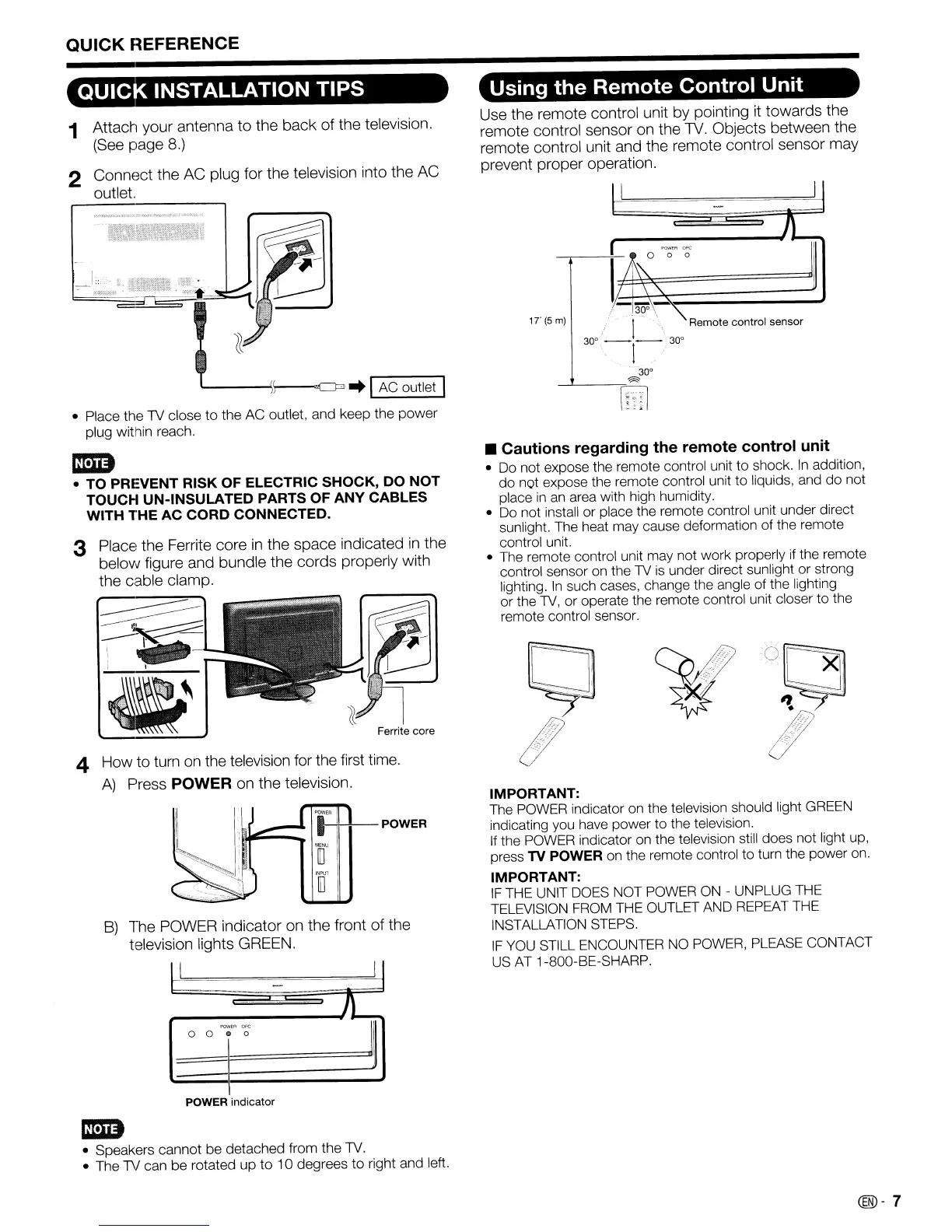
1 Attach your antenna to the back of the television.
(See page
8.)
2 Connect the AC plug for the television into the AC
outlet.
Use the remote control unit by pointing
it
towards the
remote control sensor on the 1V. Objects between the
remote control unit and the remote control sensor may
prevent proper operation.
II
1
17
\
'\.
J
-30~\~"",
I
'.
Remote control sensor
30°
-,
-1-,.
30°
30°
---'----=~
f8l
~-----ll-
0 0 0
I
/~'"
IT(5m)
• Place the
lV
close to the AC outlet, and keep the
power
plug within reach.
1""
POWER
"[I
110
IMPORTANT:
The POWER indicator on the television should light GREEN
indicating you have power to the television.
If the POWER indicator on the television still does not light up,
press
TV POWER on the remote control to turn the power on.
IMPORTANT:
IF
THE UNIT DOES NOT POWER
ON
- UNPLUG THE
TELEVISION FROM THE OUTLET AND REPEAT THE
INSTALLATION STEPS.
IF
YOU STILL ENCOUNTER NO POWER, PLEASE CONTACT
US
AT
1-800-BE-SHARP.
• Cautions regarding the remote control unit
• Do not expose the remote control unit
to
shock.
In
addition,
do not expose the remote control unit
to
liquids, and
do
not
place
in
an area with high humidity.
• Do not install or place the remote control unit under direct
sunlight. The heat may cause deformation of the remote
control unit.
• The remote control unit may not work properly if the remote
control sensor on the
lV
is
under direct sunlight or strong
lighting.
In
such cases, change the angle of the lighting
or the
lV,
or operate the remote control unit closer to the
remote control sensor.
J~
)1
Ferrite core
B)
The POWER indicator on the front of the
television lights GREEN.
4 How to turn
on
the television for the first time.
A)
Press POWER on the television.
mm
• TO PREVENT RISK OF ELECTRIC SHOCK, DO
NOT
TOUCH UN-INSULATED PARTS OF ANY CABLES
WITH
THE
AC
CORD
CONNECTED.
3 Place the Ferrite core
in
the space indicated
in
the
below figure and bundle the cords properly with
the cable clamp.
f'QWE<lOf'(;
Jl
o 0
0 0
I
POWER indicator
mm
• Speakers cannot be detached from the
lV.
• The
lV
can be rotated up
to
10 degrees
to
right and left.
(®-
7










 To Next Page