On-Screen Display Menu
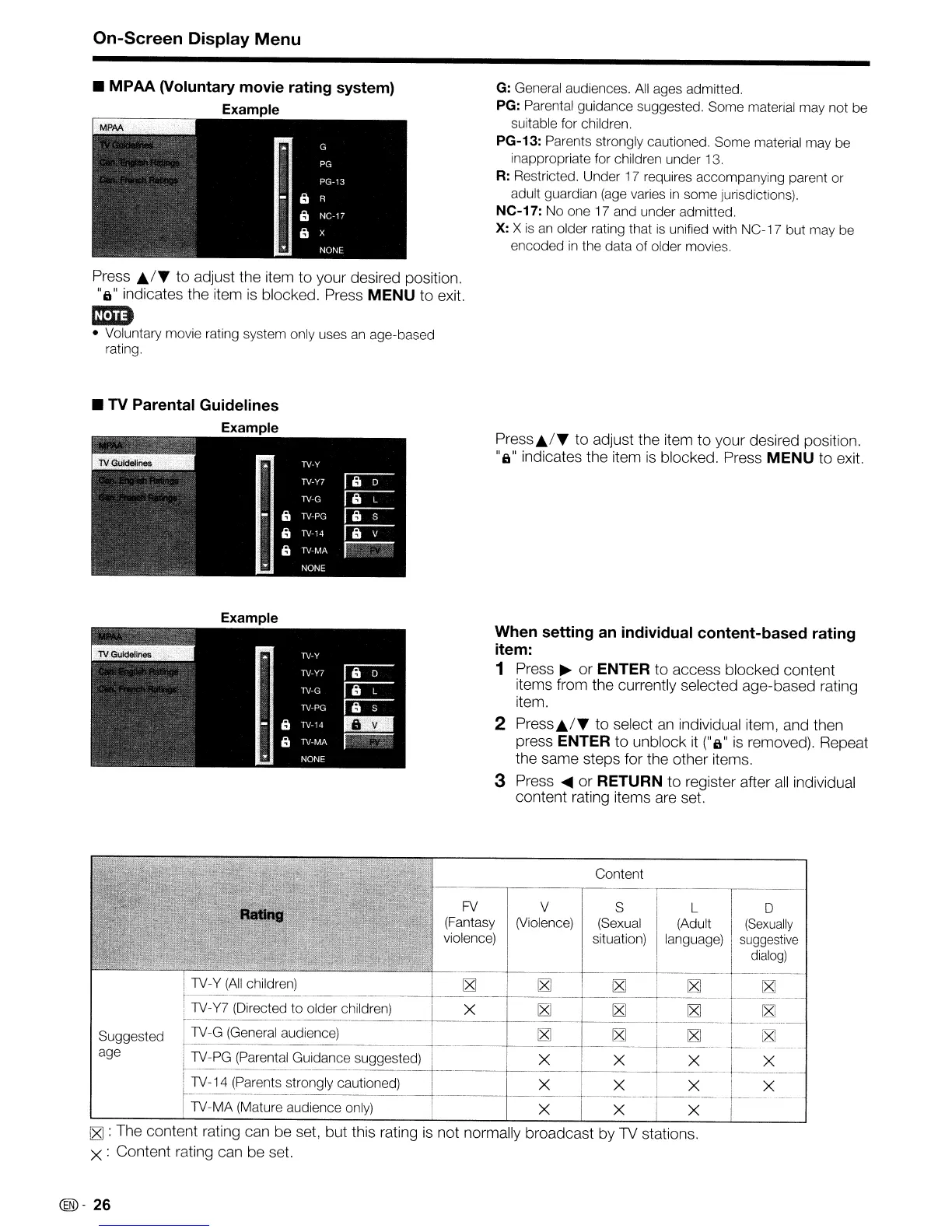
• MPAA (Voluntary movie rating system)
Example
Press
Jtf'f
to adjust the item to your desired position.
"6" indicates the item
is
blocked. Press
MENU
to exit.
mm
• Voluntary movie rating system only uses
an
age-based
rating.
• TV Parental Guidelines
Example
Example
G:
General audiences.
All
ages admitted.
PG:
Parental guidance suggested. Some material may not be
suitable for children.
PG-13: Parents strongly cautioned. Some material may be
inappropriate for children under 13.
R:
Restricted. Under 17 requires accompanying parent or
adult guardian (age varies
in
some jurisdictions).
NC-17: No one 17 and under admitted.
X:
X
is
an older rating that
is
unified with NC-1 7 but may be
encoded
in
the data of older movies.
Press./"
to adjust the item to your desired position.
"6"
indicates the item
is
blocked. Press
MENU
to exit.
When setting an individual content-based rating
item:
1 Press
~
or
ENTER
to access blocked content
items from the currently selected age-based rating
item.
2
Press./"
to select
an
individual item, and then
press
ENTER
to unblock it
("6"
is
removed). Repeat
the same steps for the other items.
3 Press
....
or
RETURN
to register after
all
individual
content rating items are set.
.-,-----...,--~--
Content
FV
(Fantasy
violence)
V
(Violence)
S
(Sexual
situation)
L
(Adult
language)
o
(Sexually
suggestive
dialog)
Suggested
age
11V-Y
(All
children)
~
~ ~ ~ ~
r------
-~~-
----.
~-~-.
j 1V-Y7 (Directed to older children) X
~ ~
~ ~
._-----~---
--_
..
_--------
-------------
1V-G (General audience)
~ ~ ~
~
, 1V-PG (Parental Guidance suggested) X X
--X--
_-L~x
---
! 1V-14 (Parents strongly cautioned) X X X I X
------
1V-MA
(Mature audience only) X X X
~
: The content rating can be set. but this rating
is
not normally broadcast by
1V
stations.
X : Content rating can be set.
@)-
26










 To Next Page