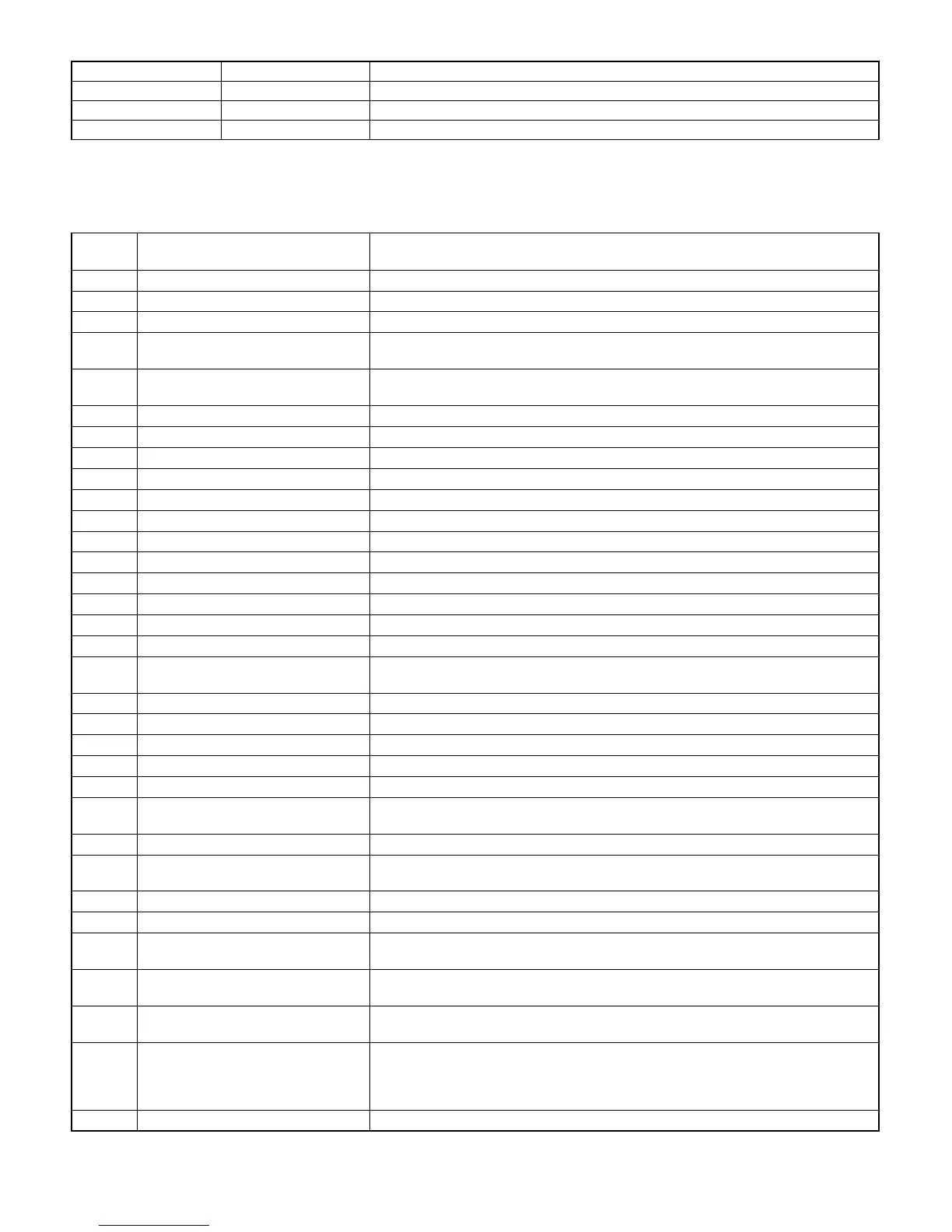
Display codes other than trouble
Trouble codes Sub code Operation
CH — Door open/DV unit uninstalled
PC — Personal counter uninstalled/auditor code input waiting
PF — Copy inhibit command is received from the host when installing PC/Modem.
(Key operator program)
The list below shows all key operator programs. These programs can be used only when the key operator code in inputted at the beginning.
Program
Code No.
Program name Function
P10 Auditing Mode Enables or disables the basic auditing mode, which controls access to copier.
P11 Number of Copies per Account Displays the total number of copies made against account numbers.
P13 Resetting Account Resets all audit accounts or selectively resets individual accounts.
P14 Account Number Control Registers accounts, deletes accounts, changes an account number, or displays all
registered account numbers.
P16 Account Limit Setting Sets the maximum number of copies which can be made against a registered account
number.
P18 Account Number Security Guards against trial and error entering of audit account numbers.
P19 Key Operator Code Number Change Changes the key operator code number.
P20 Auto Exposure Adjust Lightens or darkens copies in the automatic exposure mode.
P21 Auto Power Shut-off Timer Sets a time interval after which the copier automatically turns off.
P22 Toner Save Mode Reduces toner consumption.
P23 Auto Clear Setting Sets a time interval after which the copier returns to the initial settings.
P24 Add or Change Extra Preset Ratios Adds or changes reduction and enlargement preset copy ratios.
P25 Setting a Maximum Number of Copies Sets the maximum number of copies that can be selected.
P26 Initial Margin Shift Setting Sets the initial margin shift values.
P27 Erase Width Adjustment Sets the amount of the erase area.
P28 Initial Status Setting Sets the copier’s initial settings in the ready condition.
P29 Total Copy Count Recalls the total copy counts of the copier, document feeder, duplex module, and stapler.
P31 Preheat Mode Setting Sets the time that elapses before the copier enters the preheat mode after copying is
completed.
P42 Right/Left Shift Direction Selection Determines whether shift direction change is to be allowed.
P43 Erase Mode Initial Setting Selects the erase mode’s initial setting.
P45 Message Time Setting Sets the length of time that messages are displayed.
P46 Require Key Operator Code Prevents the copier from being started by people other than key operator.
P47 Stream Feeding Mode Enables the stream feeding mode for copying from an optional document feeder.
P70 Disabling of Auto Paper Selection Prevents automatic paper selection when using the ORIGINAL SIZE ENTER key or
copying from an optional document feeder.
P71 Disabling of Auto Tray Switching Prevents automatic switching between the paper trays.
P72 Prohibiting of Manual Feed Tray in
Duplex Copy
Prohibits the use of the manual feed tray during duplex copying. (Duplex copying can be
performed when an optional duplex module is installed.)
P73 Disabling Deletion of Job Programs Prevents stored programs from being replaced or deleted.
P74 Disabling of Document Feeder Prevents the use of an optional document feeder when it malfunctions.
P75 Disabling of Duplex Copying Temporarily prevents the optional duplex system from operating when it malfunctions.
Allows the use of the copier but not the duplex system.
P76 Disabling of Stapler Prevents damage to the stapler while awaiting repair service. (Staple sorters are
optional.)
P77 Disabling of Covers Prevents the selection of COVERS mode.
(The COVERS mode can be used when an optional document feeder is installed.)
P83 Disabling of PC/Modem Access Provides or prevents access to key operator programs through a PC/modem without key
operator code entry.
(Remote access to key operator programs can be performed only when a computer or
other equipment is connected to the copier directly or through a telephone line.)
P90 Display the List of All P Codes Sequentially displays all available programs.
8 – 18











 To Next Page