* In case of Fig. 1
Move the front cabinet to the direction A, tighten the fixing screws
a (2 pcs.) and b (2 pcs.) in this order, and make a copy again to
check that there is no center dislocation.
* In case of Fig. 2
Move the front cabinet to the direction B, tighten the fixing screws
a (2 pcs.) and b (2 pcs.) in this order, and make a copy again to
check that there is no center dislocation.
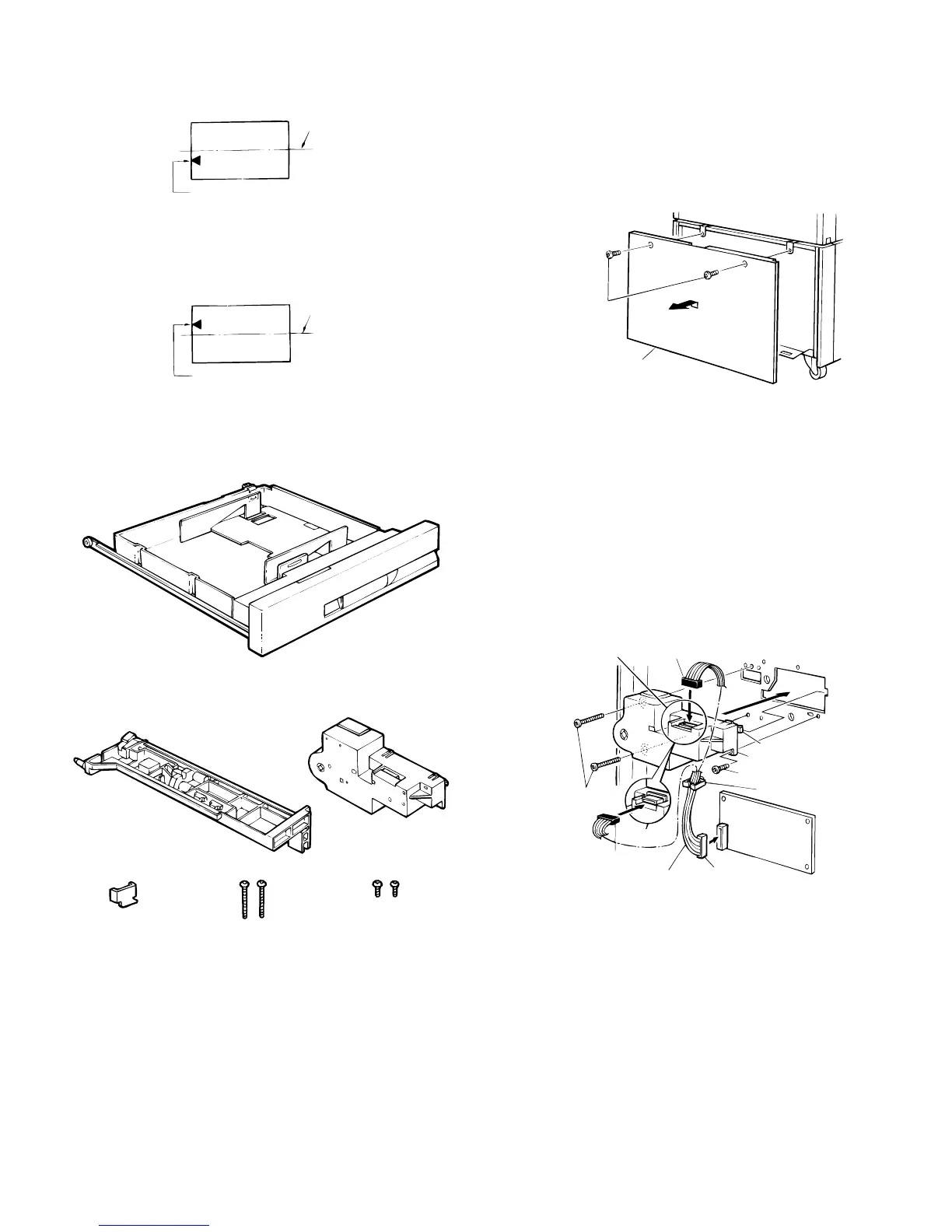
(8) SF-CM11
Be sure to unplug the copier and install the unit as
follows:
★ Procedures for installation on the SF-D20 or
SF-D21
1. Remove the rear cabinet panel from the desk.
Remove the rear cabinet panel by removing the four screws which
secure it to the desk.
2. Install the lift-up unit.
Latch the lift-up unit hooks into the rear frame of the main unit and fit
them into the two positioning bosses, then use two type-A mounting
screws and one type-B mounting screw to secure the lift-up unit.
Connect the black relay harness connector (comes included with SF-
CM11) to the lift-up unit, then connect the white connector to the
circuit board.
Slip the relay connector into the cord clip for storage.
[Note]
There are type A and type B lift-up units.
If you have the type A unit, connect the black connector for the relay
harness before installing the lift-up unit to the desk.
Fig.1
Image center (image of first copy)
Paper center line
Fig.2
Image center (image of first copy)
Paper center line
Paper Cassette
Included parts
Lift-up unit: 1
Right stopper: 1
Mounting screws A
(M4 x 30): 2
Mounting screws B
(M4 x 10): 2
Paper feed unit: 1
Mounting screws
Rear cabinet panel
Mounting
screw A
Lift-up unit
Type A
Mounting screw B
Connector(black)
Type B
Connector(black)
Connector
(white)
Circuit board
Relay harness
Hook
Cord clip
5 – 30











 To Next Page