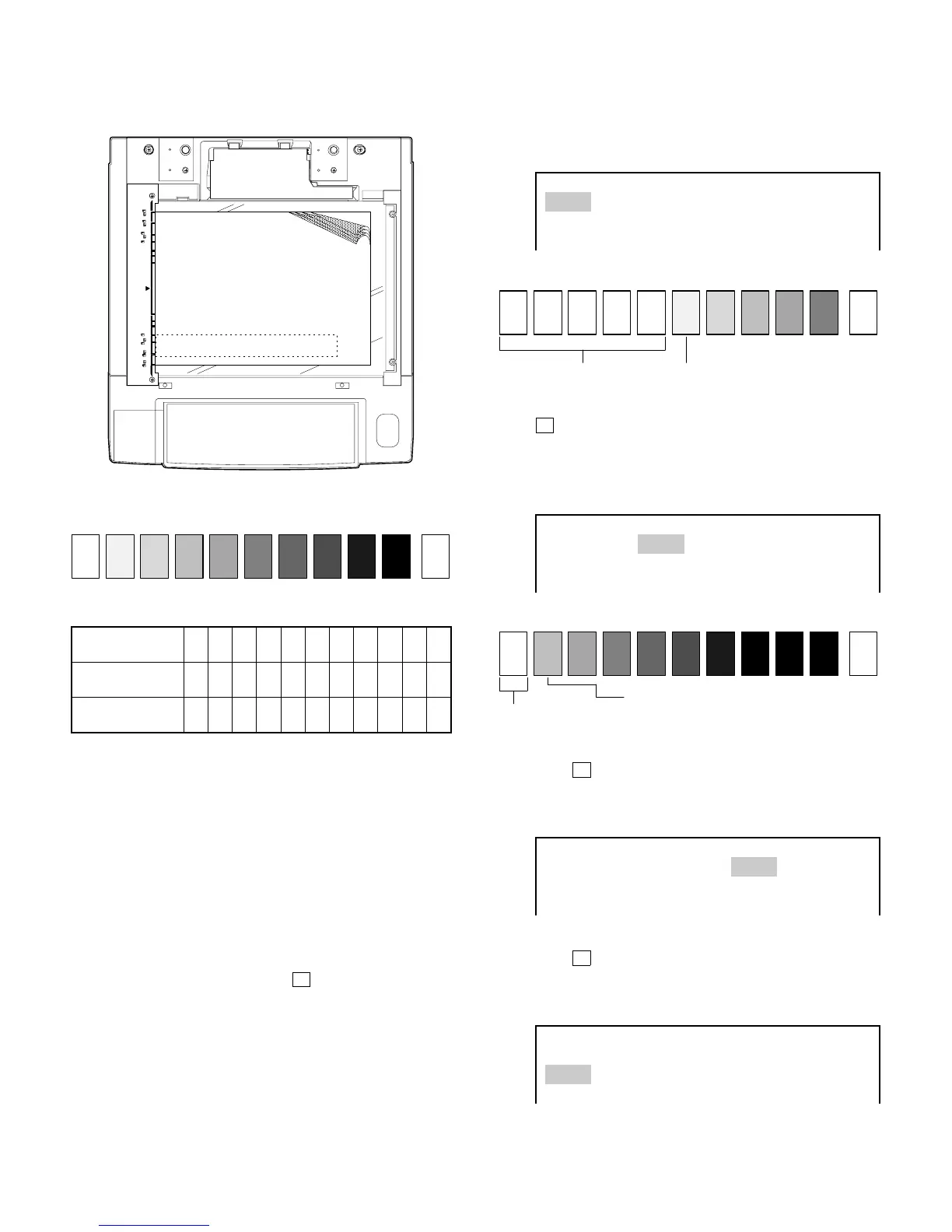
(5) Setting of test chart
1 Align four or five papers with at least 120 mm in width and ap-
prox.420 mm in length one upon another.
2 Set the test chart (UKOG-0162FCZZ) on exposure glass towards
machine front side as shown.
UKOG-0162FCZZ
DENSITY No.
12345678910W
UKOG-0089CSZZ
DENSITY No.
0.1 0.2 0.3 0.5 1.9 0
KODAK GRAY
SCALE
123419A
SHARP CORPORATION
MADE IN JAPAN
(6) Adjustment of copy density
A. Checking the developing bias output
Check that the output value is –300 V when the exposure is set to
"1" in the manual exposure mode. Perform Simulation 8-01 for
checking the developing bias.
B. Adjusting the density in manual exposure mode
1 Perform Simulation 46-01 for adjusting the copy density.
The exposure indicator of the operation panel shows "1" of the
manual copy mode.
2 Check that the cursor is on ME.1.
IF the cursor is not on ME.1, use ➡ message scroll key to
select ME.1.
3 Make a copy.
Check that the "6" of UKOG-0162FCZZ (or 0.5 of UGOG-
0089CSZZ) has slightly copied and "5"(0.3) is not copied.
<When light> Decrease the value shown on the copy quantity
indicator.
<When dark> Increase the value shown on the copy quantity
indicator.
* available values : 1-99
EXPOSURE LEVEL ADJUSTMENT
ME1: ME5: TS1: TS5:
PE1: PE5: AE1: AE5:
AE1(TS): AE5(TS):
3 When the copy density meets the above requirement, press
➡ key to highlight "ME5:".
4 Make a copy.
Check that the "2" of UKOG-0162FCZZ (or 0.2 of UGOG-
0089CSZZ) has slightly copied and "1"(0.1) is not copied.
<When light or dark> See 2).
EXPOSURE LEVEL ADJUSTMENT
ME1: ME5: TS1: TS5:
PE1: PE5: AE1: AE5:
AE1(TS): AE5(TS):
C. Adjusting the TSM mode
1 Press ➡ key to highlight "TS1:".
2 Perform adjustments of TS1 and TS5 similarly to ME1 and
ME5.
Procedure B: 2 ~ 4
EXPOSURE LEVEL ADJUSTMENT
ME1: ME5: TS1: TS5:
PE1: PE5: AE1: AE5:
AE1(TS): AE5(TS):
D. Adjusting the photo mode
1 Press ➡ key to highlight PE1.
2 Perform adjustments of PE1 and PE5 similarly to ME1 and
ME5.
Procedure B: 2 ~ 4
EXPOSURE LEVEL ADJUSTMENT
ME1: ME5: TS1: TS5:
PE1: PE5: AE1: AE5:
AE1(TS): AE5(TS):
UKOG-0162FCZZ
1 10
W
23456789
Not copied
Slightly copied
1 10
W
23456789
Copied
1 10
W
23456789
Not copied
7 – 19











 To Next Page