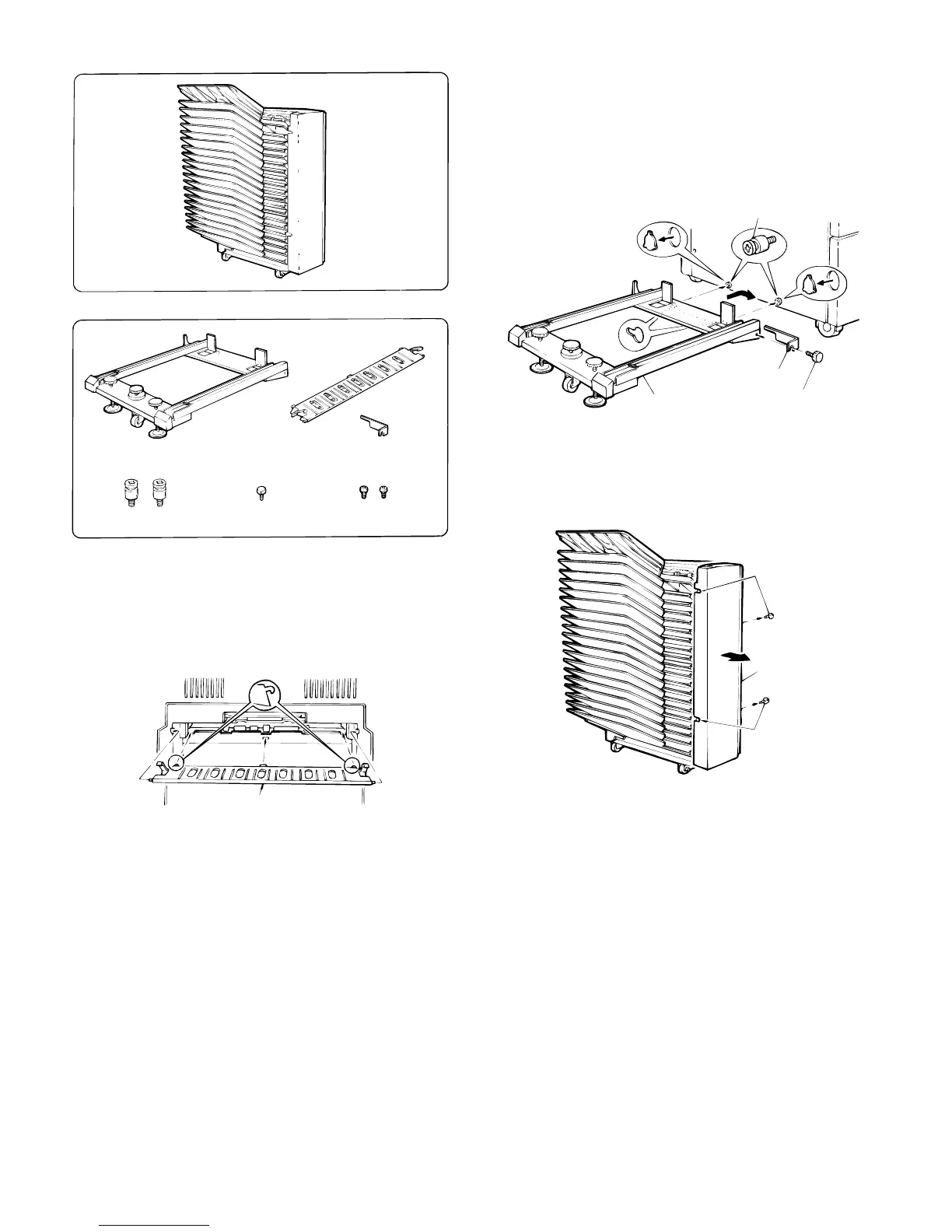
(4) SF-S15 (20-Bin Sorter)
Unplug the copier and follow the procedure below.
1. Install the support guide.
Hook the pawls (two locations) of the support guide to the inside of
the copier paper exit end to install the guide as shown in Fig.
2. Mount the sorter seat to the desk.
Remove the two cut-outs in the cabinet panel on the left side of the
desk.
Secure the two sorter seat mounting screws A to the desk.
Next, hook the sorter seat onto the two sorter seat mounting screws
A which were secured to the desk, and then use the one sorter seat
mounting screw B to secure the sorter seat mounting fixiture as
shown.
3. Remove the front panel of the sorter.
Loosen the four mounting screws in the front panel of the sorter and
remove the panel.
SF-S15
Parts list
Sorter seat
Support guide
Sorter seat mounting
fixture (1 pc.)
Sorter seat mounting
screws A (2 pcs.)
Sorter seat mounting
screws B (1 pc.)
Bracket mounting
screws B (2 pcs.)
Support guide
Cut-out
Cut-out
Desk
Sorter seat mounting
screws A
Sorter seat
Sorter seat mounting
fixture
Sorter seat mounting
screw B
Mounting
screws
Mounting
screws
Front panel
of sorter
5 – 19











 To Next Page