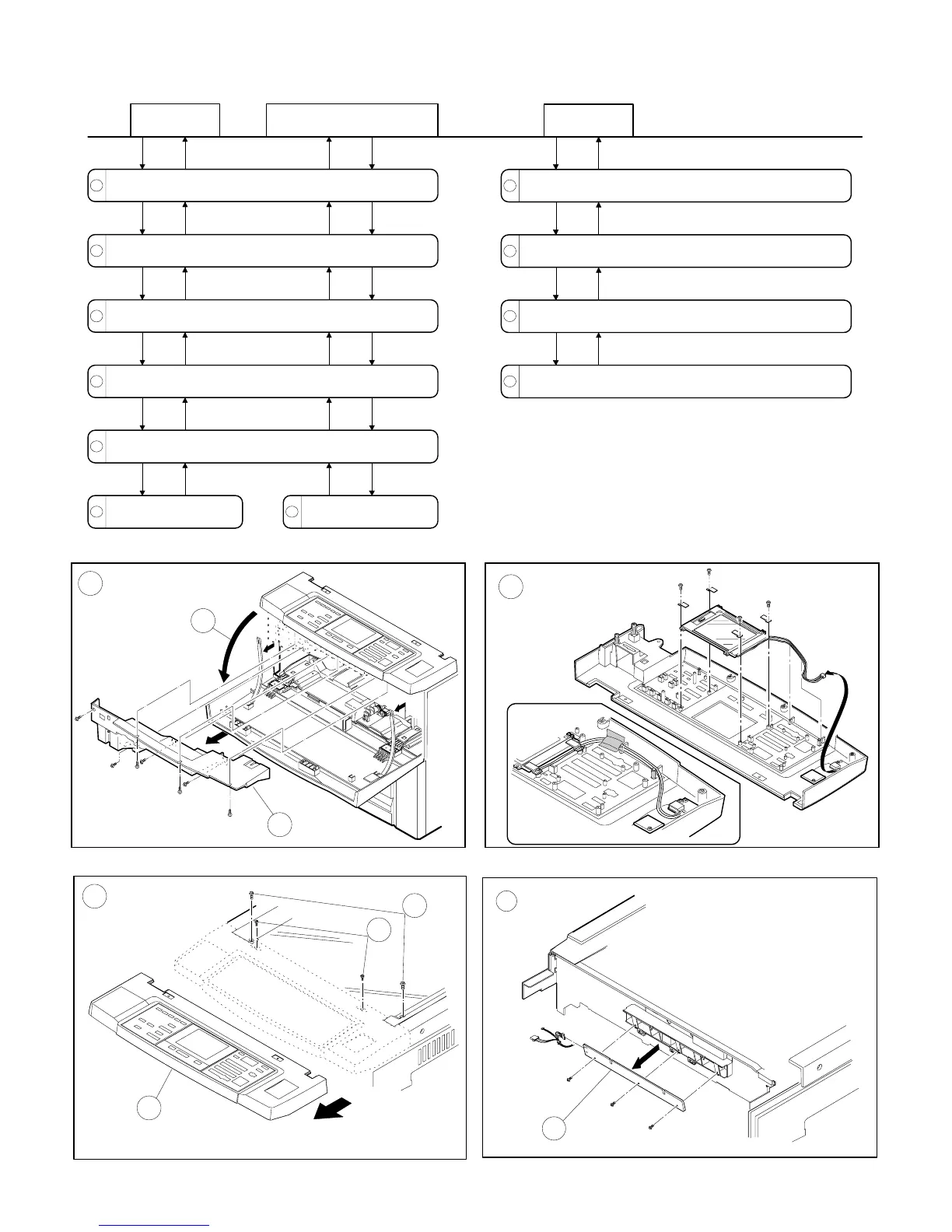
8. Operation panel unit and document
size sensor board (light receive side)
A
1
2
C
B
3
4
5
D
7
1
2
3
5
4
6
7
Operation
panel
Document size sensor
board light receive side
Open the front panel.
Remove the middle panel (5 screws).
Remove the glass holding plate and front frame side right
and left side screws (5 screws).
Remove the screws that hold the magnetic catch plate
(one each on two locations).
Remove the operation panel unit.
Remove the operation
panel from the operation panel
unit (15 screws, 6 connectors).
Remove the document
size sensor board ( screw).
8
9
10
11
LCD unit
Remove the LCD control PWB from the operation panel
unit. (3 screws, 1 connector)
Remove the LCD control PWB mounting angle from the
operation panel unit. (2 screws)
Remove the operation PWB from the operation panel unit.
(9 screws)
Remove the LCD unit. (4 screws, connector)
6 – 16











 To Next Page