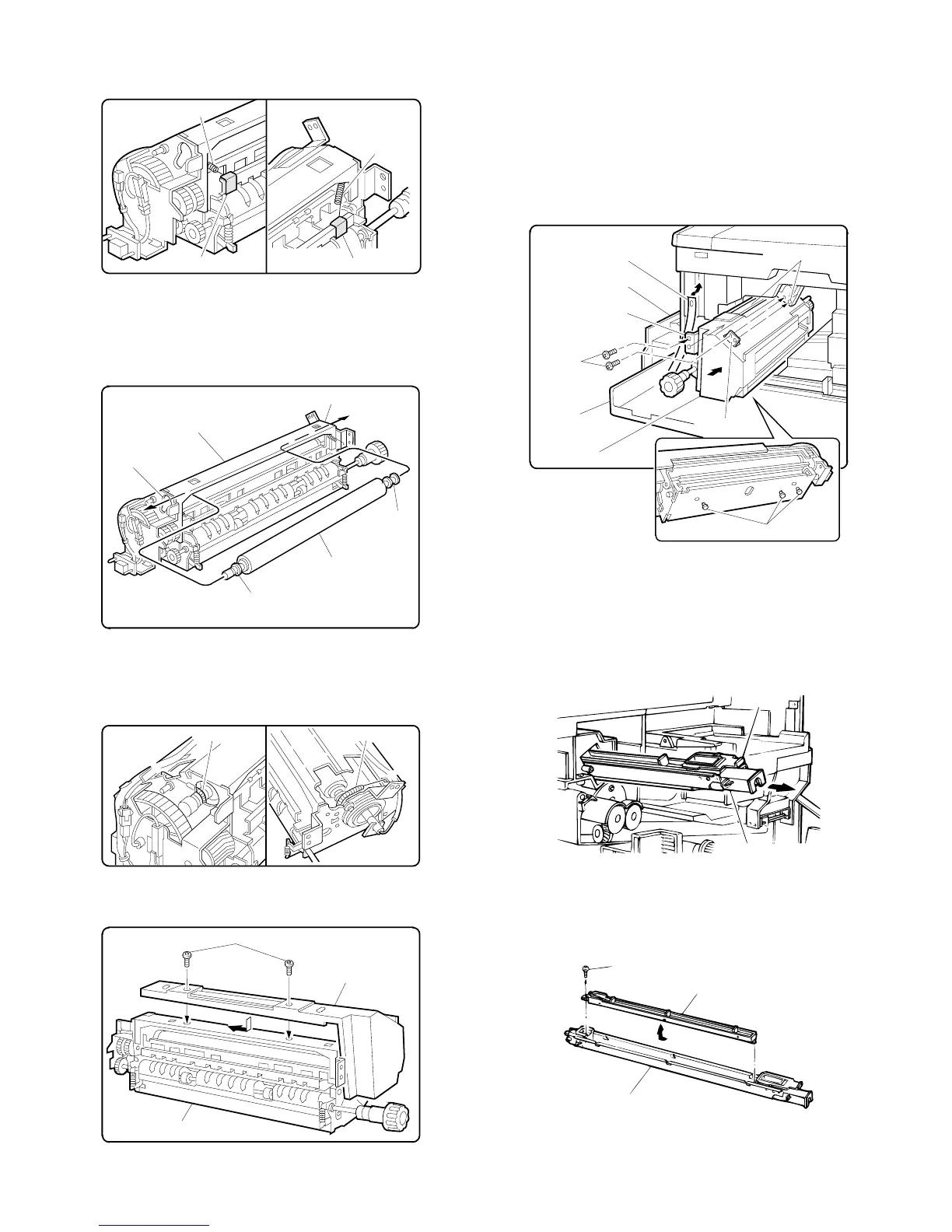
2 Remove the CL springs which are fixed to the front and the rear
side of the fusing unit with adhesive tape.
[Note] Slowly and surely remove the adhesive tape.
3 Pass the cleaning roller through the round hole at the back of the
fusing unit, then insert the cleaning roller into the round hole at the
front.
Then position the bearings at the front and the back of the clean-
ing roller.
4 Hang the Cl springs on the front and the rear frames of the fusing
unit. (Shown with arrow ←.)
Be sure to check that the CL springs are pressing the bearings as
shown in the figure.
5 Replace the fuser cover removed in Step 1, and fasten it with two
screws.
D. Installing the fusing unit
Insert the locator pin under the fuser unit into slot. Gently push fuser
unit all the way in.
Make sure now that the locator pins of the copier are firmly engaged
into two locator holes of the fuser unit mounting bracket.
Secure fuser unit with two screw removed in 2 of A, and close the
paper exit.
Replace the front panel band that removed in 1 of A.
Close the paper exit cover.
3. Cleaning corona units
A. Clean the main corona unit
1 Push down the hook of the main corona unit while removing the
main corona unit from the copier.
2 Unfasten the one screw holding the electrode on the back of the
main corona unit and remove the electrode.
Rear
side
CL spring
Front
side
CL spring
CL spring fixing tapeCL spring fixing tape
Fuser unit
Rear side round hole
Front side round hole
Busing
Cleaning roller
Busing
.
.
CL spring
CL spring
Front side
Rear side
Screws
Fuser cover
Fuser unit
Hand hold strap
Front panel band
Paper exit
Screws
Holding angle
Holding angle
Front panel
Fuser unit
Locator pins
Hook
Main corona unit
Screw
Electrode
Main corona unit
5 – 3











 To Next Page