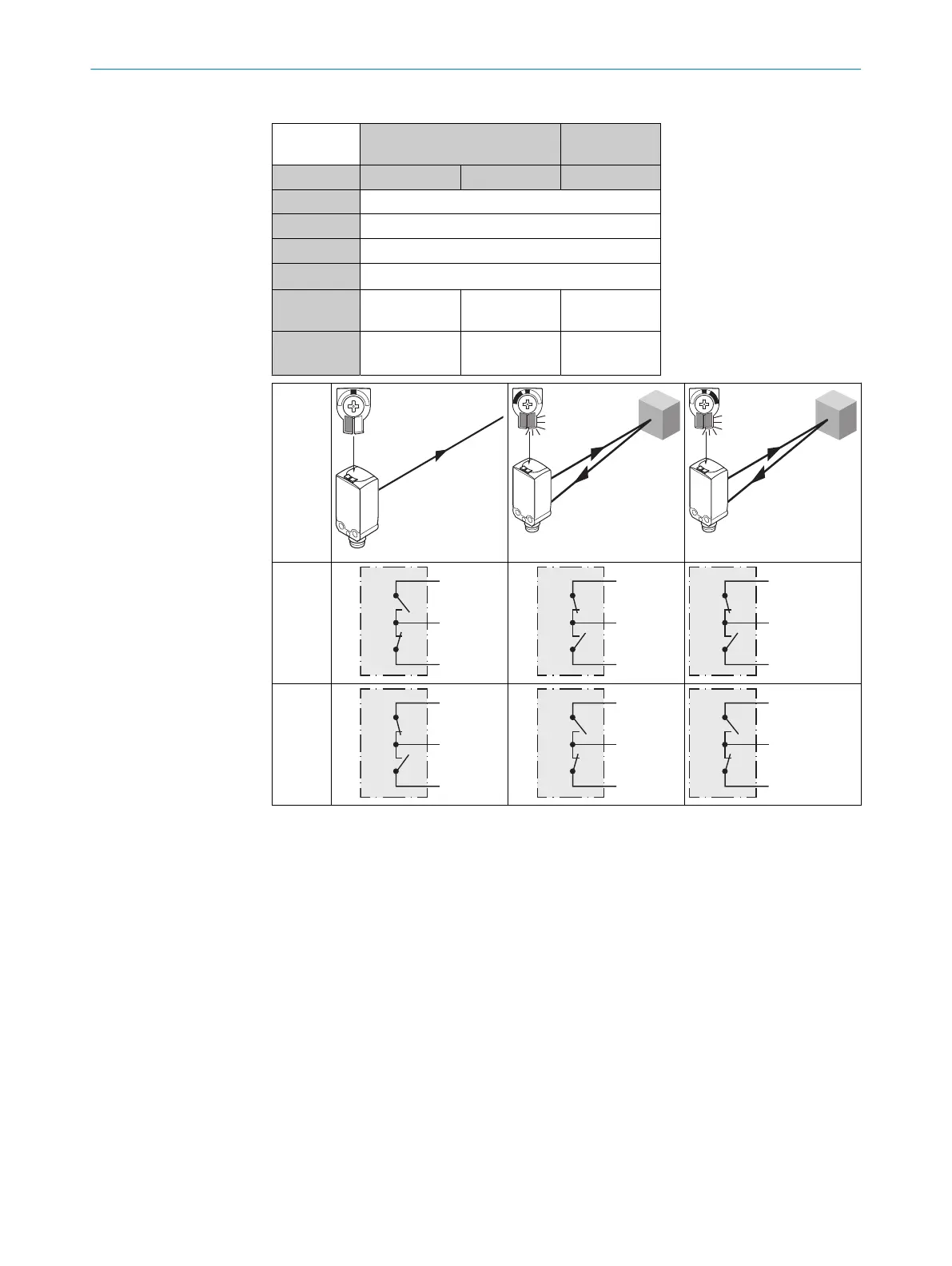
Table 2: DC
WTx4Fx- xx16xxxxA00 xx16xxxxA01-
A99
xx16D xx16R xx16x
1 = BN + (L+)
2 = WH MF
3 = BU - (M)
4 = BK Q
L1
/ C
Default: MF Q
L2
Q
L2
www.sick.com
8022709
Default:
Q
L1
/ C
Q
L1
Q
L1
www.sick.com
8022709
Q
L1
Q
L2
Q
L1/L2
Push-
pull
(≤
100 mA
)
Q
L1 / L2
Push-
pull
(≤
100 mA
)
7 Commissioning
7.1 Alignment
Alignment
Align the sensor with the object. Select the position so that the red emitted light beam
hits the center of the object. You must ensure that the optical opening (front screen) of
the sensor is completely clear [see figure 2].
COMMISSIONING 7
8025665 / 2020-11-13 | SICK
Subject to change without notice
7



 To Next Page