Configuration / diagnostics using remote mechanisms
6.3 Configuration using Web Based Management (WBM) and Command Line Interface (CLI)
SCALANCE X-200
202 Operating Instructions, 12/2011, A5E00349864-19
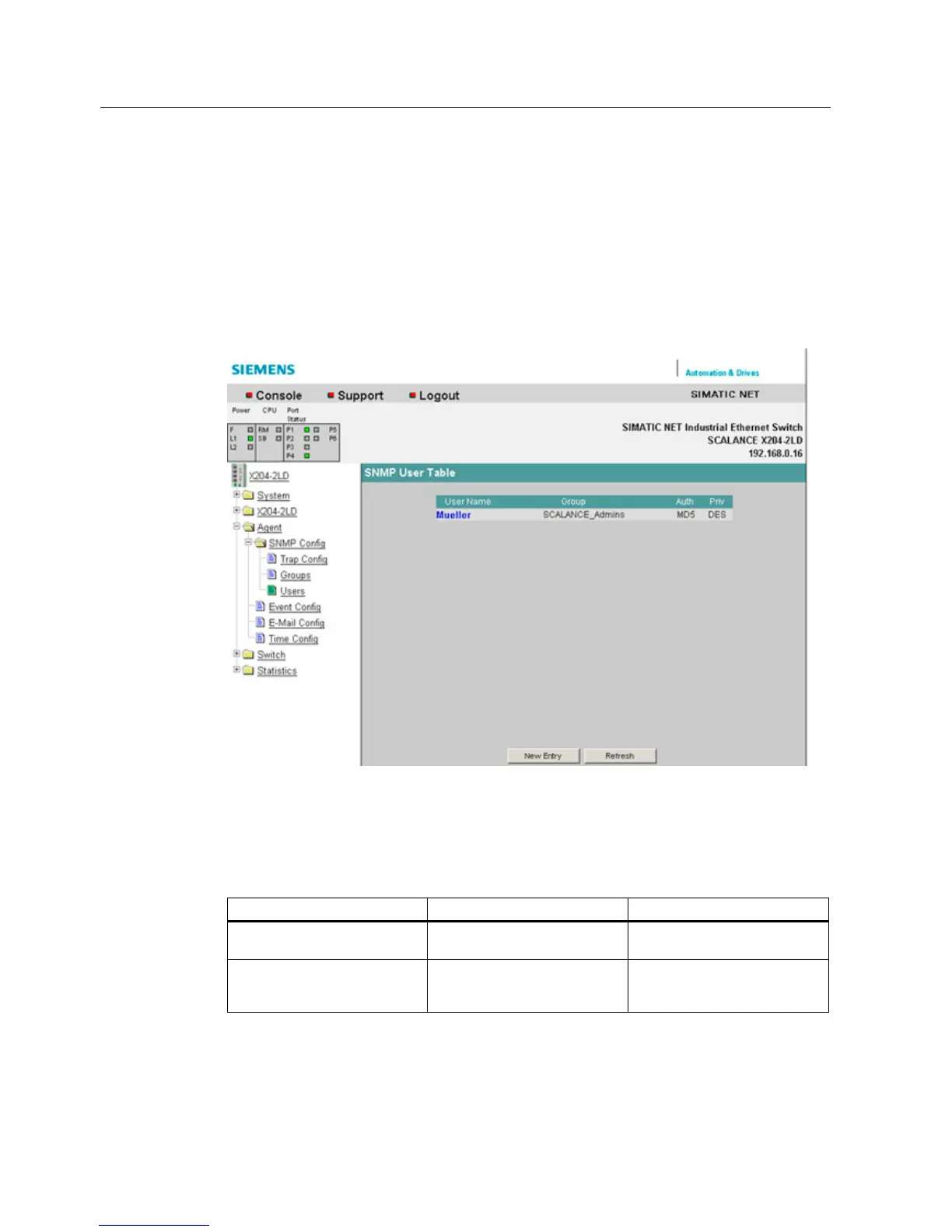
6.3.5.22 The "Agent SNMP Config Users" WBM menu
Agent SNMP Configuration Users
Here, you can create or remove users for access via SNMPv3.
When you create a user, you assign it to a previously created group. You also need to set
the required passwords and the authentication algorithm.
The relevant user names are the defaults for the passwords.
Figure 6-27 Agent SNMP Config Users screen
Syntax of the Command Line Interface
Table 6- 19 Agent SNMP Configuration Users - CLI\AGENT\SNMP\USER>
Command Description Comment
info Displays a list of all created
SNMPv3 users.
add <user> <group> [NONE |
MD5 | SHA] [Authpass]
[Privpass]
Adds a new SNMPv3 user to a
user group.
Administrator only.


 To Next Page
 Loading...