Configuration / diagnostics using remote mechanisms
6.3 Configuration using Web Based Management (WBM) and Command Line Interface (CLI)
SCALANCE X-200
180 Operating Instructions, 12/2011, A5E00349864-19
6.3.5.10 The "System Select/Set Button" WBM menu
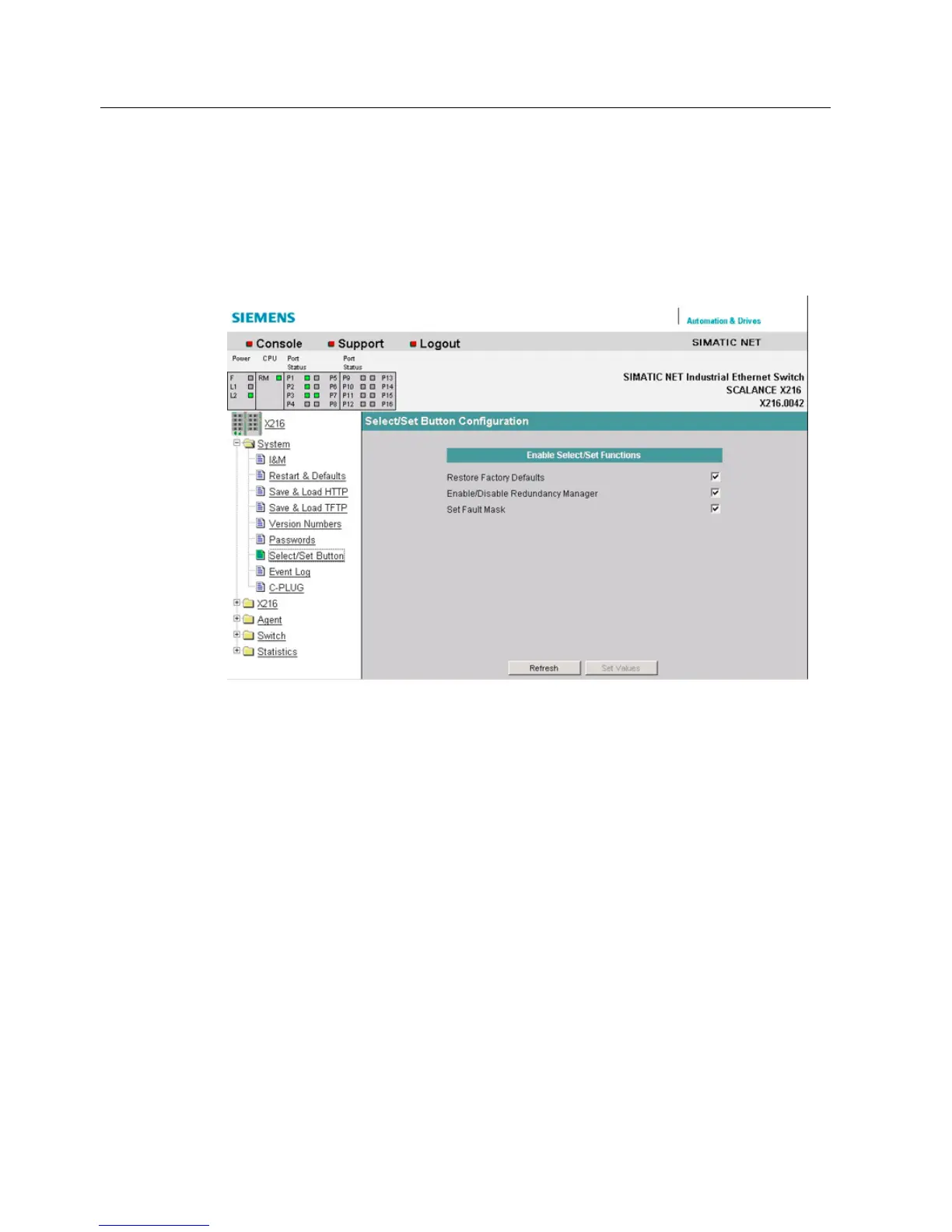
System Select/Set Button
In this dialog, you can set the function that can be configured by pressing the Select/Set
button.
Figure 6-16 "Select/Set Button Configuration" dialog
Restore Factory Defaults
Here, you can restore the factory defaults using the Select/Set button.
Enable/Disable Redundancy Manager
Here, you can decide whether or not the redundancy manager can be enabled and disabled
with a button.
Set Fault Mask
Here, you can specify whether or not it is possible to set the fault mask with a button.
6.3.5.11 The "System Event Log" WBM menu
System Event Log Table
This dialog shows which events occurred and when. You specify the events that are to be
logged in the "Agent/Event Config" dialog.


 To Next Page
 Loading...