SIGLENT
SDM3045X Digital Multimeter 69
dB
Each dB measurement is different between the input signal and a stored
relative value, with both values converted to dBm. The dB function applies to
AC voltage and DC voltage measurements only.
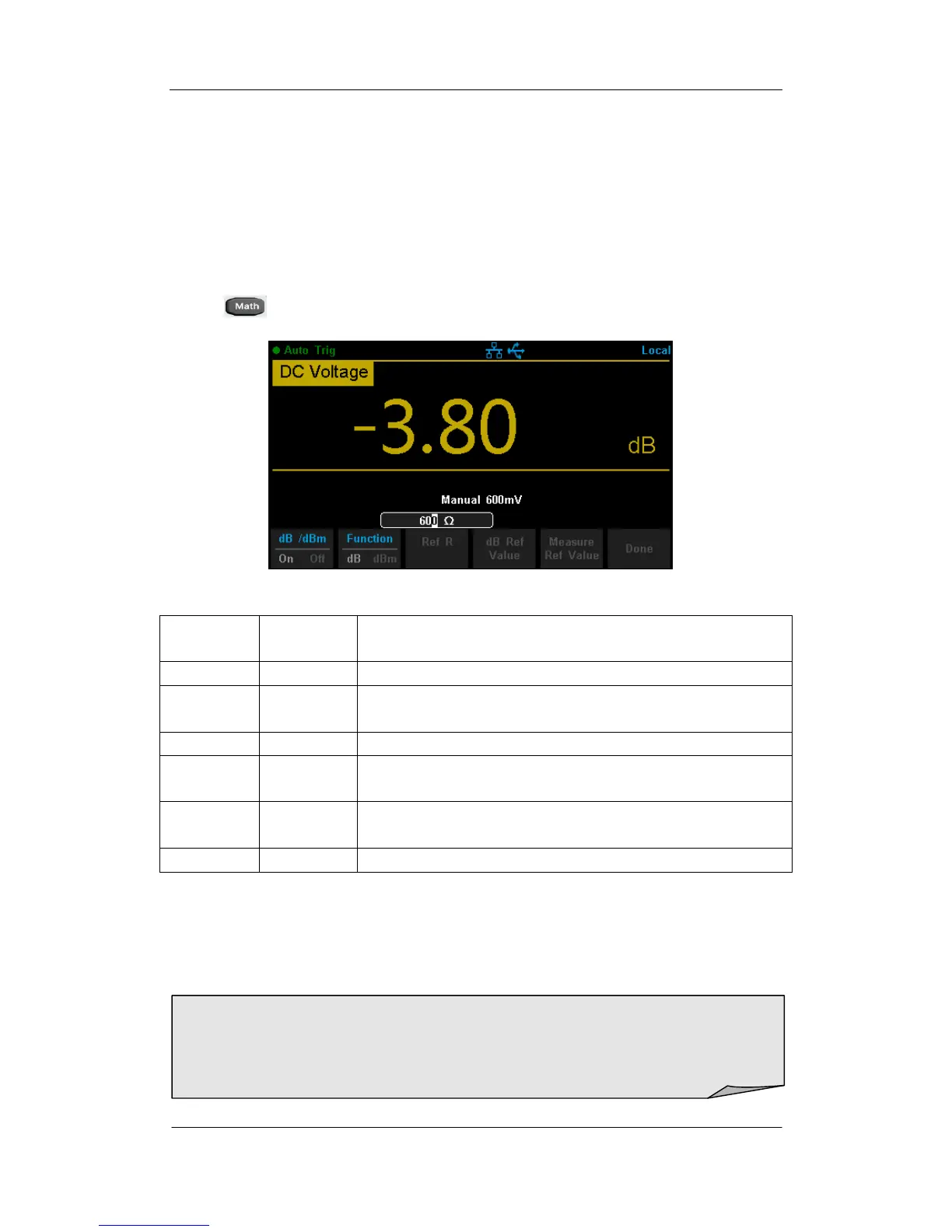
Press →【 dB/dBm On】and select【Function dB】to enter the interface
shown in the following diagram.
Diagram 2- 61 dB Function Interface
Table 2- 25 dB Measurement Function Menu Function Description
Turn on or turn off dB or dBm function.
Open dB function and the lower right corner of the
main display show “dB”.
Set the parameter via direction keys: 50Ω ~ 8000Ω.
Set the referred value of dB.
Set the current dBm measurement value as referred
value.
Save all changes and return to the higher level menu.
The computation method of the dB:
dB = 10 x Log
10
[(Reading
2
/ R
REF
) / 0.001W] – (dB Ref value)
R
REF
expressed measuring the resistance value in the actual electric circuit.
Range of the dB Ref value: -200 dBm ~ +200 dBm. The default is 0 dBm.
dB Ref value:
Input a value in dB setting interface by direction button, and then store it as
dB Ref value.
Settings of dB Ref value are stored in volatile memory.



 To Next Page