PRODUCT DESCRIPTION
SKF Enlight Collect gateway
SKF Enlight Collect IMx-1 System
User Manual
Revision F
Note: gateways must be associated with their own set of sensors, a particular sensor
can only communicate with one gateway.
1.4.1 Connections and interfaces
The gateway is housed in an
IP rated enclosure suitable for indoor or outdoor
installation (Europe) and has built-in antenna for Wi-Fi/BLE, sensor mesh
communications and mobile communication. The lower panel is the only area
normally accessible to the user and conceals connectors for all wired connections. A
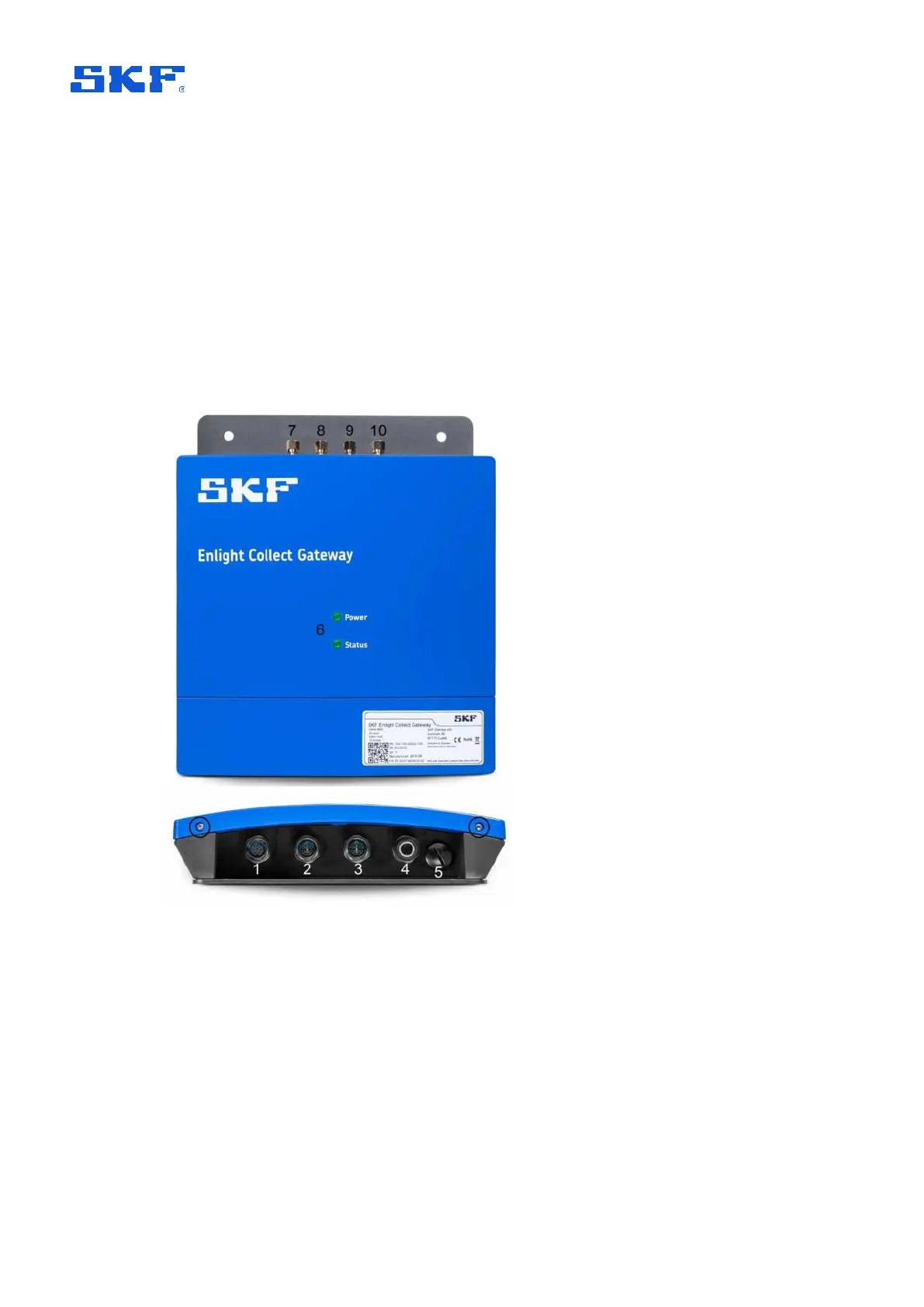
view of the gateway with its various features and connections highlighted, is shown
below:
Figure 2 View on gateway and mounting plate with key features annotated
To access the connector area, unscrew the two Torx T10 screws on the lower edge
of the cover at the locations circled in the image above. Once this cover is removed,
four M12 connectors and one blanking plug are accessible:
1. Connector for dual speed inputs with transducer power (future use)
2. Connector for Ethernet link 2 (future use)
3. Connector for
Ethernet link 1 and PoE
4. Connector for
DC power input to the gateway



 To Next Page