MAINTENANCE FUNCTIONS
Troubleshooting
SKF Enlight Collect IMx-1 System
User Manual
Revision F
4.3.3 IMx-1 sensor troubleshooting
Possible causes for a ‘non-responsive’ sensor include:
• Sensor is in ‘flight mode’.
• Incorrect or incomplete configuration.
• Mechanical damage.
• Sensor fault including discharged battery.
• Loss of mesh communications – likely multiple sensors affected.
In working on IMx-1 systems the interaction between the various radio systems that
the sensor incorporates should be considered. Be aware that, as described below,
various timeouts apply to the sensor radios to avoid unnecessary battery drain.
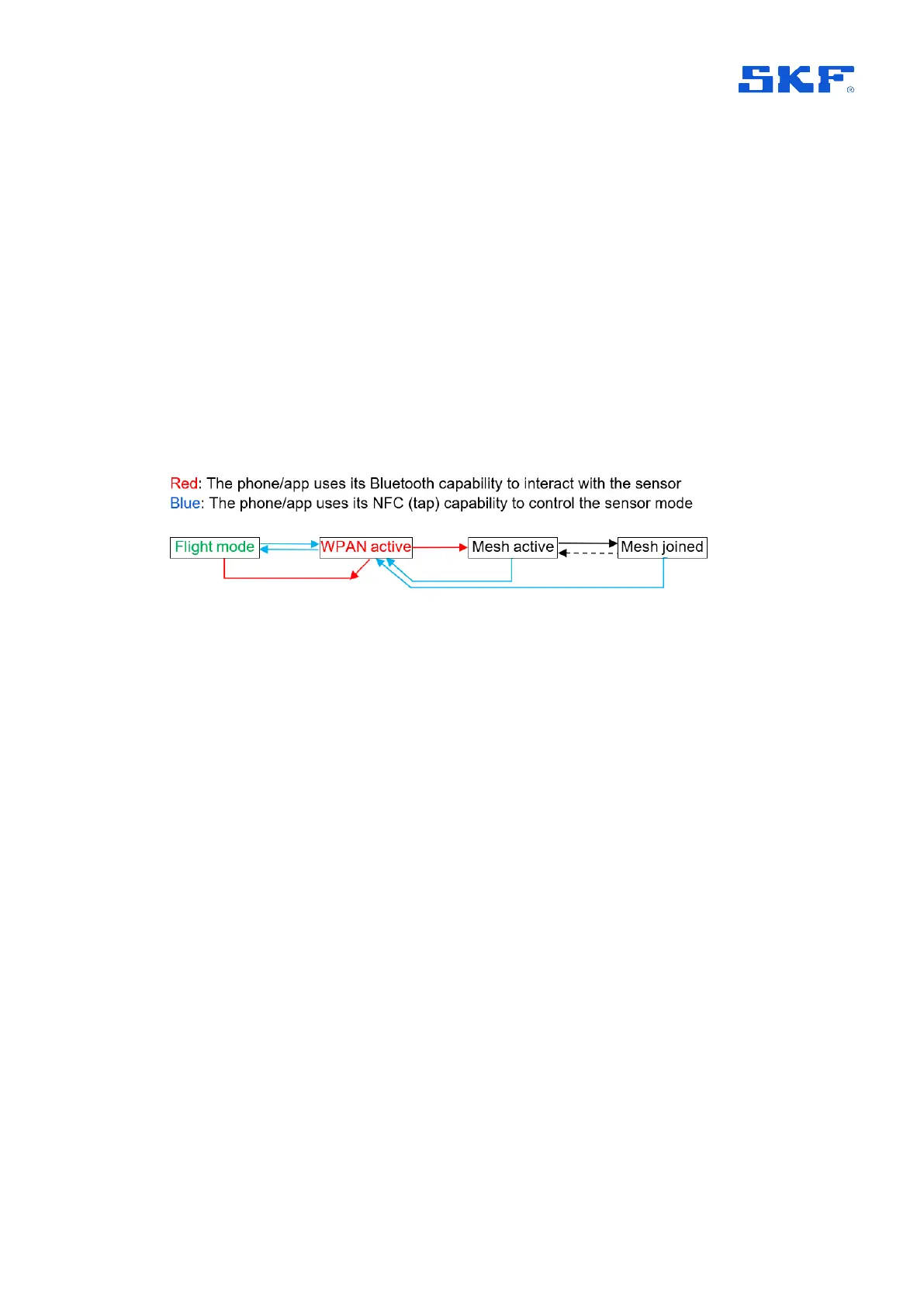
Figure 52 Sensor radio interactions and flow – all conditions
Start point for the flow described in the figure above, is a sensor in flight mode. An
NFC tap from the phone/app will take the sensor out of flight mode and activate its
WPAN radio, so the sensor is discoverable by the app using the phone’s Bluetooth
radio.
• At this stage a further NFC tap would have no consequence.
• If the app doesn’t connect to the sensor via Bluetooth then after a few
minutes the sensor will revert to flight mode.
Note that with sensor firmware 3.3 the sensor will timeout back to mesh mode
if it is in a commissioned state.
For a new sensor being commissioned, the app will normally then connect via
Bluetooth, configure it and instruct it to switch to its mesh radio. If this process
doesn’t complete properly, the following apply:
• Having connected, if the app communications aren’t properly closed or are
not maintained, after 10-minutes of inactivity the sensor will revert to flight
mode.
• Similarly, once connected, a second tap will also return the sensor to flight
mode.
With the mesh identity configured and mesh radio activated, the sensor will attempt
to join the mesh. The mesh active state may also be resumed if for some reason
mesh connectivity is subsequently lost. This is shown by the dotted, ‘return’ line.
• Note that in the mesh active state, the mesh radio will be deactivated if after
5-minutes it hasn’t successfully joined the mesh. This initial deactivation or



 To Next Page