35
EN
ATyS / ATySr - 541630C - SOCOMEC
8. ATYSROPERATINGMODES
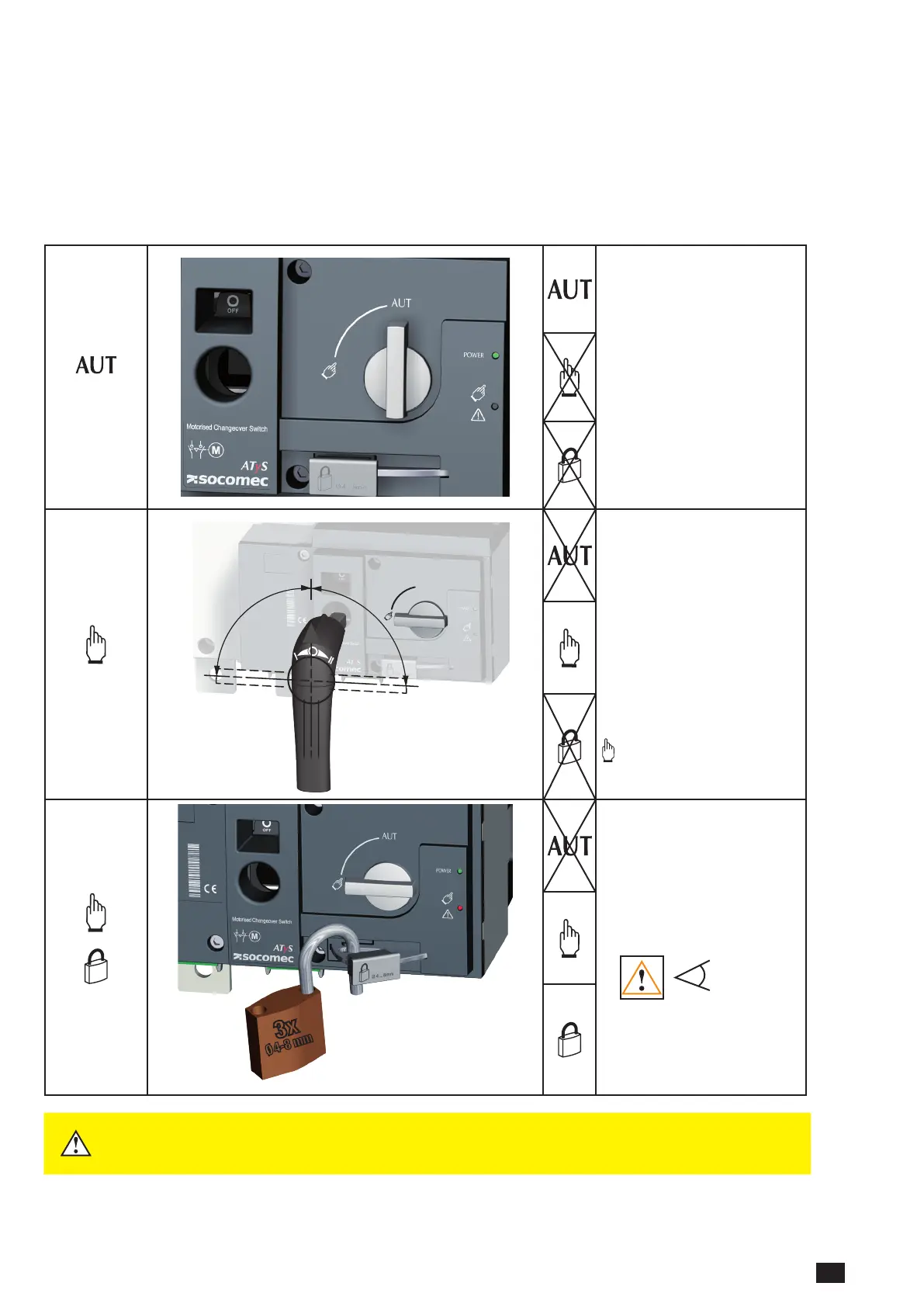
The ATySrincludes3safeanddistinctoperatingmodesthroughaselectorswitchlocatedonthefrontoftheproduct.As
standard the ATySrisdeliveredwithaselectorswitchhoweverakeylocktypeselectorswithisavailableonoption.(Tobe
speciedatorderbytheadditionof“–K”attheendofthestandardreference).
The modes of operation are as follows:
• AutoMode: “Remotelyoperatedtransferswitching”
• ManualMode: “Localemergencymanualoperation”
• LockedMode: “Securelockedpadlockingfacility”
MODE
AUTO MODE:
• Activates the remote control
inputs and the ATS controller
automation.
• Inhibits the padlocking facility
• Inhibits the insertion of the
manual operation handle
when in AUT Mode
AUTO Mode position is inhibited
when padlocked or when the
handle for manual operation is
inserted into the ATySr.
MODE
MANUAL MODE:
(NotPadlocked)
• Inhibits the control inputs.
• Allows to insert the handle
for emergency manual
operation.
• Allows padlocking in O
Position. (With the handle for
manual operation removed)
Turning the selector switch to
from AUT and back to AUT
resets a fault state.
MODE
3x
Ø 4-8 mm
MANUAL MODE:
(Padlocked)
• Inhibits the control inputs.
• Inhibits insertion of the
emergency handle.
• Allows padlocking when in O
Position.
POS 0
Padlocking in position I - O and
II is possible when the optional
function is included in the ATySr.
(Refertoproductcatalogue)
WARNING
Depending on the state of the ATySr the ATS automation may change the switch
position as soon as the mode selector is switched to AUT. This is a normal
operation.



 To Next Page