Levelogger Series User Guide
Page 26
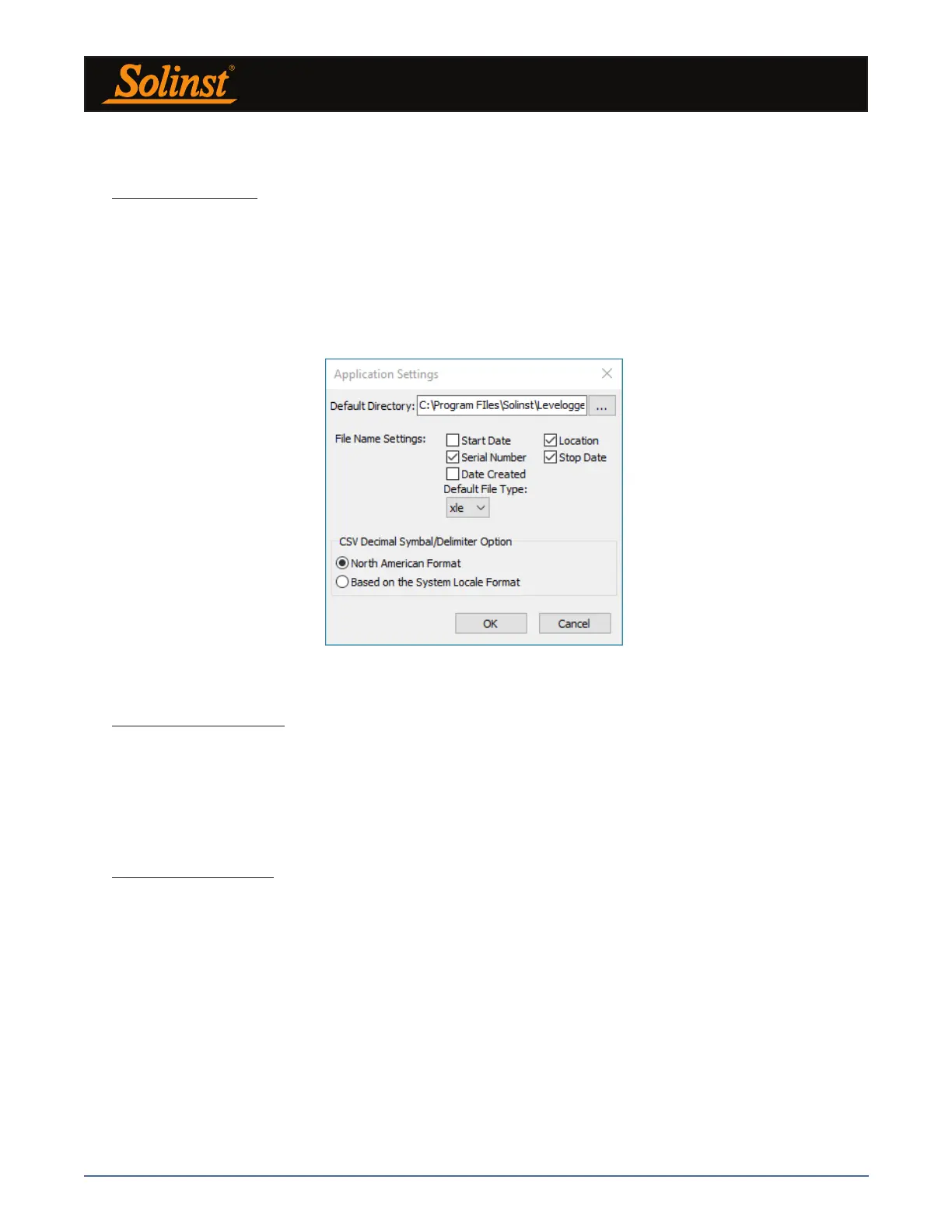
Figure 4-1 Application Setting Window
4.2 Configuration and Settings
4.2.1 Data Directory
Levelogger Software program will save data downloaded to the following default directory:
<C:\Program Files\Solinst\Levelogger4_5\Data>
Unless otherwise specified in the Default Directory field of the Application Settings window (Figure 4-1).
Click the Configuration menu at the top of the Levelogger Software window, select Application Settings and
input or navigate to a different folder destination. After completing the Application Settings, click the OK
button to confirm and save the settings.
4.2.2 File Name Settings
From the Application Settings window in the Configuration menu, you can set what information will be
included in your default file names of downloaded data (see Figure 4-1). You can include Start Date, Stop
Date, Date Created, Serial Number, and Location. Check-off the information you would like included.
After completing the Application Settings, click the OK button to confirm and save the settings.
4.2.3 Default File Type
From the Application Settings window in the Configuration menu, you can set what default file type you
would like to use for downloaded, saved and exported data files. You can select between either *.xle (default)
or *.lev file types (see Figure 4-1). For more information about the two file types, see Section 7.1.1.
You also have the option to choose between North American Format for decimal separators (period symbol)
or based on the System Locale Format, for exported *.csv files.
After completing the Application Settings, click the OK button to confirm and save the settings.



 To Next Page