C:\d830100111\d830100111ILCE9UC2\01GB-ILCE9UC2\030BAS.indd
2019/02/19 10:01
ILCE-9
d-830-100-11 (1)
GB
121
Shooting
Using the zoom
The zoom features available with this product
The zoom feature of the product provides a higher magnification zoom
by combining various zoom features. The icon displayed on the screen
changes, according to the selected zoom feature.
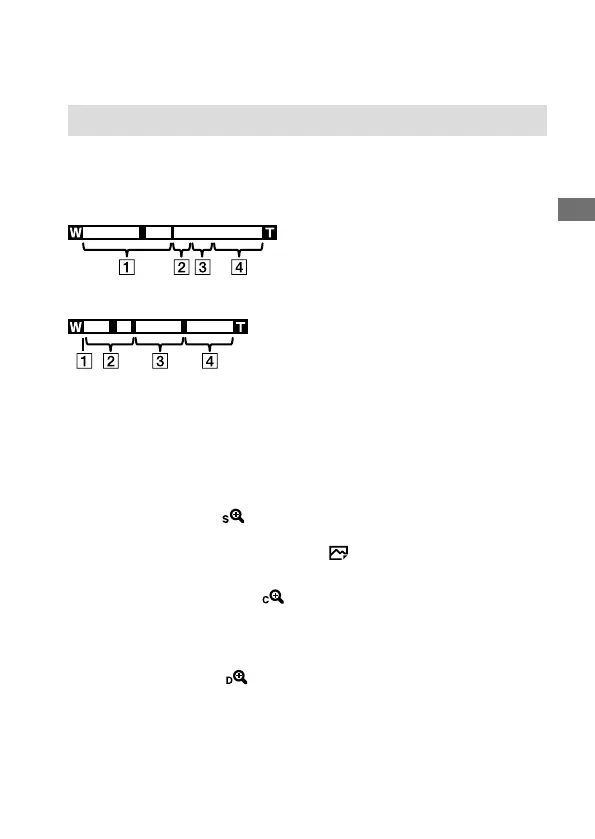
When a power zoom lens is mounted:
When a lens other than a power zoom lens is mounted:
Optical zoom range
Zoom images in the zoom range of a lens. When a power zoom lens is
mounted, the zoom bar of the optical zoom range is displayed. When a
lens other than a power zoom lens is mounted, the zoom slider is fixed
at the left end of the zoom bar while the zoom position is in the optical
zoom range (displayed as ×1.0).
Smart Zoom range ( )
Zoom images without causing the original quality to deteriorate by
partially cropping an image (only when [
JPEG Image Size] is set to [M]
or [S]).
Clear Image Zoom range ( )
Zoom images using an image process with less deterioration. When you
set [Zoom Setting] to [ClearImage Zoom] or [Digital Zoom], you can use
this zoom function.
Digital Zoom range ( )
You can magnify images using an image process. When you set
[Zoom Setting] to [Digital Zoom], you can use this zoom function.



 To Next Page