ILCE-9
d-830-100-11 (1)
C:\d830100111\d830100111ILCE9UC2\01GB-ILCE9UC2\030BAS.indd
2019/02/19 10:01
GB
54
Adjusting the focus area settings to the camera’s
orientation (horizontal/vertical) ( Switch V/H AF Area)
You can set whether to switch the [Focus Area] and the position of the
focusing frame according to the orientation of the camera (horizontal/
vertical).
This function is useful when shooting scenes for which you have to
change the camera position frequently, such as portraits or sports scene.
MENU (Camera Settings 1) [ Switch V/H AF Area]
desired setting.
Off: Does not switch the [Focus Area] and the position of the focusing
frame according to the orientation of the camera (horizontal/vertical).
AF Point Only: Switches the position of the focusing frame according to
the orientation of the camera (horizontal/vertical). The [Focus Area] is
fixed.
AF Point + AF Area: Switches both the [Focus Area] and the position
of the focusing frame according to the orientation of the camera
(horizontal/vertical).
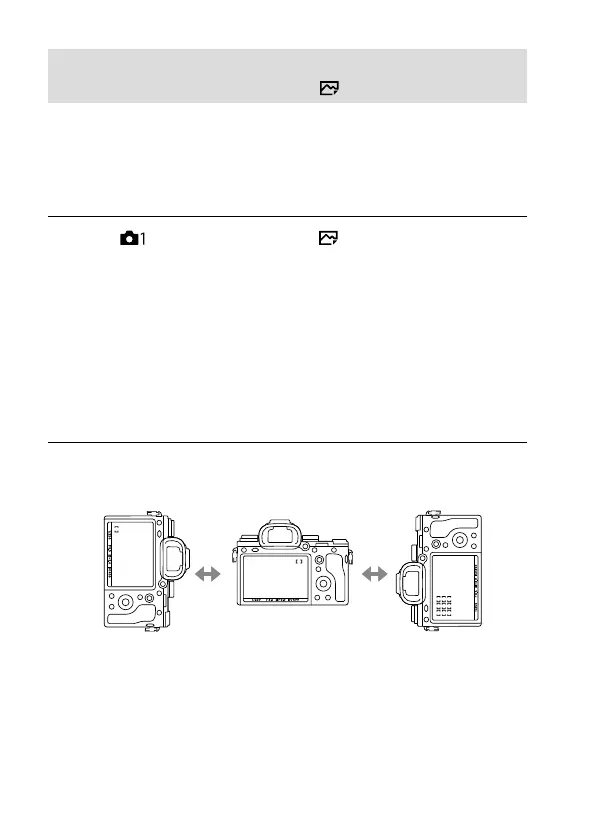
An example when [AF Point + AF Area] is selected
[Flexible Spot]
(Upper left corner)
Vertical Horizontal Vertical
[Zone]
(Lower left corner)
[Flexible Spot]
(Upper right corner)
• Three camera orientations are detected: horizontal, vertical with the
side of the shutter button facing up, and vertical with the side of the
shutter button facing down.



 To Next Page