C:\d830100111\d830100111ILCE9UC2\01GB-ILCE9UC2\100MEN.indd
2019/02/19 10:01
ILCE-9
d-830-100-11 (1)
GB
215
MENU items/List of icons
Import Root Certificate
Imports a root certificate to the
camera.
Help
Guide
Reset Network Set.
Resets all the network settings. Help
Guide
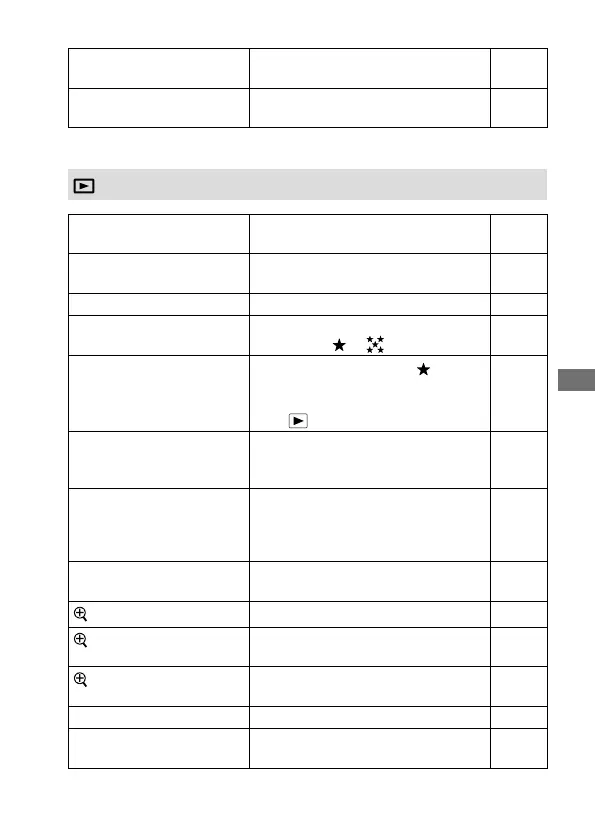
(Playback)
Protect
Protects recorded images against
accidental erasure.
164
Rotate
Rotates the image. Help
Guide
Delete
Deletes an image. 168
Rating
Assigns rating to recorded images on
a scale from
to .
166
Rating Set (Custom Key)
Sets the rating (number of
) that
can be selected using the custom key
to which [Rating] has been assigned
with [
Custom Key].
167
Specify Printing
Specifies in advance on the memory
card which still images to print out
later.
Help
Guide
Copy
Allows you to copy images from the
memory card in the memory card slot
designated in [Select Playback Media]
to the memory card in the other slot.
162
Photo Capture
Captures a chosen scene in a movie to
save as a still image.
159
Enlarge Image
Enlarges the playback images. 157
Enlarge Initial Mag.
Sets the initial magnification scale
when playing back enlarged images.
Help
Guide
Enlarge Initial Position
Sets the initial magnification area
when playing back enlarged images.
Help
Guide
Slide Show
Plays a slide show. 163
Select Playback Media
Selects the memory card slot of the
memory card to be played back.
162
Blue tab



 To Next Page